• We do not provide troubleshooting help for unsupported phones. Please try with a supported phone.
  • V20 Update 10 Alpha Learn more

Avaya J129 Provisioning

Status
Not open for further replies.

I'm Just a Technician

Customer
Advanced Certified
Joined
Jun 3, 2021
Messages
13
Reaction score
0
Good day,

We have a 3CX on-premise server and Avaya J129 IP Phones which I individually configured. The entire system has been running good for a few years now, but I really need to know now if there are custom templates for the J129 that we could use to simplify the provisioning. If there is none, then is there any easy way to deploy/provision the J129 IP Phones?
 
Might be a bit late, but the Avaya J129 phones work the same as the 96xx range, such as the 9608. They just need to be manually flashed to the SIP firmware, and you're good to go. There is a 3CX guide for Avaya phones. Works on V20 too which is great.
 
Last edited:
There are several limitations regarding those models however you can check the guideline here.
 
The process has not be changed however as you do understand there are many limitations for those devices including support.
 
  • Like
Reactions: tronic
The process has not be changed however as you do understand there are many limitations for those devices including support.
I do get the restrictions. But in a recent install, the company wanted to move staff to apps on PC and headsets, which makes sense.

But onsite staff struggle with PC skills, so being able to move the existing phones to an on prem install means they could spend the budget on headsets.

The transition from desk phones to PC app is now an easy one as the phones still do basic answering, calling and transfer. Then we can slowly transition to apps and then eventually, bin the phones and go cloud install.

There aren't many products, if any others I know of, like the 3CX that you have the option to utilise old legacy hardware released in 2018-2019 to make the migration easy.

Limited compatibility is still a great win. Take the compliment :)
 
Thank you for the heads up @tronic
 
Might be a bit late, but the Avaya J129 phones work the same as the 96xx range, such as the 9608. They just need to be manually flashed to the SIP firmware, and you're good to go. There is a 3CX guide for Avaya phones. Works on V20 too which is great.
Wow. That's cool! Thanks for the info, I will try it right now.
 
Please refer to the guideline here, where you can download the template.
 
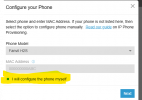
Wait a sec, did 3CX devs removed all the Avaya phone models from the drop-down list in the most recent update? Why????
They were never there as they are not 3CX approved. So you need to do them manually. Also be aware that there is no support from 3CX on the Avaya phones. Though I can tell you besides the limitations they work fine in v20. You just have to keep playing as you get them working.

1720584027902.png
 
  • Like
Reactions: TheodorosG_3CX
You are welcome.
 
Status
Not open for further replies.

Members Online Now

No members online now.

Forum statistics

Threads
111,831
Messages
589,277
Members
164,660
Latest member
RJenkinsROCK