Solved AWS Marketplace Image

Status
Not open for further replies.

DaveB-Opt

Free User
Joined
Aug 2, 2019
Messages
35
Reaction score
5
I've just created an AWS instance using these settings https://www.3cx.com/docs/pbx-amazon-aws-marketplace/
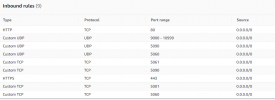
I've allowed both 443 and 80 for 0.0.0.0/0 (default settings) but it when I connect using http using the public DNS, I get

nginx error​

401 Authorization Required​

 
@DaveB-Opt with Public ip address can you access your PBX ?
Port is sure 443 and not 5001 ?
Also do you have a local DNS server that has not updated its cache yet ?
 
Ah - slight update. Chrome doesn't present the username/passsword box - FireFox does.

After logging in via FireFox I'm getting 502 Bad Gateway
 
@DaveB-Opt with Public ip address can you access your PBX ?
Port is sure 443 and not 5001 ?
Also do you have a local DNS server that has not updated its cache yet ?
I'm using the default security group as per the article.
It must be resolving to get the nginx error right?

1623319070692.png
 
You need to setup the instance via the Web Setup (port 5015.)
 
@DaveB-Opt put https and then port 5001 after FQDN.
 
You should use the IP, not the AWS FQDN.

As for the setup, it's port 5015 over HTTP, but it is not opened in your firewall.

Then, Nikos is right, it would be the HTTPS://fqdn:port. Port can be 443 or 5001 (it's configured during the setup process.)

If you still can't get it, I'd contact a partner (like us) to help you.
 
You should use the IP, not the AWS FQDN.

As for the setup, it's port 5015 over HTTP, but it is not opened in your firewall.

Then, Nikos is right, it would be the HTTPS://fqdn:port. Port can be 443 or 5001 (it's configured during the setup process.)

If you still can't get it, I'd contact a partner (like us) to help you.
I've now allowed that port on the firewall. HTTP doesn't load with the fqdn or the public IP.
So I'm assuming the tutorial is out of date?
How can we get your assistance on this?
 
I've now allowed that port on the firewall. HTTP doesn't load with the fqdn or the public IP.
So I'm assuming the tutorial is out of date?
How can we get your assistance on this?
The tutorial isn't out of date. The setup stops running to prevent someone from configuring your PBX.

DM me to get more assistance, but be aware that if we help, it's not free.
 
That's ok - we'll work out the issue ourself.
The tutorial isn't out of date. The setup stops running to prevent someone from configuring your PBX - well it is. I've followed it to the letter and you're telling me to connect via public IP + 5015 so it's not correct.
 
@DaveB-Opt put https and then port 5001 after FQDN.
Nikos - can you assist please? Seems the official KB is not correct. I followed all the instructions, and used the default security group as requested
 
Well, here's the best way:

- destroy the current instance, spin up a new one
- open the console, select Run Setup through Web browser (that's not outdated, you just don't know how.)
- then, FQDN:5015 will work. (Opened in the firewall of course)

Oh and, since paying isn't an option, I would consider using anything else than 3CX since eventually, you will need to upgrade for either more features or more calls. And, the free license is valid until 3CX decides otherwise, remember that.
 
Well, here's the best way:

- destroy the current instance, spin up a new one
- open the console, select Run Setup through Web browser (that's not outdated, you just don't know how.)
- then, FQDN:5015 will work. (Opened in the firewall of course)

Oh and, since paying isn't an option, I would consider using anything else than 3CX since eventually, you will need to upgrade for either more features or more calls. And, the free license is valid until 3CX decides otherwise, remember that.

- What will that achieve? I've followed the article to the letter
- Have you read the KB. It clearly says to go via the fqdn (I'm very capable of copy and paste)
- You obviously didn't read my last comment - it is open.

I'm happy to pay someone, just not yourself.
I'm also not happy to pay for 3CX at the moment as the 'pre-configured out of the box image' doesn't work according to their official article.

Can someone from 3CX please assist? We will be purchasing the full licensing provided we can get it working as a test (we need more simultaneous calls than the free version anyway). I don't feel comfortable with paying some John Doe on the internet who cannot even read my comments properly (regardless of your fancy logos)
 
Well, here's the best way:

- destroy the current instance, spin up a new one
- open the console, select Run Setup through Web browser (that's not outdated, you just don't know how.)
- then, FQDN:5015 will work. (Opened in the firewall of course)

Oh and, since paying isn't an option, I would consider using anything else than 3CX since eventually, you will need to upgrade for either more features or more calls. And, the free license is valid until 3CX decides otherwise, remember that.

From the official KB

  1. When the new VM is deployed, go to EC2 Console > “Instances” and click on the new VM’s “Instance ID” to select. Optionally click edit under the “Name” column to give a name to the new VM.
  2. Copy the “Public DNS (IPv4)”address for your new instance and open it in a browser, e.g.
    http://example.eu-west-1.compute.amazonaws.com
    .
  3. Login using the username
    3CX
    and the new VM’s “Instance ID” as password.
 
I'll be honest, you talk to me like I don't know what I am doing when clearly, you are new to this system.

I think nobody beside the staff will help someone like that... Have fun figuring it out, or pay 3CX to help you.
 
I'll be honest, you talk to me like I don't know what I am doing when clearly, you are new to this system.

I think nobody beside the staff will help someone like that... Have fun figuring it out, or pay 3CX to help you.

I'll be honest as well. No-one is going to pay you for support when you patronize them - just a thought.
I have set up 3CX multiple times on our internal infrastructure. The Debian VM works a charm.
But, yet again, I repeat - the official KB for the AWS image is incorrect. I've followed the article to the letter, and you (unknown person on the internet) are telling me to use the public IP address (not in the article), and then asking me to DM you to pay you for assistance?

If 3CX would like to assist then great - we're expanding our business and therefore require it to be cloud based, with a paid subscription. We're not comfortable paying beforehand if we can't test it.

Good luck to you also! You're going to need to brush up on your customer skills if you actually want people to pay for your service (we would have happily paid), but your attitude stinks
 
@DaveB-Opt with Public ip address can you access your PBX ?
Port is sure 443 and not 5001 ?
Also do you have a local DNS server that has not updated its cache yet ?
Are you able to assist please Nikos?
If we can't get our 3CX migrated to the cloud, I can't get sign-off for more licensing. My manager is awaiting a working version, and unfortunately, your KB article seems to be outdated, wrong or both.

We do get the username and password box using http://fqdn (using a browser other than Chrome)
After entering 3CX + Instance ID we're getting a 502 Bad Gateway from nginx/1.10.3
 
Last edited:
Status
Not open for further replies.

Forum statistics

Threads
111,974
Messages
590,081
Members
164,899
Latest member
mazet