Azure 3CX and CISCO 303 IP Phone - No Audio - Inbound and Ext to Ext

Status
Not open for further replies.

Gavin.Millar

Free User
Joined
Jul 27, 2018
Messages
15
Reaction score
0
Hey All,

Currently having a bit of a doozy I can't seem to wrap my head around.
I've setup 3CX in Azure using the 3CX Express method. Once I had set up extensions and the PBX I tested using our softphones and this was all working.
I moved onto our deskphones - We have a mix of CISCO SPA303 phones (which are legacy) and Linksys (not support - so I haven't started on them yet).
We also just recently purchased a Grandstream 2170 IP Phone. Then began tests on these (Cisco and GS).

We can call from our desk phones to any number outside (mobile etc) and all works fine.
If someone calls from external to internally (mobile to desk phone) we get through our IVR but the calls have no Audio.
If we try call any extension internally there is no Audio. It does seem to be a hardware based issue as these are not issues with the softphones.

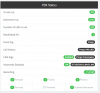
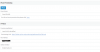
Is there a setting I could be missing? The Firewall check is all green as is the rest of the PBX Status. Initially I thought it had to do with the "PBX Delivers Audio" which turned out not to be the case. Here are some supporting items.
 

Attachments

  • phoneprovision1.png
    phoneprovision1.png
    21.5 KB · Views: 8
  • phoneprovision2.png
    phoneprovision2.png
    8 KB · Views: 8
  • status.png
    status.png
    26.2 KB · Views: 5
Did you setup a VPN tunnel from your site to Azure? Otherwise the setting you are missing is the RTFM button :)

https://www.3cx.com/Sip-Phones/Cisco-SPA/

The SPA303 phones do not support connecting to a cloud instance via STUN or SBC.
 
Did you setup a VPN tunnel from your site to Azure?
Uh could you clarify where this is in relation? 3CX side, Azure, Internal Router?
We have setup the ability for 3CX to tunnel over 5090 within the PBX.

Otherwise the setting you are missing is the RTFM button :)
https://www.3cx.com/Sip-Phones/Cisco-SPA/

So this is a possibility, I haven't come across RTFM buttons as of yet in addition to this I had to follow:
https://www.3cx.com/sip-phones/cisco-spa501g/
When setting up the phones.

The SPA303 phones do not support connecting to a cloud instance via STUN or SBC.

Yea I'm aware of that one. I did notice I was using the same port 5060 across the Cisco and that the Grandstream was using Stun on 5064 so unsure whether this has a part to play in the issue I'm having.

Thanks for you help
 
So that's an older guide mainly focus on putting the URL into the phone. But the problem is the SPA phones don't support remote connections to 3CX via the traditional methods (STUN or SBC) as noted at the bottom of the link I posted. The only supported method would be a site to site VPN to the Azure subnet from your firewall/router. This way there is no NAT between 3CX and the phones.
 
So if I understand this correctly:
The SPA303's need to be on the same network as the PBX to do this within our Router I need to set up a VPN and connect it to the Azure subnet.

The Grandstream as a device should be fine given it allows STUN?
And if that is the case how do I get the Grandstream working as it too has the same problem i.e:

  1. Can call out fine
  2. Calls going through get to IVR and can be heard but once they get to an extension no audio comes through
  3. Calls internally to extensions have no audio.
 
Last edited:
Almost. Same network implies bridging and you'd be better off setting up a routed network. As long as you have two different private subnets you should be good.
 
Ok Thanks CobaltIT,

Just so I have a better understanding why do outbound calls work but not the inbound calls?
 
So your current configuration is STUN, and technically with STUN you are supposed to use a unique SIP port and RTP range per phone and then forward those from the firewall on the phone extension page. You can see that on the Grandstream page since it supports STUN. If you make the manual changes to the SPA phones it may work, but since it's not supported, you'll get no help from 3CX. If you have a large number of SPA phones it's worth it to create an environment (via the routed VPN tunnel) where the SPA phones can talk via the local LAN config. Otherwise, it's better to replace the phones with supported models.

In your particular case outbound calls open the firewall ports and they stay open listening for response traffic. You might be able to get an inbound call immediately after making an outbound call, but a new inbound won't work without the port forwarding typically. You can try manually configuring one of the SPA phones and then port forwarding on your firewall. It's a lot of work. This article is old but the last section covers STUN and still applies:

https://www.3cx.com/docs/manual/configuring-ip-phones/#h.ul2fzupi6t22/
 
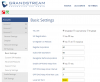
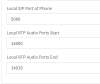
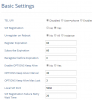
So you're referring to how these two (pictures attached) need to be of separate ports

To confirm that theory I decided I'll see which route would be the best to take so I broke down the analysis:

I disabled all the SPA303's 3CX line and only kept up the Grandstream. In theory by doing this I should only have the Grandstream polling 3CX and the line should work both incoming and internally.
I upgraded the firmware to 3CX recommended firmware. And tested - Still no luck.

Now If I'm correct the fact Grandstream uses STUN I should have been OK?
So what am I missing?
 

Attachments

  • CiscoSIPPort.png
    CiscoSIPPort.png
    71.7 KB · Views: 9
  • GSSipPort.png
    GSSipPort.png
    49.4 KB · Views: 9
Sorry chaps - I know this is a bit long winded but I just notices that there is a failure in the logs and it seems as though the content-length the size it should be which says to me the packets aren't going through am I right?

Code:
07/19/2019 10:33:17 AM - L:7.4[Extn:209] got Failure: Failure Recv 487/INVITE from 127.0.0.1:5080 tid=9cb5005c20cb9a0b Call-ID=xNp6rJA38yU4nt9-gd5BXA..:
SIP/2.0 487 Request Terminated
Via: SIP/2.0/UDP 127.0.0.1:5060;rport=5060;received=40.126.242.210;branch=z9hG4bK-524287-1---9cb5005c20cb9a0b
Record-Route: <sip:[email protected]:5080;user=proxy;uri=clnt.1-09ab0c2310d5424a9c2cc4030644c0e0>
To: <sip:[email protected]>;tag=d9b46ccd5ade4e6eb892bf6643c05d23
From: "xxxxxx:2Talk-Test" <sip:[email protected]:5060;nf=e>;tag=c5e9f811
Call-ID: xNp6rJA38yU4nt9-gd5BXA..
CSeq: 1 INVITE
Allow: PRACK, INVITE, ACK, BYE, CANCEL, UPDATE, INFO, SUBSCRIBE, NOTIFY, REFER, MESSAGE, OPTIONS
Content-Length: 0

07/19/2019 10:33:17 AM - [CM503003]: Call(C:7): Call to <sip:[email protected]:5060> has failed; Cause: 487 Request Terminated/INVITE from 127.0.0.1:5080
07/19/2019 10:33:17 AM - Session 1140 has failed in leg L:7.4[Extn:209] ; Cause: 487 Request Terminated/INVITE from 127.0.0.1:5080
07/19/2019 10:33:17 AM - Failure from <sip:[email protected]>;tag=d9b46ccd5ade4e6eb892bf6643c05d23 to "xxxxxx:2Talk-Test" <sip:[email protected]:5060;nf=e>;tag=c5e9f811
07/19/2019 10:33:17 AM -  Sending: OnSendReq Send Req NOTIFY from 0.0.0.0:0 tid=02d4494baafc7745 Call-ID=Bi_OKCOl4PPaOqz_tjA_8Q..:
NOTIFY sip:[email protected]:5483;rinstance=6c967f4d7d14d03d SIP/2.0
Via: SIP/2.0/ ;branch=z9hG4bK-524287-1---02d4494baafc7745;rport
Max-Forwards: 70
Contact: <sip:[email protected]:5060>
To: <sip:[email protected]>;tag=d0289347
From: "xxxxxx:2Talk-Test"<sip:[email protected]:5060;nf=e>;tag=8d2bae04
Call-ID: Bi_OKCOl4PPaOqz_tjA_8Q..
CSeq: 3 NOTIFY
Content-Type: message/sipfrag
Subscription-State: terminated;reason=noresource
Event: refer;id=3
Content-Length: 18

SIP/2.0 200 OK

07/19/2019 10:33:17 AM - [CM503007]: Call(C:7): Extn:209 has joined, contact <sip:[email protected]:1024>
07/19/2019 10:33:16 AM - FilePlayEndEventHandler
07/19/2019 10:33:16 AM - ~Target=Ext:Ext.209
07/19/2019 10:33:16 AM - ~Route=Dev:sip:[email protected]:5060;rinstance=1-09ab0c2310d5424a9c2cc4030644c0e0
07/19/2019 10:33:16 AM - Reason: SIP ;cause=200 ;text="Call completed elsewhere"
07/19/2019 10:33:16 AM - ~Route=Dev:sip:[email protected]:1024
07/19/2019 10:33:16 AM - L:7.3[Extn:209] has joined to L:7.1[Line:10001<<xxxxxx]
07/19/2019 10:33:16 AM - L:7.3[Extn:209] got Connected.UAC Recv 200/INVITE from xxx.xx.xxx.xxx:1024 tid=536fa178635f8555 Call-ID=uES9oAFwpienVEBVW6ey8Q..:
SIP/2.0 200 OK
Via: SIP/2.0/UDP 10.0.0.6:5060;branch=z9hG4bK-524287-1---536fa178635f8555
Contact: "3CX" <sip:[email protected]:5060>
To: <sip:[email protected]>;tag=554365ed1fecea7ei2
From: "xxxxxx:2Talk-Test"<sip:[email protected]:5060;nf=e>;tag=175c5c0b
Call-ID: uES9oAFwpienVEBVW6ey8Q..
CSeq: 1 INVITE
Allow: ACK, BYE, CANCEL, INFO, INVITE, NOTIFY, OPTIONS, REFER, UPDATE
Content-Type: application/sdp
Server: Cisco/SPA303-7.6.1
Supported: replaces
Content-Length: 206

v=0
o=- 11528 11528 IN IP4 192.168.2.160
s=-
c=IN IP4 192.168.2.160
t=0 0
m=audio 16406 RTP/AVP 0 101
a=rtpmap:0 PCMU/8000
a=rtpmap:101 telephone-event/8000
a=fmtp:101 0-15
a=ptime:30
a=sendrecv
 
Unless I missed it I haven't seen confirmation that you've forwarded the required ports on the Grandstream side. So unplug all the phones except the Grandstream phone. Forward the ports under the 'Phone Provisioning' tab to the Grandstream phone on the firewall in front of the phones:

11448

Then test the incoming calls. You need a unique SIP port per phone and unique RTP ranges per phone (2 per concurrent call).

Test and if that works, then what you can do is open up an Excel sheet and come up with unique ports for all of your phones. The Grandstreams will provision based off 3CX. The SPA phones you'll have to manually configure with their unique SIP port and RTP ranges.

The other (and probably better) option is to setup a SBC as this requires no port forwarding on the station side firewall. Provision the Grandstream to use the SBC and test. Then manually configure the SPA phones to use the SBC (typically just putting the SBC as the outbound proxy.
 
As per your request
 

Attachments

  • FWProvision1.png
    FWProvision1.png
    5.2 KB · Views: 7
  • FWProvision2.png
    FWProvision2.png
    6.2 KB · Views: 7
  • PhoneProvision1.png
    PhoneProvision1.png
    25.7 KB · Views: 6
  • PhoneProvision2.png
    PhoneProvision2.png
    9.5 KB · Views: 6
  • SIPProvision1.png
    SIPProvision1.png
    28.7 KB · Views: 6
  • SIPProvision2.png
    SIPProvision2.png
    34 KB · Views: 6
  • SIPProvision3.png
    SIPProvision3.png
    34.9 KB · Views: 6
And did it work?
 
No, Unfortunately not.

sorry for the delay - work got in the way of fun.
 
Ok so we got it working properly. Looks as though it's a setting within 2TALK which meant that it wasn't trunking correctly.
  • My phone/device is not behind NAT (e.g. It has a public IP address or port forwarding is setup). NOTE: When SIP peering is enabled NAT is always disabled

All my settings and configuration was correct. SPA303 can work in a directed mode using provisioning and the Grandstream can operate in the same way as well.
So I hope that clears things up a little.
 
Last edited:
Status
Not open for further replies.

Latest Posts

Forum statistics

Threads
111,932
Messages
589,805
Members
164,804
Latest member
fcentral