Back up without FQDN &licemse information

Yilmaz

SOHO User
Basic Certified
Joined
Feb 11, 2025
Messages
25
Reaction score
2
I’m on v20

How do you take a backup without licence and FQDN fetails

Also how to upload that file in AWS lightsail
 
ive managed to login to my instance via file zilla however unable to to get access to the 3cx folder to access the backup folders
 
In v20 it is not possible. You can download your backups from within the admin page.
 
Hello,
it seems to me it was a possible way to do so : (not sure if it's always working, but you can try )
SSH into PBX

cd /var/lib/3cxpbx/Instance1/Data/Backups/

sudo -u phonesystem /usr/sbin/3CXBackupCmd --options=MIN --file=pbx_min_bak.zip

3CX Backup command line tool.

To select options in the backup use the below strings comma separated,

example: --options=LIC,FQDN which will take a backup with License and FQDN only.

CH - includes CallHistory

LIC - includes your license information

FQDN - includes FQDN

PROMPTS - includes Prompts

FW - includes Firmware

REC - includes Recordings

VM - includes VoiceMails

MIN - minimal backup (backup only PhoneSystem configuration

--pwd=VALUE Specify the --pwd parameter to set a password to encrypt the backup
 
In v20 it is not possible. You can download your backups from within the admin page.
I can download but howto
Upload via SFTP as I can’t get access to the 3cx folder
 
Hello,
it seems to me it was a possible way to do so : (not sure if it's always working, but you can try )
SSH into PBX

cd /var/lib/3cxpbx/Instance1/Data/Backups/

sudo -u phonesystem /usr/sbin/3CXBackupCmd --options=MIN --file=pbx_min_bak.zip

3CX Backup command line tool.

To select options in the backup use the below strings comma separated,

example: --options=LIC,FQDN which will take a backup with License and FQDN only.

CH - includes CallHistory

LIC - includes your license information

FQDN - includes FQDN

PROMPTS - includes Prompts

FW - includes Firmware

REC - includes Recordings

VM - includes VoiceMails

MIN - minimal backup (backup only PhoneSystem configuration

--pwd=VALUE Specify the --pwd parameter to set a password to encrypt the backup
I’m using FileZilla and can’t get access to the 3cx folder
 
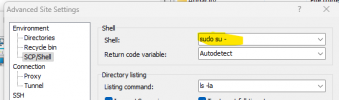
If you use WinSCP you can select the Shell Sudo su

1740992629034.png
 
im not on windows i am using a Mac, Im looking for alternatives
 
It may be easier to put your backup on an external storage, and connect the PBX via SFTP to this drive to restore your backup.
 
  • Like
Reactions: GregG_3CX
How do you take a backup without licence and FQDN
What is the goal? AFAIK one cannot restore a backup without a license and FQDN...
 
AFAIK one cannot restore a backup without a license and FQDN...
That is basically correct. But you can change the backup, e.g. change the license, get a new FQDN or use your own FQDN and certificate and then restore the backup. There are several options. As you say, it depends on what the goal is.
 
we have a license expiring the company has downgraded so they wont need a 16SIM any longer only 4. We dont want want to start from scratch as they would loose any saved data. They also changed business names so we could use this if someone has an answer to change out their key and change thier FQDN.
 
we have a license expiring the company has downgraded so they wont need a 16SIM any longer only 4. We dont want want to start from scratch as they would loose any saved data. They also changed business names so we could use this if someone has an answer to change out their key and change thier FQDN.
Contact customer service
https://www.3cx.com/contact/
Make sure to choose 'Licensing' and have your license key ready. :)
 

Forum statistics

Threads
111,955
Messages
589,925
Members
164,853
Latest member
as7h