- Joined
- Mar 6, 2020
- Messages
- 68
- Reaction score
- 18
W2019 Server - Version 20.0 Update 7 (Build 1080 Release) - OnPrem
As of today we have 6 out of 9 Enterprise licensed systems that are no longer backing up. We used to do local backups, then DFS'd the ZIP files to other systems, but with the mandatory Remote Storage changes we began using SFTP. Everything worked for a few months and now things are just breaking. No system / network or SFTP site changes on our side and these servers are in different countries for the most part.
They stopped working Nov - Dec and we cannot get the automated backups to run. There is nothing in event log during the times backups go off. I deleted the .tmp thinking it would fix it, but nothing happened.
Manual backups work, automated do not. I changed the backup name on the file to something different, restarted services and rebooted the systems to no avail. The only other thing I noticed was a .tmp file that stopped after 10% or so. Deleting it, did nothing.
I'm stumped.
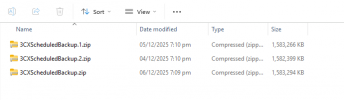
Edit: Just before I posted this I changed the SFTP target to SMB and set up a file server share for a test to see if it was the SFTP site. I still get the .tmp file on auto backup and it stops there. Manual backups work:

As of today we have 6 out of 9 Enterprise licensed systems that are no longer backing up. We used to do local backups, then DFS'd the ZIP files to other systems, but with the mandatory Remote Storage changes we began using SFTP. Everything worked for a few months and now things are just breaking. No system / network or SFTP site changes on our side and these servers are in different countries for the most part.
They stopped working Nov - Dec and we cannot get the automated backups to run. There is nothing in event log during the times backups go off. I deleted the .tmp thinking it would fix it, but nothing happened.
Manual backups work, automated do not. I changed the backup name on the file to something different, restarted services and rebooted the systems to no avail. The only other thing I noticed was a .tmp file that stopped after 10% or so. Deleting it, did nothing.
I'm stumped.
Edit: Just before I posted this I changed the SFTP target to SMB and set up a file server share for a test to see if it was the SFTP site. I still get the .tmp file on auto backup and it stops there. Manual backups work: