Backup of V16 for upgrade to v18 takes 24+ hrs, never completes, writes in the single digit MB/s range

Status
Not open for further replies.

CFMtech

Customer
Basic Certified
Joined
Apr 16, 2019
Messages
38
Reaction score
2
  • 3CX Version, Professional Annual 16.0.16
  • Server OS Windows Server 2016
  • Is the 3CX Server Hosted and where? On-premise
  • IP Phone Make/Model/Firmware version, GXP2130's
  • Provisioning Method: Local
  • Trunk Provider or VoIP Gateway Make/Model, Flowroute
  • Has the Firewall Checker passed: YES
  • Are custom Phone Templates being used: Yes
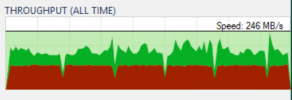
Hello support, we are trying to backup our roughly 250gb PBX in preparation for the upgrade to V18, however the backup is writing incredibly slowly, we're talking 5.5 - 6.5MB/s, the backup target is our 32TB 10 disk Veeam repository that we use for all system images. I can use the Veeam backup and replication (ver. 11) suite and hit 246MB/s on this device, however 3CX has a pitiful showing writing at less than 3% of that speed. We have wasted our weekend maintenance window and have spent unnecessary man hours waiting for this. We have let the backup run for over 24hrs and we still do not get near completion. I have attached a screen shot of the last Veeam backup and the throughput to our backup target to dispel any notions this is a result of the backup target. At this rate the only way we will be able to complete this backup is to take the production phone system down during business hours which is an unacceptable solution.

We need a workable solution to full system backups. Please advise!

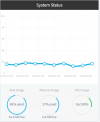
edit: I would like to add there is no AV running on this system. Dedicated to 3CX and 3CX only. Veeam is not installed locally either, backup and replication performs its functions from a dedicated backup host (different system.) 3CX is installed on an all flash array. Not a resource contention issue as we are utilizing very little resources during the backup. I have included a screen shot of the system stats as well.
 

Attachments
  • 2022-04-10 08_39_24-192.168.2.47 - Remote Desktop Connection.png
    2022-04-10 08_39_24-192.168.2.47 - Remote Desktop Connection.png
    49.8 KB · Views: 6
  • 2022-04-10 08_59_49-Untitled.png
    2022-04-10 08_59_49-Untitled.png
    38.2 KB · Views: 5
Last edited:
Why don’t you run the backup to the local server first and then copy it off the server?

Likely your backup is huge because of recordings. There are options around that too.

If recordings are on a separate drive/partition (not inside the 3CX installation folders) then you don’t need to back them up into the 3CX zip file. They won’t get deleted on uninstall.

If they are still in the default location you could also run the backup without recordings, move the recordings elsewhere, uninstall v16 and put the recordings back in the same folder after restoring on the v18 installation.
 
  • Like
Reactions: ChrisC_3CX
Damn, you waited 24+ hours before deciding the backup was too slow and aborted?

How big are we talking?

You could either archive your recordings off or move them to a temp location, do a full backup and copy them back.
 
1. Why don’t you run the backup to the local server first and then copy it off the server?

2. Likely your backup is huge because of recordings. There are options around that too.

3. If recordings are on a separate drive/partition (not inside the 3CX installation folders) then you don’t need to back them up into the 3CX zip file. They won’t get deleted on uninstall.

If they are still in the default location you could also run the backup without recordings, move the recordings elsewhere, uninstall v16 and put the recordings back in the same folder after restoring on the v18 installation.
Thanks for the response. I appreciate you taking the time.

1. We thought about that and was a possibility however we would need to more than double the currently provisioned space for the system and then all of that would get picked up in our backups and we'd be "wasting" the 300GB worth of backup space for the next 90days (our retention period)... This isn't an issue with the speed of the network, storage array or anything, rather the 3CX backup is poorly implemented, but required for each and every major version update. Not to mention the poor fools who dont know that the default backup location gets deleted upon uninstall. :rolleyes:

2. This is absolutely correct. Its all recordings and call logs (250gb of recordings and 2.5million call records) we supply local and state government and we are contractually obligated to maintain specific records until the projects we supply material for are completed and certified.

3. We got through this cluster around 7pm on Sunday after beginning 8am on Saturday but migrating a copy of the VM to another host, pulled the recordings, ran the update and replaced the recordings. Having the "original" VM and its chain of custody intact just in case this crashed and burned. Not ideal for something as trivial as a (forced I might add) version update.
 
Damn, you waited 24+ hours before deciding the backup was too slow and aborted?

How big are we talking?

You could either archive your recordings off or move them to a temp location, do a full backup and copy them back.
Thanks for taking the time to respond, I do appreciate it.

Well one of my staff, but yes they were following protocol and the 3CX upgrade instructions. We supply local and state government and we are contractually obligated to maintain specific records until the projects we supply material for are completed and certified. While it has not happened with phone records, chain of custody and file accessed/modified dates have been an issue in the past.

250gb of recordings, 2.5million call records. Its really not much in the scheme of things. We worked around it but the system needs to be improved immensely given the 3CX process for every update is rip and reinstall. We cant be the only ones who need to preserve recordings and other data.
 
This isn't an issue with the speed of the network, storage array or anything, rather the 3CX backup is poorly implemented, but required for each and every major version update. Not to mention the poor fools who dont know that the default backup location gets deleted upon uninstall. :rolleyes:
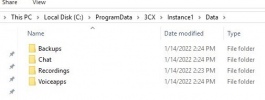
Actually, if you uninstall 3CX v16 the following directories should remain untouched:
1649763036082.png

However, I would still recommend copying the recordings out of this folder as a precautionary measure. Since we're talking about a large volume of recordings on a Host that cannot hold double that size what you could do is:

1. Take a backup including everything except the recordings.
2. Go into the Recordings path and move the recordings folder out of it just to be safe.
3. Uninstall 3CX and re-install the latest version.
4. Use the backup to restore the config.
5. When the 3CX PBX is up and running, move your recordings to the new recordings location.
7. The PBX should detect them since they are already indexed in it's database.

Hope this helps!
 
Status
Not open for further replies.

Forum statistics

Threads
111,974
Messages
590,083
Members
164,900
Latest member
Silent_Guru