Bandwidth SIP Trunk Configuration Guide | US

Status
Not open for further replies.

KaterinaK_3CX

Joined
Feb 24, 2016
Messages
246
Reaction score
36
This guide will walk you through the steps to configure a Bandwidth SIP Trunk with 3CX. It also covers the steps necessary to configure a number for SMS.

Take note of the below special configuration requirements for Bandwidth:
  • Enter the main trunk number as E164.
Read the guide.
 
the new update SMS configuration in the SIP Trunk is nice, but I see a problem on the routing.
With V U5 we could select the destination route, but we can't change that with the new V U6.
It selects for default whatever Ring Group or IVR is configured on the inbound rule.
 
In U6 you can route the trunk to an IVR and select a different destination for SMS from there.
You will need to do this from a Webclient to get the option.
 
Using this guide to set up a new Bandwidth trunk on a v20 PBX does not allow inbound calling. Is there an updated setup instructions that need to be used when setting up a Bandwidth trunk on a V20 PBX?
 
do you see the calls arriving to the badnwidht inisght portal?
Check to make sure you have the e164 format enable at bandwidth and the DID are the same format.

If they do not match it will terminate the call like a busy signal.
 
The inbound calls do not show in the Bandwidth Insights report. All numbers are E164 format in the PBX, and I am not seeing a place to ensure they are E164 format in Bandwidth, but upon onboarding it was confirmed that we use E164 format.

What you describes as the inbound calls being dropped with a Busy Signal is exactly what we're encountering.
 
I would check with badnwidth to make sure you account is set up properly with the e164 format.

When we started using it for the SMS we found out it was not properly configured on their end.

I was able to test it by adding a DID on the PBX without the e164 format and i would get the call,.
 
Do you have access to the 3CX Activity Log? If so, does it show an incoming call attempt?
 
I am adding to this, the last week we have had 2 phone systems on v20 (the only 2 out of all 70 systems we have) and both of them just broke this morning, stating they cant get incoming calls.

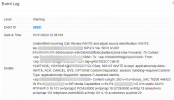
They can make outgoing but incoming on Bandwidth is completely broken. Here is the Error:

1706723098923.png


I have restarted the PBX, I have rebuilt the default Bandwidth Trunk from the v20 interface. No matter what we do, this is the error we get on every incoming call. All outbound calls working.

Again, for clarity, this worked just fine for the last week on these 2 systems, including yesterday and as of this morning its now broken. Not sure if this is 3CX or Bandwidth but these 2 customers are completely down on incoming calls.
 
I am adding to this, the last week we have had 2 phone systems on v20 (the only 2 out of all 70 systems we have) and both of them just broke this morning, stating they cant get incoming calls.

They can make outgoing but incoming on Bandwidth is completely broken. Here is the Error:

View attachment 39458


I have restarted the PBX, I have rebuilt the default Bandwidth Trunk from the v20 interface. No matter what we do, this is the error we get on every incoming call. All outbound calls working.

Again, for clarity, this worked just fine for the last week on these 2 systems, including yesterday and as of this morning its now broken. Not sure if this is 3CX or Bandwidth but these 2 customers are completely down on incoming calls.
This looks very similar to what we're seeing on our V20 instance. Yesterday for about an hour I would see event log items like you're showing here, but now, no logged incoming calls. On the V18 instance, nothing in logs at all for incoming calls. Outbound calls say 500 internal server error coming from the BW IP.
 
Last edited:
Do you have access to the 3CX Activity Log? If so, does it show an incoming call attempt?
Yes. On both the V20 and the V18 instance, there is nothing at all in the call long, event log.
 
Bandwidth was able to resolve the outbound dialing issue we had. They didnt say what fixed it, but it seems like that PBX IP didnt get whitelisted properly.

Inbound dialing is still broken, goes straight to a busy signal and drops the call. Inbound call logs still show nothing, both on 3CX and Bandwidth.

Can someone with Bandwidth trunks confirm that the 'Origination Route' for the 'Location' should be the hostIP:5060? Is anyone successfully using the Domain option and entering FQDN instead of hostIP:5060?
 
Okay, I just got off the phone with Bandwidth. What we are experiencing here is an issue with how bandwidth is sending the numbers. They say that its a default thing, but its not. The numbers are being sent in the 10 digit format and not the e164 format, as per below:

1706732712149.png

As you can see its being delivered without the +1 on the beginning of the number from Bandwidth. The issue here is that the latest update is FORCING the "+" on any DID's or trunk numbers. It auto populates and therefore cant take anything else.

We have 2 V20 machines and one of them hasn't updated and while it will suggest it, it will still take a DID without the "+" at the front of it.

So... Either we need the ability to not force the + at the beginning of the Trunk Number or the DID, or bandwidth needs to make it so it sends the +1, which apparently they say they do by default but this is all a new phone system and account, so its not as if its legacy trunks.
 
This is valuable information, thank you. I have a technical ticket open with Bandwidth at this time.
 
No problem, we were able to get the one system back up and running, the only reason they had an issue was because their number finally ported today and it was set in the e164 format. The other system which was supposed to go in today, is totally dead in the water with no solution atm. I am opening up the ticket with Bandwidth now per the convo I had with their tech, hopefully this is something with a fast fix.


While its kind of annoying this was enforced on the 3CX side of things, I am putting this on Bandwidth for not already having this in place to push things correctly.
 
Bandwidth was able to resolve the outbound dialing issue we had. They didnt say what fixed it, but it seems like that PBX IP didnt get whitelisted properly.

Inbound dialing is still broken, goes straight to a busy signal and drops the call. Inbound call logs still show nothing, both on 3CX and Bandwidth.

Can someone with Bandwidth trunks confirm that the 'Origination Route' for the 'Location' should be the hostIP:5060? Is anyone successfully using the Domain option and entering FQDN instead of hostIP:5060?
For the subacount Location Address I only enter the FQDN, do not add the port.

If bandwidth fixed the E164 on their end, you will need to configure the DID on the PBX to match their format.
 
For the subacount Location Address I only enter the FQDN, do not add the port.

If bandwidth fixed the E164 on their end, you will need to configure the DID on the PBX to match their format.
Okay. My two options to enter the origination address is an IP with a port (required) OR Domain. I've tried both, and on each, tried re-adding the trunk with the main trunk number in multiple formats: +15555555555, 15555555555, and 5555555555 just in case. :( The couple of logs I got with inbound calls yesterday showed the number with a 1, but not a +. Formatting our numbers with just a 1 didn't seem to make a difference. Since yesterday, I'm not seeing an inbound logs at all and there should be many.
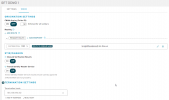
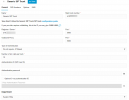
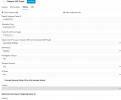
1706734689090.png

I will try setting the trunks up with just 1, and setting the location origination address to the domain again and update shortly.
 
Okay! Good news, I decided to setup a SIPtrunk.com Trunk and found that the + is not being forced on that template. It didnt auto populate the "+".

Then with this knowledge, I created a Generic SIP Trunk - Trunk, populated it with all the Bandwidth information and placed in the main DID, without the +1, using only the 10 digit and saved it. Tested and everything is now working in and outbound.

Bandwidth is refusing to admit they are having issues and NOT sending it as e164 and 3CX is forcing this + in their template. Its an unfortunate case of being caught between 2 vendors.
 

Attachments

  • brave_RvwcaNA3Af.png
    brave_RvwcaNA3Af.png
    27.7 KB · Views: 10
  • brave_SROXr4aicY.png
    brave_SROXr4aicY.png
    23.4 KB · Views: 12
Okay. My two options to enter the origination address is an IP with a port (required) OR Domain. I've tried both, and on each, tried re-adding the trunk with the main trunk number in multiple formats: +15555555555, 15555555555, and 5555555555 just in case. :( The couple of logs I got with inbound calls yesterday showed the number with a 1, but not a +. Formatting our numbers with just a 1 didn't seem to make a difference. Since yesterday, I'm not seeing an inbound logs at all and there should be many.


I will try setting the trunks up with just 1, and setting the location origination address to the domain again and update shortly.
Also you can use DNS or IP it doesnt matter, but you do have to have the :5060 at the end or you wont get calls at all. This is a requirement from BW as you can send on any port so essentially in this it would be delivering on port 80 without specifying one, iirc. Either way I can confirm no inbound will work otherwise.
 
Also you can use DNS or IP it doesnt matter, but you do have to have the :5060 at the end or you wont get calls at all. This is a requirement from BW as you can send on any port so essentially in this it would be delivering on port 80 without specifying one, iirc. Either way I can confirm no inbound will work otherwise.
Thankfully, Bandwidth was able to solve our issues on both PBXs yesterday. They did not specifically state what the solution was but after prompting repeatedly if our numbers were E164 format properly, and never getting a straight answer, they said 'they sent an update to solve the issue and to try again'. I can't confirm that E164 was the issue, but everything started working right away!
 
  • Like
Reactions: accentlogic
Status
Not open for further replies.

Forum statistics

Threads
112,142
Messages
590,937
Members
165,159
Latest member
Isuru Eranga