- Joined
- Mar 27, 2020
- Messages
- 184
- Reaction score
- 52
I know that this request sounds a little bit strange, but it’s true that this is offered by the Yealink T58A device.
So, let’s say we have the following scenario. A manager wants not to be disturbed, except from his personal secretary. So he enables the DND mode, but when his secretary has a call that she thinks is really urgent, she instructed to ask the manager if he will accepted it.
This function exists in the Yealink T58 devices and more specifically is called “DND Emergency”, and we can find it under the menu “Features” > “Forward & DND”. I tried that but unfortunately didn’t work. But the question also comes if that can be also configured from the 3CX itself, so this setting will not be lost when the device will be re-provisioned.
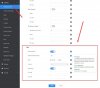
Also, I would like to know if the “number” (features.dnd.emergency_authorized_number) we should use is the extension number. As mentioned above, I tried with the extension number and didn’t work.
Any ideas?
So, let’s say we have the following scenario. A manager wants not to be disturbed, except from his personal secretary. So he enables the DND mode, but when his secretary has a call that she thinks is really urgent, she instructed to ask the manager if he will accepted it.
This function exists in the Yealink T58 devices and more specifically is called “DND Emergency”, and we can find it under the menu “Features” > “Forward & DND”. I tried that but unfortunately didn’t work. But the question also comes if that can be also configured from the 3CX itself, so this setting will not be lost when the device will be re-provisioned.
Also, I would like to know if the “number” (features.dnd.emergency_authorized_number) we should use is the extension number. As mentioned above, I tried with the extension number and didn’t work.
Any ideas?