Black Screens in WebMeetings Mobile App

Status
Not open for further replies.

Portatip0

Customer
Joined
Mar 29, 2022
Messages
10
Reaction score
1
Hi,
We are trying to connect to WebMeeting through a mobile application for Android and iOS.
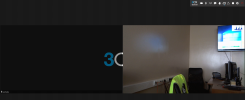
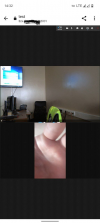
The connection is successful, but sometimes (recently very often) users do not see or hear the interlocutor. A black screen appears instead of the video of the interlocutors. It is possible to interact with the chat (raise your hand, write to the chat, etc.)
When using a VPN connection, for example, Germany or France, everything works perfectly.
Also tried to make a Wifi hotspot from the phone. Connected from a laptop. In Google Chrome, the message "Reconnecting Media" appeared, but through Firefox everything worked fine. I think the problem is not with the network.
Relevant for version 16 and 18. We are in the process of updating

1648546297093.png
 
Hi @Portatip0,

When you use a GSM / 4G (not WiFi connection) what happens? This is only happening on the Android devices or on the laptop as well, I mean the laptop if it is connected via ethernet cable, not via hotspot?
 
The phone uses 4G. I connect through the 3CX Video Conference application version 10.7.20.162.
I've attached screenshots to show what's going on.
I also tried to enter the conference from the phone, but through the Google Chrome browser. Everything works great. The problem is only with the application, I think.
On a laptop, there are no problems if you connect via a lan cable, but to a different network.
 

Attachments

  • 1648553368135.png
    1648553368135.png
    620.5 KB · Views: 5
  • photo_2022-03-29_14-30-33.jpg
    photo_2022-03-29_14-30-33.jpg
    25.9 KB · Views: 5
  • 1648553688567.png
    1648553688567.png
    433.9 KB · Views: 5
What is the difference between your screenshots in terms of how you are connecting? I see in your last upload, a phone's video is displaying correctly, is it one of the two phones that have this problem?
 
The difference is that in one screenshot I connect through the 3сx application, and in the other screenshot through the Chrome browser.
3CX APP - not working. Black screen
Chrome - working fine.

This problem on many phones, including Android and iOS
 
Hi!

I have been reading through the information here and I want to make a small recap to make sure I understand:
  • The Chrome on your PC, without VPN, everything is OK
  • From your Mobile using Mobile Data, without VPN, you get black screen
  • From your Mobile using Mobile Data, with VPN, everything is OK
Could you please mentioned what happens in the following scenarios?
  • Disable Mobile Data, and from your Mobile connect to the same WiFi you PC is connected to that works and don't use a VPN. Does the video appear? Also, please clarify if you PC is running any kind of VPN software.
  • Disable Mobile Data, and from your Mobile connect to the same WiFi you PC is connected to that works and do use the VPN connection you said works. Does the video appear?
 
  • The Chrome on your PC, without VPN, everything is OK
  • From your Mobile using Mobile Data, without VPN, you get black screen
  • From your Mobile using Mobile Data, with VPN, everything is OK
  • From your Mobile using Mobile Data in Chrome, without VPN, everything is OK
Disable Mobile Data, and from your Mobile connect to the same WiFi you PC is connected to that works and don't use a VPN. Does the video appear? Also, please clarify if you PC is running any kind of VPN software.
I/O error
photo_2022-03-30_09-51-29.jpg
Disable Mobile Data, and from your Mobile connect to the same WiFi you PC is connected to that works and do use the VPN connection you said works. Does the video appear?
Everything is OK
 
From your Mobile using Mobile Data in Chrome, without VPN, everything is OK
How did you do this? When you put a WebMeeting link into Chrome on a mobile, it will prompt you to launch the WebMeeting App? Did you enable the "Desktop site" option in Chrome and join the meeting like that?

And just to be clear, from the same mobile device, using the same WiFi connection, without VPN, using the same Meeting Link:
  • Using the WebMeeting App --> I/O Error
  • Using Chrome in "Desktop site" mode --> You join the meeting successfully
?
 
Did you enable the "Desktop site" option in Chrome and join the meeting like that?
Yes, I did.
rom the same mobile device, using the same WiFi connection, without VPN, using the same Meeting Link
I don't think this is a good experiment. We have a very specific Wifi network.
 
When you had "Desktop site" option enabled on your mobile chrome and it worked, what network were you using?
 
When you had "Desktop site" option enabled on your mobile chrome and it worked, what network were you using?
Mobile Data / 4G
 
Can you please create a new Test Extension on your 3CX installation for us and send me the WebClient credentials in a PM so that we can check if we can replicate this from our location?

If we can replicate, it may help us get to the bottom of this faster.
 
Send you link in a PM
 
I think this problem exists because of my region (sanctions from other countries to Russia). In January it works fine. But now it works only from Chrome in desktop site mode
 
we have the same problem.
 
While I can't remember reading specifically that certain internet traffic is being throttled or limited, I suppose this is a possibility.
What I can say for sure is that we as 3CX have not made any changes.

For the time being, it might then be better to use it via the VPN connection you mentioned that works, or from Chrome from a Desktop PC.
 
Status
Not open for further replies.

Forum statistics

Threads
111,973
Messages
590,077
Members
164,896
Latest member
sameage