BLF not tracking

Status
Not open for further replies.

Ed King

Bronze Partner
Basic Certified
Joined
Oct 15, 2021
Messages
13
Reaction score
2
I have a local Windows system V18 PRO. 40+ Snom D785 phones. BLF lights do not track properly and especially the shared park BLFs. Calls seem to get lost once parked. I can't pick the call up anywhere.
 
Hi,

Please list the following:

  • What firmware version is on the D785 phones?
  • What exact 3CX version?
  • Are you using custom templates
  • Are the phones on the exact same LAN and subnet as the PBX?
  • Are there any VLANs or VPN involved?
  • What version Windows are you running?
  • Is the machine used for anything else other than 3CX?
  • Is it a VM? (state what hypervisor you are using)
 
10.1.84.15
18 update 2 (Build314)
No
Yes
VLAN yes but all devices are on the same VLAN
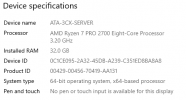
Server 2019 Version 1809 os Build 17763.2452
No
No
 
Ok since there is a VLAN involved, is it possible to move at least one of the phones outside the VLAN, and put it on the same network as the 3CX machine?

We need to see if this happens on VLAN phones only.
Also please mention if you have any deregistration issues.
 
The 3CX machine is on the same VLAN. The entire phone system is on its own VLAN within our network. Not having any deregistration issues.
 
  • Like
Reactions: Evolute IT
24 BLFs per Phone. We tried knocking it down to just 3 shared parking per phone and had the same issue.
 
Thanks Ed, the machine looks sufficient to avoid such issues. A couple of more things to check:

- Ensure the windows firewall is completely disabled
- If you have any antivirus/firewall/vpn software running on the server please remove it - we want pure Windows only
- Do you have more than one NIC showing up in your Windows Network Connections? You said the PBX and phones are on their own VLAN so wondering if you have a dual NIC setup.
 
Yes we do have a dual NIC.
 
Ok this might potentially be the root cause of the problem.

- Normally under Settings >> Network >> General you will select the NIC that is on the internet facing side (not the one looking at the phones VLAN)

- Then on the 2nd NIC which is dedicated to the phones, you must ensure that no gateway is defined. If it has a gateway, edit the connection and remove it. Just keep IP and subnet (in the same range as the phones VLAN)

- Restart the system

- Under each extension, under provisioning, there is an "Interface" option. That should be pointed towards the IP that is inside the phones VLAN. Phones may need a reset/reprovision to now be correctly configured

- If you had set up any static routes in the past, they may be in conflict with the desired configuration.

- If you have some other type of setup, that is not covered by our supported type of network layout, then you may be running in an unsupported mode that will have have issues in the long run.

Take a look at this article to get a better idea - Segregated Network
https://www.3cx.com/blog/docs/network-configurations-supported-3cx-phone-system/
 
We have made these changes and will test tomorrow night after business hours. Thank you for all your assistance and we will update the thread after our testing Wednesday night.
 
  • Like
Reactions: JohnS_3CX
So we ran our test last night. It seems if we get much above 20 phones we start to experience issues. We have 3 shared parks, 2 line appearances and the rest of the 24 buttons are just set as speed dials. The more phones we add the longer the lag and the less responsive the shared park keys are. It can take 5-10 seconds for a BLF light to update and some don't update at all.
 
Ok the fact that increasing the load on the server appears to correlate with the increase of the problem may be telling, but we should still look at some minor details just in case we missed something.

Let's try and get a few other things out of the way that may be affecting the performance:

- The more BLFs you load up on the phones, the harder it is for them to process. If the issue persists with lets say just a single BLF in total, then that's another story so better check with a single BLF

- The more contacts the phones have, the lesser their performance may be. If you have 1000+ contacts on those phones, they may potentially suffer performance-wise so take that into account

- Check the server CPU and memory load during the time when the issue occurs. Make sure you switch the task manager to show individual cores. Do you see any weird behavior?

- Make sure you have updated your AMD chipset drivers, and Ethernet drivers!

- I seem to remember Windows had some issues with the thread scheduler on Ryzen platforms, which they patched in later versions. Your current version of Windows Server 2019 might not have those enhancements. This is a long shot of course, but it could end up affecting performance in weird ways. Not sure if this can be corrected without installing something Windows 10 build 21H2...

Let me know if any of the above provides any positive results.
 
We are going to try a Windows 10 21H2 solution on Wednesday night. Will there be any issues with our license moving from one machine to another?
 
No problem so long as it's not running on two machines at the same time.
 
So we ended up migrating to a new machine running Server 2022 Same FQDN, License IP Everything as far as I can tell is the same. Can't get a phone to register. Any thoughts?
 
Hi Ed,

That certainly shouldn't be the case, the first thing that comes to mind is checking whether the network allows communication between the PBX and the phones, but that would require analyzing network traffic, knowledge of SIP and WireShark, as well as the ability to mirror some ports on the network equipment.

Given the challenges seen so far, have you considered contacting a 3CX Partner to help you with some on-site troubleshooting? https://www.3cx.com/ordering/find-reseller/
 
More testing tonight. We have migrated to a Debian machine. Going to start with one BLF per phone and then increase. We are a custom integrator with a full I.T. department so I don't see us bringing in outside help.
 
Status
Not open for further replies.

Members Online Now

Forum statistics

Threads
111,832
Messages
589,283
Members
164,662
Latest member
DejanMDS