BLFs not being imported from csv

Milos Boksan

Gold Partner
Joined
Jun 26, 2024
Messages
46
Reaction score
17
Hey all

I've created a csv file where I generated info for all user extensions. When I try to import, everything imports correctly, except the BLFs. All BLFs remain empty.

Here is a single line to show the format from the csv that I am using:
"<PhoneDevice><BLFS><BLF ID=""-1"" BLFNo=""1"" BLFType=""BLF"" BLFTypeID=""0"">203</BLF><BLF ID=""-1"" BLFNo=""2"" BLFType=""BLF"" BLFTypeID=""0"">205</BLF><BLF ID=""-1"" BLFNo=""3"" BLFType=""BLF"" BLFTypeID=""0"">202</BLF><BLF ID=""-1"" BLFNo=""4"" BLFType=""BLF"" BLFTypeID=""0"">214</BLF><BLF ID=""-1"" BLFNo=""6"" BLFType=""BLF"" BLFTypeID=""0"">201</BLF><BLF ID=""-1"" BLFNo=""7"" BLFType=""BLF"" BLFTypeID=""0"">204</BLF><BLF ID=""-1"" BLFNo=""8"" BLFType=""BLF"" BLFTypeID=""0"">219</BLF><BLF ID=""-1"" BLFNo=""9"" BLFType=""BLF"" BLFTypeID=""0"">208</BLF><BLF ID=""-1"" BLFNo=""10"" BLFType=""BLF"" BLFTypeID=""0"">216</BLF><BLF ID=""-1"" BLFNo=""11"" BLFType=""BLF"" BLFTypeID=""0"">207</BLF><BLF ID=""-1"" BLFNo=""12"" BLFType=""BLF"" BLFTypeID=""0"">206</BLF><BLF ID=""-1"" BLFNo=""13"" BLFType=""BLF"" BLFTypeID=""0"">210</BLF><BLF ID=""-1"" BLFNo=""14"" BLFType=""BLF"" BLFTypeID=""0"">209</BLF></BLFS></PhoneDevice>"

If I were to isolate one BLF entry here it is
<BLF ID=""-1"" BLFNo=""1"" BLFType=""BLF"" BLFTypeID=""0"">203</BLF>

I found this page:
https://www.3cx.com/docs/bulk-extension-import/
and judging from the instructions there this seems to be correct.

The row before the BLF in my CSV is "GoogleCalendarDisabled" and the rows after the BLF are AI related rows.

Can anyone suggest why this isnt working?
I have 50 extensions with a lot of BLFs to import (15 BLFs each, minimum) and I would prefer not to do it by hand.

Any input is appreciated.
Thanks
 
Last edited:
Are you editing with Excel by any chance?

remove the double quotations, save as csv and try again
 
  • Like
Reactions: Alejandro_3CX
<PhoneDevice><BLFS><BLF ID="-1" BLFNo="1" BLFType="BLF" BLFTypeID="0">203</BLF><BLF ID="-1" BLFNo="2" BLFType="BLF" BLFTypeID="0">205</BLF><BLF ID="-1" BLFNo="3" BLFType="BLF" BLFTypeID="0">202</BLF><BLF ID="-1" BLFNo="4" BLFType="BLF" BLFTypeID="0">214</BLF><BLF ID="-1" BLFNo="6" BLFType="BLF" BLFTypeID="0">201</BLF><BLF ID="-1" BLFNo="7" BLFType="BLF" BLFTypeID="0">204</BLF><BLF ID="-1" BLFNo="8" BLFType="BLF" BLFTypeID="0">219</BLF><BLF ID="-1" BLFNo="9" BLFType="BLF" BLFTypeID="0">208</BLF><BLF ID="-1" BLFNo="10" BLFType="BLF" BLFTypeID="0">216</BLF><BLF ID="-1" BLFNo="11" BLFType="BLF" BLFTypeID="0">207</BLF><BLF ID="-1" BLFNo="12" BLFType="BLF" BLFTypeID="0">206</BLF><BLF ID="-1" BLFNo="13" BLFType="BLF" BLFTypeID="0">210</BLF><BLF ID="-1" BLFNo="14" BLFType="BLF" BLFTypeID="0">209</BLF></BLFS></PhoneDevice>
 
I tried that. Excel formats the csv itself. When I remove the double quotations the 3CX reports an invalid csv formatting.

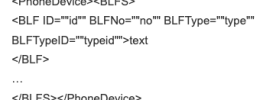
If you go to the link I provided in my original post, you can see how the format is explained:
1791465444121.png
 
@Milos Boksan as I can see it in the end you are missing 2 comma.

/PhoneDevice>",,

Go to an extension on the PBX, setup some BLFs and export the extension.
You will see the exact formar there for multiple BLFs.
Something like this :


<BLFS>
<BLF ID=""-1"
" BLFNo=""1"" BLFType=""Line"" BLFTypeID=""6"" /><BLF ID=""-1"
" BLFNo=""2"" BLFType=""CustomSpeedDial"" BLFTypeID=""2"">*700*102#Conference102</BLF><BLF ID=""890"
" BLFNo=""3"" BLFType=""SharedParking"" BLFTypeID=""3"">SP1</BLF><BLF ID=""908"
" BLFNo=""4"" BLFType=""BLF"" BLFTypeID=""0"">102</BLF><BLF ID=""908"
" BLFNo=""5"" BLFType=""BLF"" BLFTypeID=""0"">102</BLF><BLF ID=""1149"
" BLFNo=""6"" BLFType=""BLF"" BLFTypeID=""0"">150</BLF><BLF ID=""967"
" BLFNo=""7"" BLFType=""BLF"" BLFTypeID=""0"">127</BLF><BLF ID=""932"
" BLFNo=""8"" BLFType=""BLF"" BLFTypeID=""0"">105</BLF>
</BLFS></PhoneDevice>",,
 
  • Like
Reactions: Evolute IT
Dear NikosT,

I did not include the commas in the snippet, I just included the single row that describes the BLFs.
Here is an entire row with all the commas for reference copied directly from the .csv file - NOT from excel (I added newlines after each comma for readability, also redacted personal information):
200,
FIRSTNAME,
,
[email protected],
,
,
,
"<role name=""users""> <canSeeGroupMembers>true</canSeeGroupMembers></role>",
DEPARTMENT,
0,
0,
,
0000111122223333,
yealinkT4x.ph.xml,
Yealink T42S,
,
English,
Ring 1,
Ring 6,
"<PhoneDevice ProvType=""0"" Secret="""" PhoneLanguage=""English"" XferType=""BXfer"" RingTone=""Ring 1"" QueueRingTone=""Ring 6"" DateFormat=""WWW MMM DD (Mon Jan 15)"" TimeFormat=""24-hour clock""><CustomQueueRingTones /><mcgroups enabled=""false"" /><DynamicOptions /><LldpOptions /><CodecsPriority><Codec Priority=""1"" PriorityVarName=""codec1"" DisplayText=""PCMU"" PayloadTypeName=""payload1"" payload=""PCMU"">0</Codec><Codec Priority=""2"" PriorityVarName=""codec2"" DisplayText=""PCMA"" PayloadTypeName=""payload2"" payload=""PCMA"">8</Codec><Codec Priority=""3"" PriorityVarName=""codec3"" DisplayText=""G722"" PayloadTypeName=""payload3"" payload=""G722"">9</Codec><Codec Priority=""4"" PriorityVarName=""codec4"" DisplayText=""G729"" PayloadTypeName=""payload4"" payload=""G729"">18</Codec></CodecsPriority><BLFS /></PhoneDevice>",
1,
8210986B-9412-497f-AD77-3A554F4A9BDB,
0,
894106,
1,
1,
0,
0,
0,
0,
0,
1,
0,
0,
0,
0,
0,
0,
0,
60,
,
1,
,
0,
0,
0,
0,
1,
1,
1,
1,
1,
1,
1,
"<PhoneDevice><BLFS><BLF ID=""-1"" BLFNo=""1"" BLFType=""BLF"" BLFTypeID=""0"">203</BLF><BLF ID=""-1"" BLFNo=""2"" BLFType=""BLF"" BLFTypeID=""0"">205</BLF><BLF ID=""-1"" BLFNo=""3"" BLFType=""BLF"" BLFTypeID=""0"">202</BLF><BLF ID=""-1"" BLFNo=""4"" BLFType=""BLF"" BLFTypeID=""0"">214</BLF><BLF ID=""-1"" BLFNo=""6"" BLFType=""BLF"" BLFTypeID=""0"">201</BLF><BLF ID=""-1"" BLFNo=""7"" BLFType=""BLF"" BLFTypeID=""0"">204</BLF><BLF ID=""-1"" BLFNo=""8"" BLFType=""BLF"" BLFTypeID=""0"">219</BLF><BLF ID=""-1"" BLFNo=""9"" BLFType=""BLF"" BLFTypeID=""0"">208</BLF><BLF ID=""-1"" BLFNo=""10"" BLFType=""BLF"" BLFTypeID=""0"">216</BLF><BLF ID=""-1"" BLFNo=""11"" BLFType=""BLF"" BLFTypeID=""0"">207</BLF><BLF ID=""-1"" BLFNo=""12"" BLFType=""BLF"" BLFTypeID=""0"">206</BLF><BLF ID=""-1"" BLFNo=""13"" BLFType=""BLF"" BLFTypeID=""0"">210</BLF><BLF ID=""-1"" BLFNo=""14"" BLFType=""BLF"" BLFTypeID=""0"">209</BLF></BLFS></PhoneDevice>",
,

Now If I just extract the part about the BLFs we get this (Also put newlines in between all tags for readability);
"<PhoneDevice>
<BLFS>
<BLF ID=""-1"" BLFNo=""1"" BLFType=""BLF"" BLFTypeID=""0"">203</BLF>
<BLF ID=""-1"" BLFNo=""2"" BLFType=""BLF"" BLFTypeID=""0"">205</BLF>
<BLF ID=""-1"" BLFNo=""3"" BLFType=""BLF"" BLFTypeID=""0"">202</BLF>
<BLF ID=""-1"" BLFNo=""4"" BLFType=""BLF"" BLFTypeID=""0"">214</BLF>
<BLF ID=""-1"" BLFNo=""6"" BLFType=""BLF"" BLFTypeID=""0"">201</BLF>
<BLF ID=""-1"" BLFNo=""7"" BLFType=""BLF"" BLFTypeID=""0"">204</BLF>
<BLF ID=""-1"" BLFNo=""8"" BLFType=""BLF"" BLFTypeID=""0"">219</BLF>
<BLF ID=""-1"" BLFNo=""9"" BLFType=""BLF"" BLFTypeID=""0"">208</BLF>
<BLF ID=""-1"" BLFNo=""10"" BLFType=""BLF"" BLFTypeID=""0"">216</BLF>
<BLF ID=""-1"" BLFNo=""11"" BLFType=""BLF"" BLFTypeID=""0"">207</BLF>
<BLF ID=""-1"" BLFNo=""12"" BLFType=""BLF"" BLFTypeID=""0"">206</BLF>
<BLF ID=""-1"" BLFNo=""13"" BLFType=""BLF"" BLFTypeID=""0"">210</BLF>
<BLF ID=""-1"" BLFNo=""14"" BLFType=""BLF"" BLFTypeID=""0"">209</BLF>
</BLFS>
</PhoneDevice>"

As per the page
https://www.3cx.com/docs/bulk-extension-import/
the ID parameter should always be -1

I even tried randomly assigning some IDs. I created a python script to parse this, and I started with an ID od 1000 and had it increment for every BLF entry. The largest ID parameter was somewhere around 1750. The import of such a file produced the same result. The extensions get created and everything gets imported, but the BLF fields remain empty.

Hopefully this provides more info.

Cheers
 
might be quicker for you to create 1 extension, export your list then copy paste that.
 
Thats where I started from. I created 3 dummy extensions, added BLFs, and exported the data.

The only difference in formatting I could find is that the system assigned some (seemingly) random "ID" values to each BLF entry.

Then I Deleted the dummy extensions, and I tried to import the exported file that I used. Same result, BLFs were empty.
So I took to the internet, I changed the ID values to something random - I did make sure all of them were larger than the IDs used previously, and again BLFs were epmty

Thats why I wanted to get advice here.
 
Dont change ID, the BLF ID if -1 tells 3CX its a new BLF key so it'll get assigned one.

do you have no errors at all? Id expect an error.

do the BLFs get created but just blank?

It seems really odd they wont work at all...

can you take it back to basics and just configure first,lastname,email,BLFs
 

Forum statistics

Threads
112,205
Messages
591,280
Members
165,263
Latest member
SandervdMeij