Bluetooth double entry?

Status
Not open for further replies.

Ranac

Free User
Joined
Apr 3, 2020
Messages
31
Reaction score
0
Any ideas why I get a double entry when I have a paired bluetooth headset? This is in the browser extension and happens regardless of the brand I use. One always seems to get "communications" in front of it and not work. The one without communications in front seems to work fine. If it stayed there and did not change it would not be a big deal but even though its default I keep finding it switching back to the communications one.

In windows I only see one bluetooth headset.

doubleentry.jpg
 
This is a Windows API thing. The "Default" option is the default audio device for Windows. The "Communications" option is the default "Communications" audio device. The Headset option is a direct way to select the TT-BH041.

You can select the "Default" and "Communications Default" devices thru the Windows control panel system.

In other words, the "Default" and "Communications Default" options are like variables that point to whatever device you have told Windows to use.
 
  • Like
Reactions: StefanW
OK well what is the difference I guess between the one with communications and the one without communications? I only notice that in 3cx. The problem I am having is I will be in a web conference and the headset speaker will just stop playing sound. If I switch to my PC speakers I get sound fine. If I select either of the 2 entries for the headset I get no sound. after a few mins it comes back. The mic continues to work fine from the headset through the speaker dropping out. I thought it was the headset so I bought a new one and deleted the old one. The exact same thing is happening with the new headset. Any ideas?
 
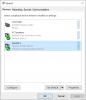
This is a feature of Windows, it allows you to have a different audio output for general audio (PC Speakers in this case and a different audio output for communication apps (the CP960 in this case)

1597307997716.png

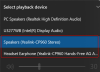
But please note that your bluetooth headset may have 2 audio outputs, one called "Stereo" and one called "AG".
1597308285344.png

If you pick AG for your mic, and "stereo" for your output, many bluetooth devices simply do not support this mode and will go entirely silent. This would justify the problem you described.

So make sure that you will pick AG profile for both your mic AND your speaker in 3CX.

Note: if you set windows to output stereo (ie. to listen to music when not on calls) and then you try answering a call in AG mode, your headset may or may not handle it well. So test it and set it up accordingly. If you are not satisfied with the audio quality of AG, then then use your laptop mic as input and use your bluetooth as "stereo" output
 
  • Like
Reactions: Evolute IT
Status
Not open for further replies.

Forum statistics

Threads
111,973
Messages
590,078
Members
164,896
Latest member
sameage