Solved Break Time not considered after Update 3CX SMB 20.0 Update 1 Build 671

Status
Not open for further replies.

bytesolutions

Bronze Partner
Advanced Certified
Joined
May 30, 2016
Messages
80
Reaction score
10
Good morning everyone.
I have several 3CX SMB configurations with different destinations for: - office hours - break times - closed offices.
For a couple of days, on all installations I have been finding that the break times no longer work. The destinations are - Office hours or closed offices. The "break times" rule is completely overridden.
I checked the rules in the "Call Management" tab, the office hours and related time zones and also the rules in trunk settings, but everything is correct. Until a few days ago, everything worked correctly with 3CX SMB v.18.
Is this a known problem?
Thank you all
 
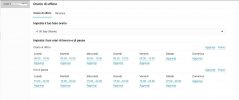
Can you please send us a screenshot of the configuration of office hours?
 
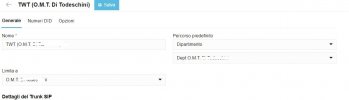
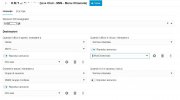
This is the complete setup.
It is now 3.41pm (in Italy) and the "Break Time" rule should be active and therefore ring group 36960 should ring after playing the "intro" message. But no, end the call after playing the "Office closed" message.
 

Attachments

  • Trunk Config.JPG
    Trunk Config.JPG
    47.3 KB · Views: 37
  • Office Hours.JPG
    Office Hours.JPG
    120.6 KB · Views: 37
  • Call Management.JPG
    Call Management.JPG
    113.7 KB · Views: 35
Please note that your break times need to be inside your office hours for this work.
 
  • Like
Reactions: chaf1848
Please note that your break times need to be inside your office hours for this work.
So the office hours must be 8.00 - 22.00 and the break time must be 15.00 - 22.00? Can you confirm?
Up to version 18 the above configuration was working.
 
  • Like
Reactions: chaf1848
Check the "break time" rule settings in the "Call Management" section of 3CX SMB v.18, make sure they are configured correctly for time zones, and also consider changes in trunk or call routing settings that could affect the application of these rules, If unsuccessful, contact 3CX support for further assistance.
 
There should be no issue if this is configured properly.
Check again the hours or reconfigure. In case further clarification is required you can always contact the Technical Support.
 
Where can I setup my own robot call on 3cx
 
@RileyCassie Are you referring to an IVR/Digital receptionist, where the system will play back the prompt and offer the options?
If that is the case, you do that in the Admin panel >> Call handling >> Digital reception
 
It seems to me I got the same problem with break ignored since migration to V20, OOH and OH are finely working, I need to check once more on monday to be sure it's not me appreciating the case wrongly
 
Let us know the outcome.
 
Well , today it works fine during break time so it was me having tested it badly
 
  • Like
Reactions: OlegR_3CX
@aws2p
Thank you for the feedback provided and glad to hear its working for you.
 
  • Like
Reactions: AWS2P
Status
Not open for further replies.

Members Online Now

No members online now.

Forum statistics

Threads
111,831
Messages
589,277
Members
164,660
Latest member
RJenkinsROCK