Break times for whole PBX (90 DID's, 6 digital receptionists, 15 call queue's)

Status
Not open for further replies.

jener

Silver Partner
Basic Certified
Joined
Jul 20, 2022
Messages
29
Reaction score
3
Hi All,

Recently we moved a customer from broadsoft to 3CX.

Within broadsoft you had a function called "group night forwarding" wich basicly sended all calls outside office hours and lunch break to a voicemail no matter wich number you dialed.

I was under the assuption that 3CX had the same funtionality with the Break Times. Unfortunately this is not working like i expected.
How can I put the whole PBX in "lunch break / closed" from 12:00 till 13:00 for every user, call queue and digital receptionist?

Thanks in advance!

Erik
 
Hi All,

Recently we moved a customer from broadsoft to 3CX.

Within broadsoft you had a function called "group night forwarding" wich basicly sended all calls outside office hours and lunch break to a voicemail no matter wich number you dialed.

I was under the assuption that 3CX had the same funtionality with the Break Times. Unfortunately this is not working like i expected.
How can I put the whole PBX in "lunch break / closed" from 12:00 till 13:00 for every user, call queue and digital receptionist?

Thanks in advance!

Erik
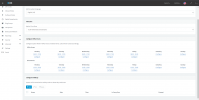
Settings -> Office Hours
 
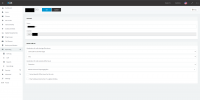
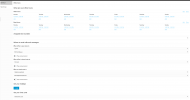
Office hours ARE working, Break Times are NOT working, please see attachments. All call should go to IVR 800 outside office hours and during break times:

officehours.png

officehours2.png
 
typo, must be IVR881

officehours3.png
 
Hi @jener,

The break hours that you have configured are considered to be In office hours, therefore the destination will be the In office hours destination. In order for the break hours to be considered out of office, it will have to be configured outside the office hours range.
For example office hours from 08:00-12:29 and then again from 13:01-17:00.

1689607687404.png


In case you want to have a different destination for break hours than the default in/out of office hours, you can route the calls directly to an extension group and from Web Client >> Admin Console >> Office Hours >> select the extension group and set up the routing for In office hours, break hours and out of office hours.

1689607251740.png

You can find more information here: https://www.3cx.com/docs/manual/ivr-digital-receptionist/


Since you are already using a CFD app to route calls though, you can modify that and route the calls based on time of the day.
https://www.3cx.com/docs/cfd-routing-calls-time-day/
 
Hi @GeorgeP_3CX,

Thank you for your quick reply.

Now i see where things go wrong. I've tried to do this in the management console instead of the Admin console, that one has more possibilities

Another thing: how can i apply this on an IVR? In the admin console you can only set this on an extension group and not an IVR or Call Queue....

best regards,

Erik

btw, the CFD is because i had no choice :)
 
@jener

The configuration on the Admin Console applies only for extension groups.
You cannot specify office hours for Digital Receptionists or Call Queues.

In the Inbound Rule you set the destination to be the extension group and from there you specify the destination based on the hours configured. Then you route the calls to three destinations(instead of two like the Inbound Rule) based on the time of day.

Can you please clarify what is the exact scenario that you are trying to implement, in order to provide you with a more accurate advise?
 
Hi George,

The only thing i would like to accomplish is to set the PBX in closed modus during their lunch break :)

It's a pity that you can only add multiple office hours in the admin console and not in the management console because in the admin console your can only set it on extension groups and not on the whole PBX so im a bit stuck in a loop.

I really don't want to apply those office hours first on a extension group and from that on an IVR or queue. If they have e.g. a company party and the PBX need to be in closed modus an hour earlier i have to apply this on multiple extension groups wich is a nightmare...
 
The best option then is to set the office hours in the Management Console, but the break times should not be in the range of the in office hours.

In case you want to change the Phone System to out of office hours in specific occassions, you can always use the dial code to Force the Phone System to be out of office hours(Management Console >> Settings >> Dials Codes >> "Force 3CX Phone System to IN or OUT of office") without the need to change the office hours.

Just dial from an extension the dial code followed by:
0 -> Default office hours
1 -> Force In office hours
2 -> Force Out of office hours

Keep in mind though that if you force the Phone System to out of office hours using the dial code, you will need to dial the dial code again in order to change the Phone System back to the default.
 
thnx for the info!

question: if i set the office hours on an extension group. are those applied to the members of that group?

Erik
 
question: if i set the office hours on an extension group. are those applied to the members of that group?

In case the extensions are part of multiple extension groups, you will need to specify 'Main Group Membership' in order for the extension to follow the office hours of the extension group that you want. (Admin Console >> Users >> extension configuration)

1689691504942.png

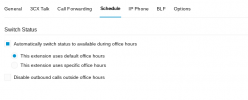
Once this is done, all the extensions will be using the group office hours for switching between statuses during office hours, but this needs to be configured in the Schedule tab of the extension configuration in the Admin Console.

1689691649645.png

Note though that the Auto Switch will happen between Available, Away and DND Status. In case the extension is on Lunch or Business Trip status, it will not switch between statuses.
NOTE: During Break Times, the extension switch to Away status.
 
Hi George,

Thanks for the information! this is what i needed!

best regards,

Erik
 
Status
Not open for further replies.

Forum statistics

Threads
111,974
Messages
590,081
Members
164,899
Latest member
mazet