Bulk Import/Regenerate Passwords

Status
Not open for further replies.

Jim Taylor

Silver Partner
Basic Certified
Joined
May 16, 2018
Messages
39
Reaction score
5
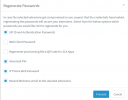
I just spun up a new 3CX, used the CSV template to bulk import users and used the same AuthID/Password for all entries, thinking I can just hit Regenerate Passwords when done. The problem is, I don't want to email everyone in that process. I already have it set to not send the welcome email when a new extension is added under the email notifications section, but when I go to Regenerate Passwords under the Users section, there is a checkbox for 'Resend Welcome email to the selected extensions' but it is grayed out...can't deselect it. Anyone have a fix? We're not ready to send the Welcome email to everyone yet. Worse case I can always go modify the CSV and reimport, but that seems tedious to have to create unique ID's and passwords for everyone rather than just using the build-in feature in 3CX.
 
Hello @Jim Taylor

If you select Regenerate Passwords for " Web Client Password " and "Regenerate provisioning file & QR Code for 3CX Apps" then the option to Resend Welcome email is greyed and cannot be deselected.
Once you unselect the above options, the Resend welcome email will be available to unselect it too.

1710171647536.png
 
Thanks for the info...is there a best practice for bulk importing? I don't think the provisioning file and QR code will be an issue, but does that mean I will have to create unique Web Client Passwords in the import CSV, or will the end user be fine with the same across the board since it makes them change it at first logon?
 
  • Like
Reactions: Plains_JosephW
@Jim Taylor Hi there.
The moment you import csv, the best and safest thing will be for you to regenerate all the passwords including QR etc.
The user can always request "Forgot password" and apply his own, but until then it is better and let the Phonesystem randomize all that sensitive data.
 
I would love to let the system randomize everything, but I'd like to withhold re-sending the welcome email until a later date/time, but the option gets grayed out when leaving the other items selected mentioned above.
 
You could use custom SMTP settings to choose a 'black hole' for sending email, generate the emails and then change the SMTP settings back to normal a few minutes later.

I would probably test it on a single extension first (to make sure they don't queue up waiting for the SMTP settings to be 'fixed') but I suspect this would work for your scenario.
 
to make sure they don't queue up waiting for the SMTP settings to be 'fixed'
It does if the SMTP server times out, not sure how long though. Perhaps, send them all to an internal address where they can just be deleted? But then one has to go edit the email address on all the extensions. Though to be fair, in the past we left the email blank and added it in when ready to send the welcome email.

Overall we'd also prefer to be able to set a new system up completely, and only when ready for use send the welcome email.
 
It does if the SMTP server times out, not sure how long though. Perhaps, send them all to an internal address where they can just be deleted? But then one has to go edit the email address on all the extensions. Though to be fair, in the past we left the email blank and added it in when ready to send the welcome email.

Overall we'd also prefer to be able to set a new system up completely, and only when ready for use send the welcome email.
There are black hole smtp services such as https://blackhole.readthedocs.io/en/latest/ (if you trust them) or it's relatively trivial to set up your own (if you don't).
 
  • Like
Reactions: SweetAction
Thanks for those links...I'll do that and just make them all unique from the start. Not too tedious with that method, thanks!
 
  • Like
Reactions: Lee Cramman
Status
Not open for further replies.

Latest Posts

Members Online Now

Forum statistics

Threads
111,817
Messages
589,159
Members
164,635
Latest member
ok.cmptr