Solved Call By Name not working

Status
Not open for further replies.

tse

Forum User
Joined
Oct 17, 2012
Messages
15
Reaction score
2
Hello all,

I have a customer that is on V18 (linux based) that recently noticed the call by name option in their digital Receptionists main menu stopped working (it was previously working). When a caller chooses that option, the system comes back with a voice response of "File not found" and just sits waiting for input. When digits are entered for a name, it comes back with the same voice message. What file is the system looking for and where should it be in the file structure? Any help would be greatly appreciated. Thanks.
 
Hello all,

I have a customer that is on V18 (linux based) that recently noticed the call by name option in their digital Receptionists main menu stopped working (it was previously working). When a caller chooses that option, the system comes back with a voice response of "File not found" and just sits waiting for input. When digits are entered for a name, it comes back with the same voice message. What file is the system looking for and where should it be in the file structure? Any help would be greatly appreciated. Thanks.
And actually, I just tried the Call By Name on a different customers V18 Linux system and got the same "File not found" response. Did something happen to this feature with the upgrade to V18?
 
You might want to try re-recording the self identification, for one extension, then try using that one. If it works, then either the recording files have moved, or vanished, from the directory they are required to be in. .
 
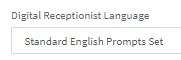
You'll have to update the system prompt used by those IVRs. Edit the IVRs in question and check what's selected in the following drop-down:
1649964222192.png

Then, go to "Settings >> System Prompts >> Updates" and check if there's an update for that specific System prompt. You should also check if there's an update for the system prompt used by the system(the one selected in "Manage System Prompts")

Note: You might need to restart the 3CX IVR Service after updating the system prompt. You can do this from "Dashboard >> Services". Bear in mind that restarting the 3CX IVR Service will affect system extensions dropping any related calls so I recommend doing this out of office hours.
 
Chris, thank you, that did it.

Tim
 
Last edited:
  • Like
Reactions: ChrisC_3CX
Glad to hear!

Do let us know if you need anything else!
 
Status
Not open for further replies.

Forum statistics

Threads
111,974
Messages
590,081
Members
164,899
Latest member
mazet