Call Flow Designer for 3CX V20

IliasL_3CX

Staff member
Joined
Jun 2, 2014
Messages
147
Reaction score
118

New Call Flow Designer (20.2.84) brings key fixes and improvements.​

The updated Call Flow Designer - adapted for 3CX V20 - brings an enhanced DateTime component. This allows you to create advanced time-based call flows based on office hours, holidays and custom schedules. The update also includes build output enhancements, bug ...
Continue reading the Original Blog Post.
 
Last edited by a moderator:
Nice! Please just remember to update the documentation, specially for the database access component! Tried to use the parameters but couldn't figure out how they should be set.
 
Nice to see that my baby is still alive ;)

Nice! Please just remember to update the documentation, specially for the database access component! Tried to use the parameters but couldn't figure out how they should be set.
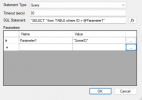
This is how you should use it:
1740747239430.png
 
Woohoo! Thanks 3CX for this release.
 
Brilliant! I just used the last version for a couple scripts and had to manually redo the office hours side of things, perfect that this has come out to save me documenting that for the team for the future!
 
Great news - if is possible - in next release will be perfect 1)to be able connect directly to "change" 3CX instance and edit scripts trought API. 2) connect to GitHub to share and save scripts for team and colaboration 3) connect to AI API to help define scripts and prompts. Tx for your good product and work!
 
Last edited:
  • Like
Reactions: GregG_3CX and N_G
This is a great news !
Thank to the 3CX team for changing his mind about the CFD :)
 
Awesome! It is nice that updates come out regularly and can self-install. Thanks.
 
  • Like
Reactions: GregG_3CX and N_G
Is there a way to build without defining a project extension?
When CFAs are only used in forwarding/redirection scenarios an extension is not necessary
 
Is there a way to build without defining a project extension?
When CFAs are only used in forwarding/redirection scenarios an extension is not necessary
It would still need to be addressable internally. This is not just a matter of someone dialling an extension number.
 
In the past, when you import an App, it tooks the flow name "Project_name.Main" as extension.

My concern is about updating existing call flows, that already have this ".Main" name. Because you cannot set this as project extension due to spell check (whats correct, because . and _ are not dialable :D )
 
Existing scripts will still work when upgrading.

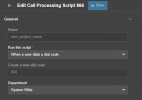
When creating a new script, you can have them addressed via a DID, dial code (extension), or any call coming in on the defined SIP trunk.

1741183154560.png

The .Main is no longer added.
 
Awesome news! Do you need to rebuild a v18 callflow or can you open a v18 callflow in the v20 cfd after which it will be 'converted' to a v20 capable callflow? Right now I have a v18 PBX where the callflow with basic date time conditions and Did routing stops working after the upgrade.
 
Awesome news! Do you need to rebuild a v18 callflow or can you open a v18 callflow in the v20 cfd after which it will be 'converted' to a v20 capable callflow? Right now I have a v18 PBX where the callflow with basic date time conditions and Did routing stops working after the upgrade.
You need to open your existing CFD project with the new version of the CFD, rebuild it, and upload again to 3CX. You should do this AFTER upgrading 3CX, because the build output will not work on v18.
 
I am glad to see that the CFD app got updated. There appears to have been a change made as per the changelog:

- The Database Access component now shows an error in designer and during the app build when the SqlStatement is set to an expression containing variables

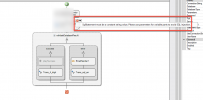
This seems to impact us as we pass the session ANI to a SQL server to do a lookup (invoking a stored procedure), so we would need to pass this variable accordingly. The error message in the new CFD is "SqlStatement mist be a constant string value. Please use parameters for variable parts to avoid SQL injection".

Unfortunately, the documentation (https://www.3cx.com/docs/manual/call-flow-designer/) shows that it has not been updated since 2021 and does not mention how to surmount this.

Is there a link to documentation as to how to accomplish variables under this new V20 (or if possible how to override or bypass that check)?

1741305621240.png
 
Last edited:
Check my response above, I explained how to do it.

Im not following you. We have to pass an EXEC command using the session ANI to the SQL server.
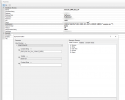
This is how it is setup currently:
1741307140302.png
 
Instead of using the CONCATENATE function, just enter the command as text, and replace the session.ani variable with a parameter name starting with the @ symbol. For example:
[Your command] @CallerNumber

Then you pass the parameter CallerNumber set to session.ani.
 
Instead of using the CONCATENATE function, just enter the command as text, and replace the session.ani variable with a parameter name starting with the @ symbol. For example:
[Your command] @CallerNumber

Then you pass the parameter CallerNumber set to session.ani.
I think I am understanding.

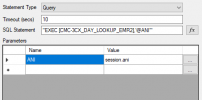
If the caller ID (from 3CX) is 8135551212 we need to pass the following command to the SQL server (in this example the name of the stored procedure is CMC-3CX_DAY_LOOKUP_EMR2):

EXEC [CMC-3CX_DAY_LOOKUP_EMR2],'8135551212'

In the V18 we used CONCATENATE to build the string:

CONCATENATE("EXEC [CMC-3CX_DAY_LOOKUP_EMR2] '",session.ani,"'")

Would that mean that the corresponding updated query in CFDv20 is:

"EXEC [CMC-3CX_DAY_LOOKUP_EMR2],'@ANI'"

1741309009805.png

Is that correct? (I still dont understand how changing this improves security since I am still using the variable just calling it in a different way, but happy to get rid of the concatenate function that I do not need.)
 
Remove the single quotes around the parameter @ANI. Apart from that it should be ok.

SQL injection is avoided because by using parameters, if the parameter value has SQL code to change the meaning of your SQL command, the parameter will escape it in a way that will not execute the desired code. In your case you're passing the caller's number, which will not have a tricky value, but this is in general to avoid possible SQL injection if you pass for example a value that you are getting from a web service....
 

Latest Posts

Forum statistics

Threads
111,929
Messages
589,783
Members
164,802
Latest member
SpacetelSupport