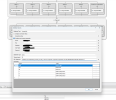
We are encountering an issue when trying to upload an IVR project created using
3CX Call Flow Designer (CFD). Upon selecting the
.zip file and attempting to upload, we receive the following error:
Error Message:
ScriptCode: Invalid value
Steps to Reproduce:
- Navigate to Call Flow Apps > Add Call Processing Script.
- Select "Upload a Call Processing Script project".
- Upload a .zip file containing the IVR project.
- Click OK and observe the error.
Troubleshooting Done:
✔ Verified that the
.zip file contains all necessary CFD files.
✔ Confirmed that the
.zip was generated correctly using the latest
3CX Call Flow Designer version.
✔ Attempted different IVR projects, but the same error persists.
✔ Tested on multiple browsers and systems, issue remains.
System Information:
- 3CX Version: 3cx V20 Update 5
- Call Flow Designer Version: V20
- Hosting Environment: Google Cloud
Can anyone provide guidance on what might be causing this error? Any help is appreciated.
Note:
We have tried disabling components and when the main.cs lines reached 3810 lines and 340606 characters It uploaded successfully.
Then enabled a component and it stopped uploading after reaching 4670 lines and 430272 characters and we started facing this error.