Call Flow Designer question

Status
Not open for further replies.

Bio17Lab

Premier Customer
Joined
Jun 15, 2024
Messages
4
Reaction score
2
Hello 3CX community!

I'm a new 3CX client, and we recently migrated from our old Wildix system to 3CX Pro.

I haven't found an answer in the forums, so I have a question regarding the Call Flow Designer.

I would like to create a "simple" script to check a variable in my contacts list. Specifically, I want to verify if the "Department" column equals "VIP" or not, and then route the call based on this result.

Is it possible to access this information from the Call Flow Designer?

Thanks in advance!
 
Hello @Bio17Lab,

You will need to execute a C# script for that. You will need to pass the variable session.ani as a parameter, which contains the caller's number. Then, the code to execute should be:
C#:
// First, get the tenant
var tenant = PhoneSystem.Root.GetTenant();

// Next, find the contacts from the company phonebook matching the caller's number
var phoneBookEntries = tenant.FindContacts(callerNumber);

// Iterate all the matching contacts and return true when at least one is a VIP contact
foreach (var phoneBookEntry in phoneBookEntries)
{
    if (phoneBookEntry.CompanyName == "VIP")
        return true;
}

// When no contact is considered VIP, return false
return false;

Hope it helps.
 
Thanks a lot @edossantos_sipcaller

I was just trying to play with some C# code but couldn't find the variables that interested me.

You are my savior! I will test this as soon as possible and will report back if necessary.

Thank you so much !
 
Thanks a lot @edossantos_sipcaller

I was just trying to play with some C# code but couldn't find the variables that interested me.

You are my savior! I will test this as soon as possible and will report back if necessary.

Thank you so much !
You're welcome, remember to pass the session.ani variable when you invoke the script.
 
The script compiles perfectly. I haven't had the chance to test it yet cause our SIP Trunk is not active and i'm still discovering the entire system.

I took the opportunity to install Visual Studio and after some research in the 3cxpscomcpp2 assembly I ended up finding all the PhoneBookEntry variables.

I just have a doubt about the CompanyName and Department and their respective names in VisualStudio. There are several "AddressNumberOrData[0,1,2,3,4,5,6,7,9]..." I will make some tests.

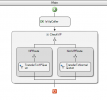
Also possible that my simple design in Call Flow Designer is not correct. But thats another story.

1718545168050.png

Thanks again for the help :cool:
 
Ah, sorry, you want to check the department and not the company name. Yes, it's one of the AddressNumberOrData fields which has the value, I don't remember exactly which one, you will need to make some tests...
 
Hello @Bio17Lab,

You will need to execute a C# script for that. You will need to pass the variable session.ani as a parameter, which contains the caller's number. Then, the code to execute should be:
C#:
// First, get the tenant
var tenant = PhoneSystem.Root.GetTenant();

// Next, find the contacts from the company phonebook matching the caller's number
var phoneBookEntries = tenant.FindContacts(callerNumber);

// Iterate all the matching contacts and return true when at least one is a VIP contact
foreach (var phoneBookEntry in phoneBookEntries)
{
    if (phoneBookEntry.CompanyName == "VIP")
        return true;
}

// When no contact is considered VIP, return false
return false;

Hope it helps.
Wow! That opens a door to a new world. I wonder if there might be a way to retrieve other information from the 3CX-System to handle CFD, like:

Remaining time "Set Status temporarily"
(this would enable user to set e. g. next two hours Do not disturb - and if a call is received half one hour later, the CFD could inform the caller there is DND for remaining one and a half hour)

Office Holidays
(this would make it easy just to set up holidays and CFD is able to retrieve the range of days and automatically generates the appropriate annoucement)

Office Hours
(this would make it eays just to change office hours without the need to change the annoucements as CFD autmatically generates the appropriate annoucements after retrieve all the necessary informations from the 3CX Database)

Is there a list of database fields and variables available?
 
Wow! That opens a door to a new world. I wonder if there might be a way to retrieve other information from the 3CX-System to handle CFD, like:

Remaining time "Set Status temporarily"
(this would enable user to set e. g. next two hours Do not disturb - and if a call is received half one hour later, the CFD could inform the caller there is DND for remaining one and a half hour)

Office Holidays
(this would make it easy just to set up holidays and CFD is able to retrieve the range of days and automatically generates the appropriate annoucement)

Office Hours
(this would make it eays just to change office hours without the need to change the annoucements as CFD autmatically generates the appropriate annoucements after retrieve all the necessary informations from the 3CX Database)

Is there a list of database fields and variables available?
For more information on what you can do, you can check the Call Control API documentation:
https://www.3cx.com/blog/releases/v20-call-control-api/
 
  • Like
Reactions: Bio17Lab
Thank you so much. I've dowloaded the Call Control API and searched the needle in the haystack, and found the Extension.OverrideProfile Property, but this is obsolete.

For me as an absolute beginner it's hard to find out, wheter it is possible at all to retrieve from 3CX-System the remaining time a temporarily status of an extension will be set back to previous status to let the CFD play an announcement e. g. "the pty you try to reach is on DND for app. 30 minutes"

Anyone here able to lighten this matter?
 
Thank you so much. I've dowloaded the Call Control API and searched the needle in the haystack, and found the Extension.OverrideProfile Property, but this is obsolete.

For me as an absolute beginner it's hard to find out, wheter it is possible at all to retrieve from 3CX-System the remaining time a temporarily status of an extension will be set back to previous status to let the CFD play an announcement e. g. "the pty you try to reach is on DND for app. 30 minutes"

Anyone here able to lighten this matter?
I'm not sure where this information is. I think the easiest way to find out is creating an app with Visual Studio and debugging it. This way you can inspect all the properties of your Extension, and see where this is located.
 
  • Like
Reactions: Bio17Lab
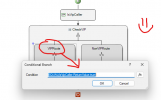
For information, "AddressNumberOrData8" is the variable for "Department" in contact list.

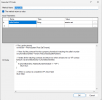
Here is the final result code in 3CX call Flow Designer :

1718994188323.png

1718994648946.png

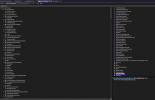
For those who wonder how to find variables.

I simply installed Visual Studio, downloaded the Call Control API v20.

I also installed on my Windows Computer 3CX PBX so i got my 3cxpscomcpp2 assembly in Visual Studio.

Then you just look around what you need with the Object Explorer in Visual Studio :

1718994324213.png

@edossantos_sipcaller thanks again for the sample code. Its perfectly working and you drive me on the good way !!
 
Thanks for sharing your findings with the community!
 
  • Love
Reactions: Bio17Lab
Status
Not open for further replies.