Call Flow Script: Play Custom Holiday Message Based On Date

IliasL_3CX

Staff member
Joined
Jun 2, 2014
Messages
147
Reaction score
118

Automate holiday messaging and call routing with custom prompts for specific dates.​

This script lets you play a custom holiday message based on the date before routing an incoming call. It uses the new 3CX V20 feature to trigger scripts for calls received on SIP trunks. Unlike the default single holiday prompt, this script allows a unique...
Continue reading the Original Blog Post.
 
Will this work for the 3CX MT version?
 
What's the difference to the "old" holiday script?
Before you had the option to configure the destination, the script routes after playing the prompt. Where does this script route the call to, the default holiday destination?

And do you still need to assign the SIP Trunk to a department for the script to work?
 
This script works well.

However, when will it again be possible to record announces from the office holidays menu? At the moment, it's still impossible to record with a desktop phone or a microphone.

What's more, the announcement is played back twice. Is it possible to play it only once?

Thanks in advance for any feedback on this subject.
 
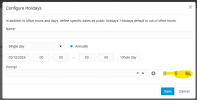
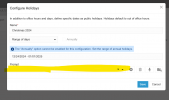
What version are you running? Are you referring to the Office Holdays from the Office Hours page?

1733223866442.png
 
  • Like
Reactions: ElenaF_3CX
Yes, V20 R3
It seems that this feature is coming with the R4, but still in RC for the moment. It's impossible to install it in production at customer sites.
 
  • Like
Reactions: Evolute IT
What version are you running? Are you referring to the Office Holdays from the Office Hours page?

View attachment 45414
I don't get how this script is any different from routing using the normal holiday prompt and routing in the system.

1733460646006.png
 
Its only needed if you want to have a different prompt for each holiday, I.e. Xmas prompt is different from say Easter prompt.
 
Its only needed if you want to have a different prompt for each holiday, I.e. Xmas prompt is different from say Easter prompt.
Some feedback. In the instruction pages for the scripts, they need more step by step or basic info, so programming noobs can understand what needs to change. As it all goes way above most peoples heads. Also, the examples and the store scripts are different, making it even harder to understand. :oops:
 
Thanks for the feedback.

Its not easy and not for everybody. But it allows us to add functionality relatively quickly without having to test the call manager each time which is a massive thing. So in a sense its also for us. But a good developer can do a lot of stuff with the call flow scripts.

The visual CFD was cute with its 90s interface but the way forward is AI. We just dont have the time yet but I think we have shown our development speed.

The latest version of the script is in the store, not in the blog. thats just to add some context
 
The latest version of the script is in the store, not in the blog. thats just to add some context
I look forward in using this, I do a lot with CFD!
 
Does the store script work with system wide SIP trunks that have DIDs allocated for different departments? Last I had read, the store script initially only worked for a trunk allocated to a department. Someone in the german forum had modified a version to work with system wide trunks+DIDs, but unsure if any of those changes have been incorporated?
 
Yes it works with system wide trunks. Also with dial codes, so you can define when to run the script basically

Maybe some scripts are checking certain department level variables so then they would need adapting. If someone modified the script it means that particular script depended on some department type things maybe

But in general a call script can be run at the sip trunk level so you can use it as an entry point for all your calls. And then filter based on caller ID, DID, destination whatever you want

Even the pbx uses internal call scripts to run certain functions you see in the interface. So our server is optimized to handle these scripts with high performance and system wide. Of course a poorly written script could be a problem
 
Yes, it's a very nice script as a template (especially because of the reference implementation of trunk routing), which many people appreciate. Unfortunately, GetTimeBasedRoutingInfo() is not documented, so we had to figure it out on our own.

There have already been several extensions, such as number selection (holiday_select.cs) and internal redirects without being triggered by external calls (holiday_intern.cs).

https://www.3cx.de/forum/threads/holiday-ansage-für-dids.121165/post-442021

Battlecry from 2015 :)
 
Last edited:
  • Like
Reactions: random_guy
I'm having an issue with the holiday.cs script on v20 u4. I have 2 trunks on this pbx.
I added the holiday dates and the audio to be played under the department holidays tab.

- I added the holiday.cs script and set it to execute when receiving calls at the trunk level.
This works, but after the holiday audio is played, I get the DEST_NA audio prompt.

- I tried adding the holiday.cs script and setting it to execute when a DID is called, and selected the two DIDs for the two trunks.
No holiday audio is played, only the DEST_NA is played.

I don't know C# and more important I don't know the 3CX functions, so I don't understand what's going on with the script.
What is the correct way to configure it?
 
I'm facing same issue with setting Holidays.
There is no straight forward way to add Holidays like there was in V18.
Now, there are multiple entries(depending on how many entries are there in the call handling page) that need to be changed.
This was such a simple thing to do in v18.
 
- I added the holiday.cs script and set it to execute when receiving calls at the trunk level.
This works, but after the holiday audio is played, I get the DEST_NA audio prompt.
Once the holiday prompt is played, it will route to the destination where the caller would have gone to if it was a holiday.

So if it is going to your queue, you will need to adjust your holiday destination within the queue

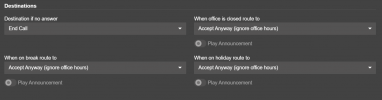
1734601971233.png

If you have your Holiday route to accept anyway, and no agents logged in to the queue due to it being a holiday then it is normal for it to go to the Destination if no answer. Just adjuest your holiday route on the bottom right to go to End Call. the holiday prompt will play and the call will be dropped. You could for example send it to a voicemail box for example or wherever you need it to go.
 
Thanks Nicholas,
that makes sense.

What about when you assign the script to individual DIDs? can you explain why the audio prompt is not played and the call goes directly to DEST_NA?

in my current configuration, there's no DIDs assigned to a call handling object, the default trunk destination is an IVR

Edit: also I noticed that if you create a script and set it to execute when a DID is called, it creates an inbound rule. If you delete the script, the inbound rule is still there, see video attached
 

Attachments

Last edited:
Once the holiday prompt is played, it will route to the destination where the caller would have gone to if it was a holiday.

So if it is going to your queue, you will need to adjust your holiday destination within the queue

View attachment 45727

If you have your Holiday route to accept anyway, and no agents logged in to the queue due to it being a holiday then it is normal for it to go to the Destination if no answer. Just adjuest your holiday route on the bottom right to go to End Call. the holiday prompt will play and the call will be dropped. You could for example send it to a voicemail box for example or wherever you need it to go.

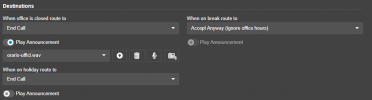
Sorry, I just checked and to me it seems correctly configured:

here's the trunk config:
1734604949405.png

and here's the IVR 601 destinations configuration

1734605007719.png

I assume it would take the route when on holiday, and it's correctly set to End call, what am I missing here?
 

Members Online Now

Forum statistics

Threads
111,834
Messages
589,287
Members
164,662
Latest member
DejanMDS