Call Flow Script: Play Custom Holiday Message Based On Date

The script only applies when a call is on the trunk, not to a DID.
1734605301179.png

So this trunk would need to be assigned to the department it is taking the office hours from.

Do you have a DID assigned to the trunk that goes to a queue? This would also apply to that. You mention the Destination if no answer, but you are showing me a Digital receptionist, which I would assume a DID is being called so it goes to the holiday prompt then goes to the Queue which is misconfigured.
 
The script only applies when a call is on the trunk, not to a DID.

So this trunk would need to be assigned to the department it is taking the office hours from.

Do you have a DID assigned to the trunk that goes to a queue? This would also apply to that. You mention the Destination if no answer, but you are showing me a Digital receptionist, which I would assume a DID is being called so it goes to the holiday prompt then goes to the Queue which is misconfigured.
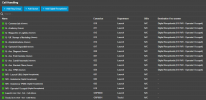
Nope, there's no DID assigned to any object in call handling, see ss below
Trunk -> default destination IVR 601.
IVR 601 has destination on holiday set to End Call, and transfer to queue after 10s of no selections.

From what I understand, if I set up the holiday.cs script to execute at trunk level, the call goes through the script, checks the calendar and plays the audio, then goes to the original destination set in the default route, in this case the IVR. The IVR has "End call" on destination on holidays. is this the supposed behavior or am I not understanding the logic workflow?

1734605917560.png
 
Thanks for the feedback.

Its not easy and not for everybody. But it allows us to add functionality relatively quickly without having to test the call manager each time which is a massive thing. So in a sense its also for us. But a good developer can do a lot of stuff with the call flow scripts.

The visual CFD was cute with its 90s interface but the way forward is AI. We just dont have the time yet but I think we have shown our development speed.

The latest version of the script is in the store, not in the blog. thats just to add some context
IMHO (don't know how the rest of the community feels about this, so please take this lightly), this is good in some cases and bad in other cases.
In this particular case, where the holiday functionality was manageable via the web ui or CFD for more complex setups, it's a step back.

I'd say about ~50% of our customer requests during the year are about setting up holidays or forwards to other queues during periods of time, and this takes time.
Some users were skilled enough to set up their office closure by themselves in v18, record their audio and schedule the holiday. As of now they have to open a request to us because they don't have the ability to do this anymore.

I'm currently trying to adopt the suggested methods, but I'm struggling to get them working (as seen from my posts above).
Also this approach doesn't seem to address some of the situations that we use CFDs to manage.

An example is a customer with a single trunk with multiple DIDs
- Office A has 2 of these DIDs
- Office B has 1 DID and is located in another area
- They share the same departments (administration, sales, warehouse)

-They have different holidays (like saint's day) occurring on different dates. How can I apply the different holidays if the script runs when receiving the call at the trunk level and not the single DID?

-How can I handle office B asking this: for the month of December the administration deparment will be closed all saturday afternoons, while office A remains operational

-How to handle Office A sales department asking for forwarding calls to sales queue of office B.

-Sales will have extraordinary opening hours on sundays on X dates.

Before starting developing CFD apps to manage these requests, this was done by my colleagues using "fake" extensions, and switching the status to open/close the inbound calls, this was not schedulable and we had to set notifications to switch back the extension status.

Basically for the customers with these kind of requests we put the whole call flow before the queues in CFD apps, but as you said this is heavy on the pbx and has me worried we are not on the right track, but we don't have the skill necessary to develop a c# script to do the same thing we can do with the CFD app that requires only basic flowcharting knowledge.

Being pretty new with voip and having only started about 3 years ago with 3CX, I never quite understood why is there no call control object that works as a calendar/date-time object with the functionalities where we can select dates, date ranges and the destination. The pieces seem to be all there, we could just have an object that we can insert anywhere in the call flow and control the destination based on dates. I think all the requests I posted above would be handled by such an object

sorry for the long post and again, this is not a rant, just some considerations from a voip neophyte who is trying to understand the correct way to achieve what our customer are asking on a daily basis
 
The call should come in on the trunk, go to the holiday prompt during the holiday period, then go to your IVR.

If that is not happening, you should put your PBX into verbose logging, and see the call flow from the logs of the system. You should send this through to technical support so they can see the logs if you are having difficulty parsing the logs.
 
As a check list:


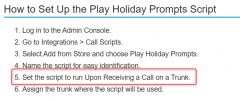
1. Ensure the Script is used when the call is coming on a SIP trunk, not a DID
2. Ensure your holidays are set properly, with proper dates.
3. Define your holiday prompt
4. Test with your DID or main number to go to the route you need.

The holiday prompt should play at this point and end the call if this is configured in the DR.
 
As a check list:

1. Ensure your SIP trunk is in the department used for the holidays, and not system wide
2. Ensure the Script is used when the call is coming on a SIP trunk, not a DID
3. Ensure your holidays are set properly, with proper dates.
4. Define your holiday prompt
5. Test with your DID or main number to go to the route you need.

The holiday prompt should play at this point and end the call if this is configured in the DR.

Thanks again for the quick response Nicholas,

I did some more tests and the issue seems related only to the routing to End Call of the IVR.

1. Ensure your SIP trunk is in the department used for the holidays, and not system wide (done)
2. Ensure the Script is used when the call is coming on a SIP trunk, not a DID (done)
3. Ensure your holidays are set properly, with proper dates. (done)


Test 1
  • Trunk with main number (no additional DIDs)
  • Default Route to IVR
  • IVR route on holiday set to "End Call"
  • Set holiday for the only department to today and uploaded the holiday audio
  • Inbound call -> holiday audio -> DEST_NA
Test 2
  • Trunk with main number (no additional DIDs)
  • Default Route to IVR
  • IVR route on holiday set to a registered extension
  • Set holiday for the only department to today and uploaded the holiday audio
  • Inbound call -> holiday audio -> Extension rings
Test 3
  • Trunk with main number (no additional DIDs)
  • Default Route to Queue
  • Queue route on holiday set to "End Call"
  • Set holiday for the only department to today and uploaded the holiday audio
  • Inbound call -> holiday audio -> Call ends.

I'll pull the logs and open a support ticket with the logs
 
Disable "Play prompt.. from System > Options > General > System Settings.
If you want to keep that option then on the IVR set End Call + Play Announcement with a busy tone.
 
Last edited:
  • Like
Reactions: NicholasP_3CX
that works, thank you
 
1. Ensure your SIP trunk is in the department used for the holidays, and not system wide (done)
Unnecessary, the SIP trunk does not need to be assigned to a department.

What is crucial is the DID department, in your case the IVR department.
 
  • Like
Reactions: N_G
Unnecessary, the SIP trunk does not need to be assigned to a department.

What is crucial is the DID department, in your case the IVR department.
That was an oversight on my behalf, but edited the response.
 
  • Like
Reactions: fxbastler
just found out another issue on another pbx.
If a trunk has default route to a call script (CFD in this instance), if I set the holiday script the call just drops
 
As a check list:


1. Ensure the Script is used when the call is coming on a SIP trunk, not a DID
2. Ensure your holidays are set properly, with proper dates.
3. Define your holiday prompt
4. Test with your DID or main number to go to the route you need.

The holiday prompt should play at this point and end the call if this is configured in the DR.
Hi Nicholas,

Will it be possible to activate/assign the script only for a certain DIDs?

we have a customer with one trunk and 30 DIDs, but every DID goes to a department/site with different holidays.

Is there an scheduled about when the script for DID will be available?

Thanks in advance,
Joel.
 
Hi Nicholas,

Will it be possible to activate/assign the script only for a certain DIDs?

we have a customer with one trunk and 30 DIDs, but every DID goes to a department/site with different holidays.

Is there an scheduled about when the script for DID will be available?

Thanks in advance,
Joel.
The script will only apply to holidays in a department. It already checks if the DID is routed there. If it goes to a user or such, it doesn't trigger.
 
Last edited:
  • Like
Reactions: Evolute IT
Wow.
How is this made so difficult ?
This does not add anything in the process, it only frustrates the customer and gives IT extra work that is not needed.
Why does the system not honor the settings at department level ?

We have customers that are able to easily set department office hours and holidays (with prompts) themself trough the web gui.
Why would they require IT to apply some kind of script to make their (own) deparment settings to take affect ?

It is something that is done at department level, I don't want to apply a script for every call that comes in on the trunk.
The department is called and they are able to tell when it is closed and what to do with it.
 
The script is only needed once per SIP trunk and then remains unchanged. It's not that complicated.

But yes, I agree with you: it was easier back then.

In the old days, everything was better and made of wood ...
 
  • Like
Reactions: N_G
Wow.
How is this made so difficult ?
This does not add anything in the process, it only frustrates the customer and gives IT extra work that is not needed.
Why does the system not honor the settings at department level ?

We have customers that are able to easily set department office hours and holidays (with prompts) themself trough the web gui.
Why would they require IT to apply some kind of script to make their (own) deparment settings to take affect ?

It is something that is done at department level, I don't want to apply a script for every call that comes in on the trunk.
The department is called and they are able to tell when it is closed and what to do with it.
Im not sure what you are talking mean. Its very easy to set holiday messages in advance or else set custom ones from the WEB GUI.

This script is only required if you want to make holiday messages different per date and for the whole year in advance.
 
Im not sure what you are talking mean. Its very easy to set holiday messages in advance or else set custom ones from the WEB GUI.

This script is only required if you want to make holiday messages different per date and for the whole year in advance.

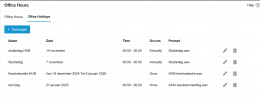
In the Admin Console the customer goes to Office Hours -> Department
Chooses date and time and records their own prompt. (see image below)
And you're done. Just like setting the office hours of a department (which they also do themself).
Which seems logical to everyone and no need to do something else.

However this did not work.

As I read it now, I also have to install and configure some kind of script, that is invoked at every call that enters a SIP trunk.
This does not make sense.
Anyone would expect that this works the same as the (department) office hours, you set them in the gui and you are done.

With a lot of DID's on one trunk, this means a lot of calls and a lot of needless invoking the script.

In v20 the focus is on using the departments.
It would make more sense if the system itself would have 'system wide' office holidays. (only used if set)
And use (custom) holidays set on department level. With an option to override system wide set holidays.
The same as with the office hours.

And how does this work when another extension within 3CX calls the department ?
In my understanding I put the script on calls received on a trunk.
However if a call does not come from the trunk, then the script is never invoked ?

1737529698290.png
 
Last edited:
The script is only needed once per SIP trunk and then remains unchanged. It's not that complicated.
It's original from the 3CX store, installed and functional in under 1 min per sip trunk, nothing else to do.

Anyone would expect that this works the same as the (department) office hours, you set them in the gui and you are done.
With a lot of DID's on one trunk, this means a lot of calls and a lot of needless invoking the script.
Look at what has been written here so far, it's all there. The script is compiled by 3CX and then runs. The number of calls is not significant, such a construct would otherwise run elsewhere in 3CX with every incoming call.

I'm not upset that the many different times at various locations (there were 4) in the previous 3CX versions have stopped, and I don't really miss the global time and holiday settings. This way, there are more and finer control options, and call flows are much easier to understand.

This does not make sense.
for you ..
doesn't matter :cool:
 
Last edited:
  • Like
Reactions: N_G and Evolute IT
It's original from the 3CX store, installed and functional in under 1 min per sip trunk, nothing else to do.


Look at what has been written here so far, it's all there. The script is compiled by 3CX and then runs. The number of calls is not significant, such a construct would otherwise run elsewhere in 3CX with every incoming call.

I'm not upset that the many different times at various locations (there were 4) in the previous 3CX versions have stopped, and I don't really miss the global time and holiday settings. This way, there are more and finer control options, and call flows are much easier to understand.


for you ..
doesn't matter :cool:

Why would you, me or anyone want to install a script for basic functionality, that should have been in place out of the box ?
Things like office hours and holidays are not exotic functions.

It could (and should) work the same like office hours, it's even in the same sub item.
Why are holiday (hours) different ?
A department receives a call at a certain date and time, holiday -> message that is configured.

And yes, I also think it probably still would result in a construct running somewhere in 3CX.
(Hopefully at department level and not on trunk level.)
But at least then it feels more natural and more as a complete product.
Instead of a half ass product where you still need to add something here and there, to make something work that is already in the product.

The holiday settings are presented just like the office hours.
With the big difference that for holidays the system administrator still has to install a script.
Which is not mentioned in the product or makes it a logical step to do and introduces risks at outage.


Why do you keep reffering to previous/old versions and that they would have been better and then talking about stuff you did not like in it?
I am looking at the V20 version and think this is a flaw that really needs to be addressed, to make 3CX a better product for their customers. And based on the results on internet, I am not the only one.

I don't know why you think that insulting people would help.
It sure does not help the reputation of 3CX and makes me (and anyone who reads this) wonder about the quality of (silver) partners.
 

Latest Posts

Forum statistics

Threads
111,991
Messages
590,166
Members
164,929
Latest member
Cloudstar