Call forwarding stopped working after updating to V20

Status
Not open for further replies.

haba-beton

Premier Customer
Joined
May 31, 2021
Messages
34
Reaction score
4
Hi everyone,

I recently updated to the latest V20 version, and ever since then, I've been having issues with call forwarding. Before the update, I had set up call forwarding to redirect my calls to another number when I wasn't available, and it was working perfectly. However, after the update, it just stopped working altogether.

Every time someone tries to call me when I have forwarding enabled on the SNOM phone to a external number, the call doesn't get forwarded; they get a message saying, "Call couldn't be placed.".

Has anyone else experienced this issue after updating to V20? Any suggestions on how to fix it? I'd appreciate any help or advice you can provide!

Thanks in advance!
 
Do not do any forwardings on the phone itself. Use your profiles and the call forwarding from the PBX.
 
Do not do any forwardings on the phone itself. Use your profiles and the call forwarding from the PBX.
Hello @NicholasP_3CX,

thanks for the quick response. I understand what you're saying about using profiles and call forwarding from the PBX, but the challenge is that we have over 300 Snom phones in our organization. Managing call forwarding settings directly through the PBX for all these devices would be incredibly time-consuming and complex.

We prefer to handle call forwarding directly on the phones because it's much easier for us to manage and for our users to control.

If there’s any way to get call forwarding working directly on the phones after the V20 update, we’d greatly appreciate it. Any other suggestions are welcome!

Thanks again!
 
You can manage all your extension call forwarding based on their status via the admin console.
 
The way that 3CX works is that the extension is not an individual devices, but the person themselves

This is why you can have multiple devices on one extension. When you configure this on the phone itself it is not pushed to the other devices like the profiles.
 
I get what you're saying about 3CX and extensions, but this worked perfectly fine with V18. We could set call forwarding directly on our Snom phones without any issues, and it didn't interfere with other devices on the same extension.

We'd really like to keep managing forwarding directly on the phones if possible. If there's a way to make this work with V20, please let us know!

Thanks!
 
Unfortunately not. Its not the intended way of using 3CX.
 
  • Like
Reactions: haba-beton
Hello @NicholasP_3CX,

i made forwarding on the profile and it still doesn't work. I mean it works but the "Main Trunk Number" is shown instead of the original phone number from caller.

I tried creating a new sip trunk using different provider templates but it sadly still doesn't work.
 
Last edited:
Outbound caller ID like that is "Clip No Screening." Does your SIP provider support Clip No Screening?
 
Outbound caller ID like that is "Clip No Screening." Does your SIP provider support Clip No Screening?
Hello @SteveITS ,

Yes, my SIP Provider Telekom does support Clip No Screening, it worked with the v18 version. I believe the issue lies in the Outbound Parameters of the trunk. I can't modify these parameters directly in the trunk, so I created a custom template. However, I'm unable to upload it because I receive the error: "3cx header/template - Value is required."

I also tried copying an existing template and only changing the name, but I still can't upload it.
 
I recall seeing other posts here with that error but I cannot find any threads with solutions right now.
 
  • Like
Reactions: haba-beton
Hello @SteveITS ,

Yes, my SIP Provider Telekom does support Clip No Screening, it worked with the v18 version. I believe the issue lies in the Outbound Parameters of the trunk. I can't modify these parameters directly in the trunk, so I created a custom template. However, I'm unable to upload it because I receive the error: "3cx header/template - Value is required."

I also tried copying an existing template and only changing the name, but I still can't upload it.
If you hope to change the outbound parameters of V20, please check the method can work in your side:
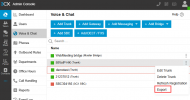
1. create the sip trunk firstly;
2. export the sip trunk, and then change the outbound parametere as what you want;
1725330609659.png
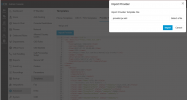
3. upload the template file here:
1725330812838.png
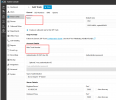
4. follow the steps to create the sip trunk.
1725330894134.png
 
Status
Not open for further replies.

Members Online Now

Forum statistics

Threads
111,832
Messages
589,284
Members
164,662
Latest member
DejanMDS