call log and call recording files not match

Status
Not open for further replies.

[email protected]

Premier Customer
Joined
Sep 30, 2016
Messages
15
Reaction score
4
Product: Enterprise Perpetual
Version Number: 16.0.9
OS: Windows 2019

Case:
1. Client call in to a ring group
2. A in the ring group pick the call
3. Client said he want to talk with B, so A blind transfer the call to B
4. Client talk with B for few minutes

When we check the call log, there is only Client to B
Client talk with A has no log, but we could find the recording file in A's folder

we found 1 call has this problem so far

We did not have this problem before

Any body could help?
 
To first get a bit more information about the issue could you let us know of the following:

1. From your description, I gather that you cannot reproduce this issue at all, is that correct?
2. Do you know how extension A had picked up the call? Is he part of the ring group and simply answered a ringing call, did he use the pickup function(*20*), did he pick it up via a 3CX App, did he use some other method?
3. When you say call log, which call log are you referring to, the "Call log" as seen in the Management Console or the extension's call history, or something else?
4. In the Management Console, go to Call Reports and generate a call report for that whole day, do you still not see the specific call?
 
1. We found 2 actually.
The client dial in 2 times on 2/8.
The two call both pick by A, then transfer to B

We did not search for other because there are too many.
We has 10k+ call each day.
We did not try to reproduce it
There are too may similar case and they had no problem

2. The ring group type is "ring all". So A should be pick the call normally when it ring
He is using Yealink T27P Desktop phone

3,4. From the call log in web console and call report
When I search the client number on that day, it only show the call from client to B only
But we can found the call recording files of "client to A" in A's folder and "client to B" in B's folder
 
I think I got it
The call report had show it but it is not in the form we expected

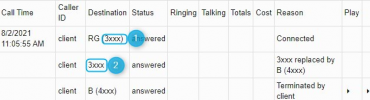
The record is like this
Call TimeCaller IDDestinationStatusRingingTalkingTotalsCostReasonPlay
8/2/2021 11:05:55 AMclientRG (3xxx)answeredConnected
client3xxxanswered3xxx replaced by B (4xxx)
clientB (4xxx)answeredTerminated by client

All 3xxx is our ring group
All 4xxx is our user

It is expected to show A in the 2nd line destination, but it show the ring group number
The call record file name in A's folder is "client number-ring group number"
And there is no ⏵button

I had test a long time ago
I don't know when it changed

Can I change it back?
 
I think we'll need a bit more information to help us better understand the situation and therefore hopefully figure out what might've happened:

1. Are you saying that the extension numbers show below (1) and (2) are the exact same number?:
1628246132523.png

2. Were the columns "Ringing", "Talking", "Totals", empty or did you simply remove the values before posting the image?

3. Do you know on what device extension A was using when this call occurred (3CX Android/iOS App, 3CX Windows App, IP Phone, etc)

4. Is the recording file you found for "client number-ring group number" empty or does it actually contain audio of the conversation between the client and extension A?
 
1. Yes they are the same
2. There was data but I deleted
3. Both A and B using Yealink T27P
4. I can play the file and hear the conversation between the client and extension A
 
Hey @[email protected]

I have tested this thoroughly but was unable to reproduce it with the steps you describe no matter what I tried.

I think the only way to get to the bottom of this would involve a more in depth investigation possibly meaning analyzing 3CX's logs in the process. That said, I recommend considering contacting our Support team to get started on this.

Since 3CX v18 is now out, you might also want to consider holding this off as this issue might go away after upgrading since many improvements have been made in v18.
 
Thanks for your help

I opened a ticket
 
  • Like
Reactions: ChrisC_3CX
Thanks for letting us know!

If you do manage to figure this out we'd appreciated it if you could also update this thread accordingly for anyone that might have the same problem.
 
Status
Not open for further replies.

Forum statistics

Threads
111,981
Messages
590,112
Members
164,908
Latest member
FarizQasimov