Call Log / Report | Retention

alexis41818544158

Platinum Partner
Joined
Aug 4, 2022
Messages
25
Reaction score
3
Hello,
Is there a way to limit the call log to 90 days? At this time all calls are saved by default.
Thanks
 
Hello @alexis41818544158

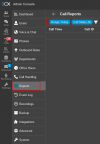
You're correct, by default, call logs are stored indefinitely, as they serve as a comprehensive record of system activity. However, if you're looking to limit the data you view, the Reports section allows you to filter results based on specific date ranges, such as the last 90 days, or apply other criteria to meet your needs.

Screenshot of the reports filters :
1749660920684.png
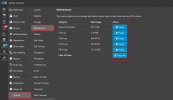
If you wish to manually purge older call log data, you can do so by navigating to:
Admin Console > System > Maintenance, then selecting the appropriate data category to purge (Note also that you can purge a specific date range)

Screenshot of the Purge function :
1749660783063.png
 
  • Like
Reactions: GregG_3CX and K_SAK
Hello @alexis41818544158

You're correct, by default, call logs are stored indefinitely, as they serve as a comprehensive record of system activity. However, if you're looking to limit the data you view, the Reports section allows you to filter results based on specific date ranges, such as the last 90 days, or apply other criteria to meet your needs.

Screenshot of the reports filters :
View attachment 48220
If you wish to manually purge older call log data, you can do so by navigating to:
Admin Console > System > Maintenance, then selecting the appropriate data category to purge (Note also that you can purge a specific date range)

Screenshot of the Purge function :
View attachment 48219
Hello,

So it is not possible to set an automatic deletion after 90 days?
Thanks
 
Hello,

So it is not possible to set an automatic deletion after 90 days?
Thanks
Hello @alexis41818544158
Am afraid that you can't do it automatically.

However, you can manually purge the logs at any time for any date range you choose by going to:
Admin Console > System > Maintenance, and selecting the data category you'd like to clear.
 
  • Like
Reactions: Evolute IT
You have not mentioned "why" you want to purge the data. Is this an effort to save storage space or optimize 3CX performance? or is this about wanting to remove data for security reasons? or something else?

Personally, I think, data is invaluable. You may not be able to think of a reason to keep this data today, but tomorrow you might really want that information. But once the data is purged, you cannot go back.

May I offer a sample reason why you might want to keep this data? What if, for example, you discover that an employee has been sharing company secrets with a competitor. You can escort the employee out the door, but you would want to keep all voicemails, call recordings, call history, and chat data so you have evidence you can present in court. If you purge that historical information, there is no going back.

I know that this is an edge case, and you might assume this scenario does not apply to your business, but that is not my point. My point is that you never know why you might want that data in the future.

If you are looking for strategies to conserve space or optimize the 3CX database, we can talk about options. If for some security reason you want to permanently delete the data, that's a completely different situation that requires a different conversation.
 
You have not mentioned "why" you want to purge the data. Is this an effort to save storage space or optimize 3CX performance? or is this about wanting to remove data for security reasons? or something else?

Personally, I think, data is invaluable. You may not be able to think of a reason to keep this data today, but tomorrow you might really want that information. But once the data is purged, you cannot go back.

May I offer a sample reason why you might want to keep this data? What if, for example, you discover that an employee has been sharing company secrets with a competitor. You can escort the employee out the door, but you would want to keep all voicemails, call recordings, call history, and chat data so you have evidence you can present in court. If you purge that historical information, there is no going back.

I know that this is an edge case, and you might assume this scenario does not apply to your business, but that is not my point. My point is that you never know why you might want that data in the future.

If you are looking for strategies to conserve space or optimize the 3CX database, we can talk about options. If for some security reason you want to permanently delete the data, that's a completely different situation that requires a different conversation.
The reason is related to employee privacy policy in the client's company legislation. In Europe these rules are very restrictive. Do you think there could be an automatic solution?

Thanks
 
Hello alexis41818544158,

I seems that 3CX is working on a great option for the next release.
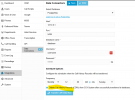
If you could setup a database and export the data, the CDR data is all safe at another database. This is done automatically.


1749809079883.png
Please note, you will need the Enterprise edition, not the Free or Pro.
 
This new feature in the current release candidate does not replicate all the data. In my view, there is additional data that should be replicated before truncating the data.
 
This new feature in the current release candidate does not replicate all the data. In my view, there is additional data that should be replicated before truncating the data.
In the case at hand where the requirement is to remove the data altogether after a short time, replicating would just be a way of deleting it by shifting it temporarily to a remote database where it will just be purged shortly after - not having all the various elements replicated is not that much of an issue.
 
Originally there was only one issue -- can we purge data automatically keeping only the last 90 days. I expanded the conversation by putting forward a concern that you might not want to delete everything for future historical reporting needs.

It was proposed by @paulodagraca that they use the automatic purge of data coming in V20 U6 after replicating the call data using the new Grafana feature. This is a good solution that addresses the original concern.

I then pointed out that the new replication process does not replicate all the data they may need in the future for reporting purposes. I do not know whether simply moving the data away from a accessible source (3CX) to a separate, non-public location is sufficient to address the original security concern, but that is what I would do -- replicate ALL the data before purging the data from 3CX.

Once the data is gone, there is no getting it back. That could be a big problem in the future if you want to look at things like call growth over time, or how many calls are answered/missed by agent from month to month, and I can think of 100 more questions I might like to answer that would be impossible if the data is gone.

My suggestion is that you very carefully consider whether that data still has value beyond 90 days. If it does, then you better find another place to replicate the data before you purge.
 
  • Like
Reactions: K_SAK

Latest Posts

Forum statistics

Threads
111,962
Messages
589,986
Members
164,867
Latest member
swegner