Solved Call progress tones

Status
Not open for further replies.

fhoffens

Bronze Partner
Basic Certified
Joined
Mar 26, 2022
Messages
8
Reaction score
9
Hi

I have some throubles with the call progress tones.
When i use Voip IP provider, like Twillio, like Didww,
all incoming calls made from a fixed line, when dialing the tone sounds. But if the call originates from a cell phone, there is silence until someone answers.

In both cases, SIP semaphoring and RTP work perfectly. The call is established and there is audio.

What is missing in the case of calls originating from cell phones is the "call progress tones".

I am only with Voip trunks. I don't use anything analogous. Codec G711A, SIP, V18 3CX, Cloud.

Any tips?

Thanks in advance,


Felipe
 
Have you confirmed that this happens with different mobile carriers? If the calls are all coming into the PBX, on the same trunk, which I'm assuming they are, then my first guess it that it is an issue with the originating provider. It may be that a progress message, like "ringing" is not being received, or acknowledged, or, audio is not being cut through until answer supervision. You might want to test and see what happens when a line is busy...silence, or a busy tone.

You may also want to reach out and explain the difference, in call behavior to your provider. Perhaps the calls from mobiles (again...all mobile providers?), come in on a different route, to them, that has incorrect settings, between the providers.
 
Last edited:
  • Like
Reactions: NickD_3CX
Hi all,

I have learned.

Me problem is the 183 Message.

3CX is not sending "Ringback tone"

I have 180 Code, but not 183 RingBack.

Anyone knows who activate it?

In Asterisk world is: progressinband = no/yes

Thanks in advance,

Felipe
 
Hello,

Your SIP operator should send message 183.
Message 180 tells the PBX to ring.
Message 183 contains the ringing tone in the SDP.
 
What @nicoonline says is indeed the case but since you're talking about incoming calls then do bear in mind that 3CX will not send 183 but will send 180 instead, which, tells the provider/pbx/client on the other end to generate the ringback for the caller.
 
@ChrisC_3CX : Yes sorry, I didn't realise he meant "incoming calls" :)
 
  • Like
Reactions: ChrisC_3CX
Hello,

Your SIP operator should send message 183.
Message 180 tells the PBX to ring.
Message 183 contains the ringing tone in the SDP.
Nico

My SIP operator dont send me 183 message. That is the point.

I have not ringback from my operator.

In Asterisk world i can resolve with progressinband = no/yes , but in 3CX i cant't found a solution.
 
Why are you specifically looking for 183 though, 180 should be sufficient.

In any case, if you want to confirm the 3CX is working as expected, what you can do is either run a packet capture while placing an incoming call or checking the Activity Log after receiving an incoming call and check to see if 3CX indeed sent 180 Ringing when the call was actually ringing say an extension.

If it does, then that confirms that everything should be fine with the PBX and that the matter is pretty much out of 3CX's control at that point.
 
Thanks for your answer.

PBXs generally when they receive a message 180, they respond with a message 183 with the ringing sound. That is the normal situation.

In cases where the re-invite is operating, the same phone should send 183 with the ringing sound. "Ringback".

In the case of 3CX neither of the two situations happens.

In the world of Asterisk and its related, it is very simple to solve. The progressinband parameter is added in the sip.conf

In other PBX like Grandstream it is also possible to correct it. Same as Cisco.

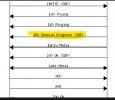
The flow is incoming call.

PSTN----> SIP Provider -----> 3CX ( Azure Cloud) ----> Sip Phone

183 is not

183.png
 
As I understand, you've also had a conversation with one of my colleagues about this and to briefly summarize, you were informed that the 3CX PBX only sends a 180 Ringing outward so what was suggested is to use a Digital Receptionist to essentially force calls to be automatically answered and hence send whatever audio you want by utilizing the Digital Receptionist's prompt.

As per that conversation I'll be marking this thread as closed so please feel free to start a new thread should you need anything else.
 
Status
Not open for further replies.

Forum statistics

Threads
111,974
Messages
590,081
Members
164,899
Latest member
mazet