Call Report showing forwarded extension in Caller ID.

Status
Not open for further replies.

SkyWireDavis

Forum User
Joined
Jul 31, 2019
Messages
9
Reaction score
1
3CX Enterprise Annual v16.0.4 hosted in a Google cloud instance.

We use an answering service to handle customer calls outside of our office hours (and when all agents are busy). The Call Queues have 'Destination if No Answer' configured to direct the calls to an extension that was created for the answering service. The mobile number for the answering service extension is populated with the external number of the answering service. The forwarding rules for the answering service extension are all configured to 'Forward to Mobile'. We are not having any issues with the calls successfully routing out to the answering service.

The issue is that the Call Report shows the answering service extension in the Caller ID field, rather than the phone number of the external caller. This only seems to occur when no agents are logged into the queues. When agents are logged into queues and the calls are forwarded out due to the 'Destination if No Answer' timer, the customer's phone number is displayed as we would expect.

Basically, it seems like the issue of displaying the incorrect caller ID is only occurring when the call DOES NOT route through the IVR.

Can anyone suggest what I may have misconfigured in my system?

Thank you
 
Did you find a solution?
We have the same problem.
 
Unfortunately, I have not been able to resolve this issue.
 
I'm not an expert but having had a similar issue when an extension had to forward an inbound call to a mobile device, the solution was in the SIP Trunk Outbound Parameters settings.

There i changed the parameters in the screenshot to have the "OriginatorCallerID" settings.

Hope this helps or puts you on the right path to finding a solution.
 

Attachments

  • outbound_parameters.png
    outbound_parameters.png
    29.8 KB · Views: 81
I'm not an expert but having had a similar issue when an extension had to forward an inbound call to a mobile device, the solution was in the SIP Trunk Outbound Parameters settings.

There i changed the parameters in the screenshot to have the "OriginatorCallerID" settings.

Hope this helps or puts you on the right path to finding a solution.
Awesome. I'm going to try this.

To confirm, are you saying that you set ALL of the parameters in the screenshot to use "OriginatorCallerID"?

Thank you!
 
  • Like
Reactions: Ayia Napa George
Worked perfectly for me.
We (and our sales partner) spent at least 10+ hours on this...

Changed from
1582652640301.png

to
1582652555001.png
Obviously:
The Trunk / SIP Provider need to support "Clip No Screening", otherwise I don't think it will work


Big Thank YOU !
 
  • Like
Reactions: HeliosIT
Awesome. I'm going to try this.

To confirm, are you saying that you set ALL of the parameters in the screenshot to use "OriginatorCallerID"?

Thank you!

The initial parameter that i adjusted to this value was the "Remote party ID - Calling Party : User Part".
After that i also adjusted the "From: User Part" value aswell.

So only the parameters in the screenshot that have the "OriginatorCallerID" value is what i adjusted, the others remained the same.
 
The initial parameter that i adjusted to this value was the "Remote party ID - Calling Party : User Part".
After that i also adjusted the "From: User Part" value aswell.

So only the parameters in the screenshot that have the "OriginatorCallerID" value is what i adjusted, the others remained the same.

Thank you for clarifying. Unfortunately, it looks like both of those parameters were already set to 'OriginatorCallerID" in my system, which means we're seeing the issue with those configs in place. :(
 
Then check for Clip No Screening on your SIP-Trunk.
It cannot work without CNS.
 
Thank you for clarifying. Unfortunately, it looks like both of those parameters were already set to 'OriginatorCallerID" in my system, which means we're seeing the issue with those configs in place. :(

This extension that you use for the answering service, is this a DR or a phone extension?
Can you perhaps show the settings of the extension itself and perhaps a screencapture of the call report?
Do block out sensitive information and numbers.

What can you see in the activity log when you turn on verbose logging and replicate the situation?
 
Then check for Clip No Screening on your SIP-Trunk.
It cannot work without CNS.
Thanks for the suggestion. I have verified that my SIP Trunk does allow CNS and I just tested spoofing some numbers to confirm the functionality. I guess the fact that the OriginatorCallerID value is populated into the logs when a forwarded call DOES route through the IVR would also suggest that part is working. It's only when no agents are logged in and the calls immediately forward out that we see the extension recorded as the caller ID.
 
This extension that you use for the answering service, is this a DR or a phone extension?
Can you perhaps show the settings of the extension itself and perhaps a screencapture of the call report?
Do block out sensitive information and numbers.
I'm not sure what a DR is. Could you elaborate? I'm about to head into a meeting, but I'll get a screencap and sanitize it afterward.
 
I'm not sure what a DR is. Could you elaborate? I'm about to head into a meeting, but I'll get a screencap and sanitize it afterward.

Digital Receptionist / IVR.

Also try to look at the activity log with verbose on and replicate the situation.
 
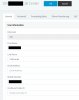
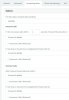
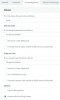
OK. It's definitely configured as an extension. No DRs even reference that extension. All routing to that extension is handled at the queue level. See below for the config I have in place. All forwarding options are set to Forward to Mobile. I went with that config as another thread had recommended it for this exact usage, but maybe I should try Forward to Number instead?

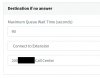
The Destination If No Answer config shown below is the same for all queues.
 

Attachments

  • CC_Extension_Config.jpg
    CC_Extension_Config.jpg
    132.6 KB · Views: 24
  • CC_Available_Forward.jpg
    CC_Available_Forward.jpg
    203.5 KB · Views: 23
  • CC_Away_Forward.jpg
    CC_Away_Forward.jpg
    169 KB · Views: 23
  • Queue_Destination_If_No_Answer.jpg
    Queue_Destination_If_No_Answer.jpg
    46.7 KB · Views: 22
Forwarding "To Number" is automatically replaced with "Forward to Mobile" if you enter Your mobile number...

I just did the following test:
Set up a number xxx010 which is in state "Away" and redirected to xxx123.
xxx123 is in state "Available" and in this state, it's directly forwarded to a mobile phone 0049172xxxxxx.

If phone 0049152yyyyy calls xxx010 the mobile phone 0049172xxxxxx rings and Number 0049152yyyyy is presented as caller.

I cloud not try with a call group instead of xxx010 normal number.
But you might try with a normal number redirected to a mobile first and then test with your call group.
 
Status
Not open for further replies.

Latest Posts

Forum statistics

Threads
111,939
Messages
589,843
Members
164,821
Latest member
M_R