- Joined
- Oct 30, 2024
- Messages
- 3
- Reaction score
- 0
Hi everyone,
I run a 3CX systems on V20 Update 9 (Build 995).
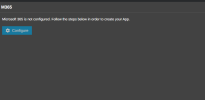
This 3CX System is running in Multi-Company mode, the M365 page shows "Microsoft 365 is not configured" but the Configure button does not respond (it looks disabled), so i cannot start the wizard. I am logged in as System Owner. Because of this, SharePoint also cannot be selected as a storage location.
From what I found in the web, this seems to be expected when Multi-Company mode is enabled, but I could not find any fix.
My questions:
1. Is the Microsoft 365 integration officially not supported in Multi-Company mode? If so, is this planned for a future update?
2. Is there any supported way to use SharePoint / Microsoft 365 as the backup storage on a Multi-Company system (for example, configuring the integration another way or switching modes temporarily)?
3. If not, what do you recommend for automated daily backups to remote storage on a Multi-Company system (SFTP, SMB, Google Cloud Storage or S3)? Any problems or limitations to watch for?
Goal: daily automatic configuration backups kept for 28 days in a remote location.
Thank you for any guidance or experience you can share.
Regards,
Ahamed
I run a 3CX systems on V20 Update 9 (Build 995).
This 3CX System is running in Multi-Company mode, the M365 page shows "Microsoft 365 is not configured" but the Configure button does not respond (it looks disabled), so i cannot start the wizard. I am logged in as System Owner. Because of this, SharePoint also cannot be selected as a storage location.
From what I found in the web, this seems to be expected when Multi-Company mode is enabled, but I could not find any fix.
My questions:
1. Is the Microsoft 365 integration officially not supported in Multi-Company mode? If so, is this planned for a future update?
2. Is there any supported way to use SharePoint / Microsoft 365 as the backup storage on a Multi-Company system (for example, configuring the integration another way or switching modes temporarily)?
3. If not, what do you recommend for automated daily backups to remote storage on a Multi-Company system (SFTP, SMB, Google Cloud Storage or S3)? Any problems or limitations to watch for?
Goal: daily automatic configuration backups kept for 28 days in a remote location.
Thank you for any guidance or experience you can share.
Regards,
Ahamed