Call report with incoming DID

Status
Not open for further replies.

ajsmith227abts

Customer
Joined
Oct 16, 2023
Messages
18
Reaction score
4
Good afternoon,

I am looking to generate a report about each call that includes the DID/incoming number. How can this be done? The Call report leaves this out, and the DID/Trunk report just give a raw count of calls to each number. Thank you!
AJ
 
How about pulling a Standard Call Report, and save this as CSV. Then I´m sure you will see your DID/incoming number, in the below case an Annonymous, but would have the number if there was one:

1697489976108.png

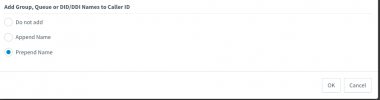
If you want to see which DID was called when the call came in to your system, please remember to go to Advanced / Contacts / Options and eg. Prepend the Name in Groups Queue, ect..
 
Unfortunately, I do not get any information about the did, only caller ID information.
1697492294847.png
1697492530617.png
 
Unfortunately, I do not get any information about the did, only caller ID information.
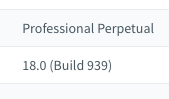
May I ask if you are running on a standard edition of your 3CX?

What does it look like if you go to your Call Log, dont you see the calling number, and the Name of - or your Inbound DID?
 
1697493141887.png
1697493232931.png
Just the incoming Call ID of the caller, nothing about the DID they used to call
 
Did you name your inbound DID, like we did. We called our main number 66181168 for IN:JED to make it easy for us to see where the call came in. So the DID they called can be shown as a number or a name.

1697493525244.png
1697493509654.png
 
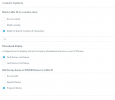
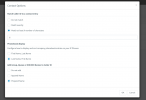
In the Contact Options, is it selected as the below:

1697493758821.png
 
1697493957618.png
Swapped to First name first, but nothing changes in reporting
 
Did you name your Inbound DID´s like we did in this Picture?
1697494164799.png

Did you just make a new call to test after the change in Contact options?
 
We have had that done. Nothing. New calls only showing Caller ID, not Did or the Named label of the DID
1697494509863.png
 
Isent this your your inbound DID that is named?1697494889707.png

As this looks like the Calling Number:
1697495073617.png
 
No, Those are the Caller ID names and number. Not DID/Line name
 
OK, this is really strange to me, and I have to give up, hope there will be a wise person who can assist, as I mean your setup is correct.
Best of luck..
 
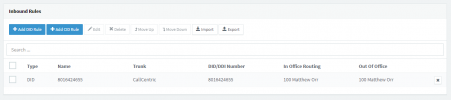
I've been doing this a long time, and in my experience @jed is correct. Giving a "name" to all of your inbound rules should be included in your call reports.

1697554269002.png

In case anyone is wondering, this is all fake data in the image above.

This is what your inbound rules (or similar) should look like for each of your DIDs. If this does not work for you, then it may be time to contact 3CX support.
 
  • Like
Reactions: jed
Found the issue. For whatever reason, my DIDs did not have the "*" in front of them. With that added, the reports Prepend the Name created for the DID. Weird bug.

Thank you both for the help!
 
  • Like
Reactions: jed
Not a bug, this indicates the call is not matching that inbound rule. Putting a wildcard now allows it to match and so it will now show.
 
  • Like
Reactions: jed
Exactly right @SweetAction. I was going to say the same thing. This suggests that inbound routing previously was inconsistent, so a bonus fix.
 
  • Like
Reactions: jed
Status
Not open for further replies.

Forum statistics

Threads
111,974
Messages
590,081
Members
164,899
Latest member
mazet