- Joined
- Apr 13, 2021
- Messages
- 9
- Reaction score
- 2
Greetings,
I am looking to find out which number a caller dialed to reach one of our phone systems. We have many unused numbers on the SIP trunk so they just follow the routing on the trunk itself instead of having a inbound route (which I know can be named and presented on the phone screen).
I can find the call in the call logs, but it just shows the final destination (extension that eventually picked up the call).
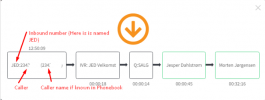
When I generate a report, I can see how the call was routed in the system and the caller ID information, but it doesn't tell me which number they dialed. The problem is there is approximately 60 numbers that route the same way on the trunk.
What would be the best way to find the DID called by an external party? I'm wondering if I'm overlooking an easy way to obtain this information.
I am looking to find out which number a caller dialed to reach one of our phone systems. We have many unused numbers on the SIP trunk so they just follow the routing on the trunk itself instead of having a inbound route (which I know can be named and presented on the phone screen).
I can find the call in the call logs, but it just shows the final destination (extension that eventually picked up the call).
When I generate a report, I can see how the call was routed in the system and the caller ID information, but it doesn't tell me which number they dialed. The problem is there is approximately 60 numbers that route the same way on the trunk.
What would be the best way to find the DID called by an external party? I'm wondering if I'm overlooking an easy way to obtain this information.