Solved Caller ID forwarded to Mobile Phone

Status
Not open for further replies.

Oveis

Titanium Partner
Advanced Certified
Joined
Feb 22, 2024
Messages
23
Reaction score
2
Hello everyone,

When a call is made to the extension, the caller ID works properly. However, when the call is switched and forwarded to the mobile number, the caller ID shows the system number instead of the original caller's number.
This causes confusion for the extension, as they cannot identify who called. I've checked all the options in the Caller ID Controlled section, but none of them seem to be working.
I spoke to SIPTrunk and was informed that all Caller IDs are passed through, but 3CX is changing the header so we need to set it up in 3CX.
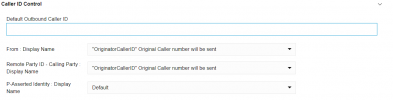
1723056264478.png

Any Advise or solution?
 
Which provider are you using? Is this a Supported provider?
 
Hello everyone,

When a call is made to the extension, the caller ID works properly. However, when the call is switched and forwarded to the mobile number, the caller ID shows the system number instead of the original caller's number.
This causes confusion for the extension, as they cannot identify who called. I've checked all the options in the Caller ID Controlled section, but none of them seem to be working.
I spoke to SIPTrunk and was informed that all Caller IDs are passed through, but 3CX is changing the header so we need to set it up in 3CX.

View attachment 43055

Any Advise or solution?
If its an unsupported provider, youll have to create a custom template as 3CX have hidden the outbound paramters required for this to work, I have a template if you need it, of course all providers are different but works for me.

What I used for it to work was:

<field name="ParameterOut" custom="" parameter="RequestLineURIHost">$GWHostPort</field>

<field name="ParameterOut" custom="" parameter="ContactUser">$OriginatorCallerId</field>

<field name="ParameterOut" custom="" parameter="ContactHost">$ContactUri</field>

<field name="ParameterOut" custom="" parameter="ToDisplayName">$CalledName</field>

<field name="ParameterOut" custom="" parameter="ToUserPart">$CalledNum</field>

<field name="ParameterOut" custom="" parameter="ToHostPart">$GWHostPort</field>

<field name="ParameterOut" custom="" parameter="FromDisplayName">$OriginatorCallerId</field>

<field name="ParameterOut" custom="" parameter="FromUserPart">$OriginatorCallerId</field>

<field name="ParameterOut" custom="" parameter="FromHostPart">$GWHostPort</field>

<field name="ParameterOut" custom="" parameter="RemotePartyIDCallingPartyDisplayName">$OriginatorCallerId</field>

<field name="ParameterOut" custom="" parameter="RemotePartyIDCallingPartyUserPart">$OriginatorCallerId</field>

<field name="ParameterOut" custom="" parameter="RemotePartyIDCallingPartyHostPart">$GWHostPort</field>
 
This all assumes that your provider allows you to send the callers number, and that you are not restricted to sending numbers that you have with your provider..
 
This all assumes that your provider allows you to send the callers number, and that you are not restricted to sending numbers that you have with your provider..


The name of this feature is:

Calling Line Identification Presentation No Screening
Generally abbreviated as: CLIP No Screening.

I mention this because it's often easier for others reading this thread to request a feature from their providers when they know the name.

I'm sure you already knew this @leejor , but I named it for the benefit of other visitors to the thread. :p

No offense.
 
  • Like
Reactions: Evolute IT
I've communicated with the SIP Trunk provider, and they have confirmed that all Caller IDs are being transmitted to the 3CX system, so there are no restrictions.
 
If its an unsupported provider, youll have to create a custom template as 3CX have hidden the outbound paramters required for this to work, I have a template if you need it, of course all providers are different but works for me.

What I used for it to work was:

<field name="ParameterOut" custom="" parameter="RequestLineURIHost">$GWHostPort</field>

<field name="ParameterOut" custom="" parameter="ContactUser">$OriginatorCallerId</field>

<field name="ParameterOut" custom="" parameter="ContactHost">$ContactUri</field>

<field name="ParameterOut" custom="" parameter="ToDisplayName">$CalledName</field>

<field name="ParameterOut" custom="" parameter="ToUserPart">$CalledNum</field>

<field name="ParameterOut" custom="" parameter="ToHostPart">$GWHostPort</field>

<field name="ParameterOut" custom="" parameter="FromDisplayName">$OriginatorCallerId</field>

<field name="ParameterOut" custom="" parameter="FromUserPart">$OriginatorCallerId</field>


<field name="ParameterOut" custom="" parameter="FromHostPart">$GWHostPort</field>

<field name="ParameterOut" custom="" parameter="RemotePartyIDCallingPartyDisplayName">$OriginatorCallerId</field>

<field name="ParameterOut" custom="" parameter="RemotePartyIDCallingPartyUserPart">$OriginatorCallerId</field>


<field name="ParameterOut" custom="" parameter="RemotePartyIDCallingPartyHostPart">$GWHostPort</field>
Thank you it worked
 
Status
Not open for further replies.

Latest Posts

Forum statistics

Threads
111,831
Messages
589,276
Members
164,660
Latest member
RJenkinsROCK