Caller ID from SIP trunk shows gateway extension?

Status
Not open for further replies.

berengard

New User
Joined
Oct 19, 2023
Messages
9
Reaction score
3
Hello!

So I'm using 3CX with the Grandstream HT318 gateway to receive inbound calls and forward them to VoIP phones.
But I'm having some trouble making it display the caller ID of the original landline phone number. Is that possible?

I tried to tweak the settings in my SIP Trunks > Grandstream HT318 > Inblound parameters,
but it either shows the trunk number or my 3CX IP address...

Thanks for the help,
-Sergey.
 
Hi, please note that the device is not supported, if you are using it as a generic gateway trunk, then you need to check what sip field is the gateway using for caller id, in that way you can set correctly the inbound parameters.

If you need further assistance with that device you will need to enter in contact with Grandstream.

Have a great day!
 
It's really strange. I was trying to tweak the gateway parameters for hours yesterday while looking at the 3cx invite messages in logs.
One time the caller ID it passed was actually the number I dialed from, but the very next call, it was the trunk number again, and I haven't even changed anything.

I've updated the firmware of the Grandstream HT813 to latest and the change log said that it's supposed to fix a few caller ID bugs, but doesn't seem to have helped in my case.

I'm stuck with this. Any additional information is very appreciated!
Thank you...
 
I'm afraid we cannot advise on this. You should contact vendor for further clarification.
 
I think I just might do that.
Thank you anyway.
 
It would be good though to share the results to the community ;)
 
  • Like
Reactions: TheodorosG_3CX
I'm having some trouble making it display the caller ID of the original landline phone number. Is that possible?
To be clear...the issue is with the caller ID received being incorrect? Or, is it that you do not receive any caller Id at all? Or...are you attempting to set up to receive a DID of the PSTN line, as well?
 
So it looks like the issue is resolved (in a slightly strange way perhaps...)
To be clear...the issue is with the caller ID received being incorrect? Or, is it that you do not receive any caller Id at all? Or...are you attempting to set up to receive a DID of the PSTN line, as well?
I was receiving a caller ID but it wasn't the caller ID of the incoming PSTN phone number, but the gateway trunk number that passes the PSTN call to VoIP for my server to route.

It turned out that the reason I wasn't seeing the incoming PSTN phone number is because it took 2 landline rings for the caller ID data to come through and I was telling it to answer after 1 ring.
Setting that number to 2, solved the problem and now I'm always seeing the phone number coming through the SIP From header.

That also raises one question for me. Are there any other settings generally on gateways such as HT813 to tell it to wait for the caller ID and then answer immediately, or do I have to always statically wait 2 rings and then assume that it has the caller ID?
 
If your provider uses Bellcore type caller ID, then it is sent between the first and second ring. (it was originally done that way so the first ring could wake up the caller ID device) That behavior can't be changed. If you don't wait long enough, then nothing will be "collected" before the call is sent to 3CX.

There is usually one setting, that will apply to all trunks, telling the gateway how long to wait. It is given different names depending on the make.
 
If your provider uses Bellcore type caller ID, then it is sent between the first and second ring. (it was originally done that way so the first ring could wake up the caller ID device) That behavior can't be changed. If you don't wait long enough, then nothing will be "collected" before the call is sent to 3CX.
Ooh, that's fascinating! Explains my pain for the past couple of days lol

There is usually one setting, that will apply to all trunks, telling the gateway how long to wait. It is given different names depending on the make.
What would that setting usually be related to, PSTN? SIP?
I'd be interested to look for it, but I read my gateway's documentation and the time-related settings I found don't seem to be related to my case scenario.
 
Had a look through the manual for your device but it doesn't seem to show the entire FXO settings page.
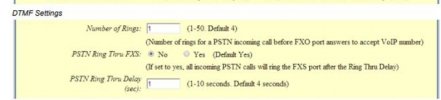
I did find this...
DTMF setting.jpg
If you can find something similar in your devices settings, then that that is what controls when the gateway passes the call onto 3CX. On many (all?) Cisco devices, which I'm more familiar with, it is a variable, in seconds, rather than number of rings.

Every manufacturer tends to do it a bit differently. Some caller ID types, used outside North America (and some other areas), that don't use use Bellcore, send the CID after a current reversal, or immediately, so no delay is usually required.
 
If you can find something similar in your devices settings, then that that is what controls when the gateway passes the call onto 3CX. On many (all?) Cisco devices, which I'm more familiar with, it is a variable, in seconds, rather than number of rings.
Thanks for looking it up. Yeah, I did look into these settings but they don't set a waiting time to pass the call to 3CX, instead it's to the gateway's FXS port, which it also has but I'm not using it.

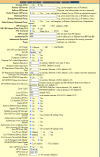
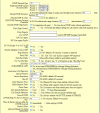
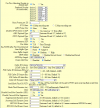
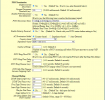
I've attached the device's FXO settings. I went through them multiple times, but couldn't put my finger on anything that sounds like what I'm looking for, other than the Amount of Rings setting.
If you're interested, let me know if you can quickly spot anything related to it...
 

Attachments

  • 1.png
    1.png
    127.8 KB · Views: 6
  • 2.png
    2.png
    89.9 KB · Views: 6
  • 3.png
    3.png
    79 KB · Views: 7
  • 4.png
    4.png
    72.5 KB · Views: 7
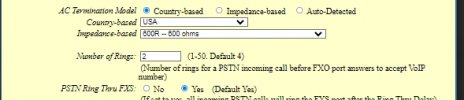
It should be this setting....Number of Rings, which you already have set to 2.

DTMF setting2.jpg
If you were to change that to 1, then you'd probably stop getting caller ID.
 
Yup, that's how it is right now.
Gotta wait for 2 rings.
 
Hello,

To display the original caller ID of the landline phone number when using 3CX with the Grandstream HT318 gateway, you'll need to check and configure a few settings in your SIP Trunks and the Grandstream device itself:

  1. Grandstream HT318 Configuration: In the Grandstream HT318 gateway settings, ensure that the option for "Passing Original Caller ID" or "Forward Original Caller ID" is enabled. This setting allows the gateway to pass the caller ID information from the landline to 3CX.
  2. 3CX Configuration: Within your 3CX management console, make sure you have configured the SIP Trunk associated with the Grandstream HT318 gateway to pass through the caller ID information. You may need to contact your SIP trunk provider for specific settings, as some providers have different requirements for passing caller ID.
  3. Caller ID Manipulation: Double-check that there are no caller ID manipulation rules or settings in 3CX that might be altering the caller ID information. Ensure that it's set to pass the caller ID as is.
  4. Provider Configuration: If you are using a VoIP provider, verify that they are correctly sending the original caller ID information to your Grandstream HT318.
  5. Testing: After making these adjustments, test inbound calls to verify that the original caller ID is now displayed on your VoIP phones.
If you have tried these steps and are still experiencing issues, it's a good idea to reach out to your SIP trunk provider or Grandstream support for specific troubleshooting and configuration guidance. They may be able to provide insights and settings to ensure caller ID information is correctly passed through.

For your video editing needs, consider CapCut, a versatile and<a href="https://capsnip.com" rel="external"></a> user-friendly video editing app that offers a wide range of features to help you create and edit videos with ease.
 
To display the original caller ID of the landline phone number when using 3CX with the Grandstream HT318 gateway, you'll need to check and configure a few settings in your SIP Trunks and the Grandstream device itself:
Awesome! Thanks for the detailed instructions. It looks like all of these factors are taken care of in the gateway and 3CX.
Right now I have the right Caller ID showing up when a PSTN number calls in, but that works only after a minimum of 2 rings.
While it isn't really a big deal, I was wondering if there are any settings to tweak or is that just how this tech works that I'm not aware of. As @leejor mentioned, the caller id data comes in *after* the first ring so that how that works.
Generally it's fine, but I was just curious. :)
 
@berengard Good to know the solution has been found ;)
 
Status
Not open for further replies.

Members Online Now

Forum statistics

Threads
111,831
Messages
589,277
Members
164,660
Latest member
RJenkinsROCK