Caller ID isnt being passed when "Appending" to RG

Alphabetic

3CX MVP
Silver Partner
Advanced Certified
Joined
Jul 1, 2016
Messages
6,573
Reaction score
2,585
Hello all

We use a custom SIP trunk template off of ntes.pv.xml.

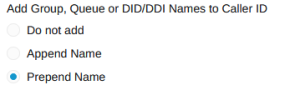
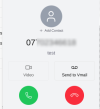
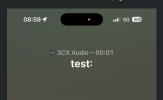
im not seeing the Caller ID being passed through when receiving calls on the mobile app (when you select to append to RG in contacts page) - what parameter in the SIP template needs to be changed for correct mapping?
1778228785388.png

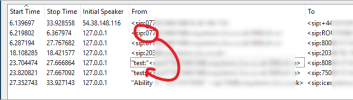
Call from 077xxx to IVR (800) then option 4 to RG "Test"
1778228020860.png

1778229492217.png

This is the template

Code:
<?xml version="1.0" encoding="utf-8" standalone="yes"?>
<doc>
  <header>
    <name>Owlnet</name>
    <time>2025-10-15T14:01:20.9208206Z</time>
    <template>ntes.pv.xml</template>
    <type>gateway-template</type>
  </header>
  <data>
    <device>
      <field name="Name">SIPName</field>
      <type>provider</type>
      <manufacturer></manufacturer>
      <model>provider</model>
      <field name="RegistrarHost">sip.domain.io</field>
      <field name="RegistrarPort">5060</field>
      <field name="ProxyHost"></field>
      <field name="ProxyPort">5060</field>
      <field name="SecondaryRegistrar"></field>
      <field name="IPRestriction">ANY</field>
      <field name="TransportRestriction">UDP</field>
      <field name="RequireAuthFor">4</field>
      <field name="IpInContactReg">1</field>
      <field name="IpInContactRegValue"></field>
      <field name="TimeBetweenRegistration">120</field>
      <field name="RegistrarInvite">0</field>
      <field name="IsSupportReinvite">0</field>
      <field name="IsSupportReplaces">0</field>
      <field name="DisableVideo">1</field>
      <field name="SRTPMode">0</field>
      <field name="IsBindToMS">1</field>
      <codecs>
        <codec rfcname="g722" />
        <codec rfcname="pcma" />
        <codec rfcname="g729" />
      </codecs>
      <field name="Source" custom="" parameter="RequestLineURIUser">$LineID</field>
      <field name="ParameterIn" custom="" parameter="FromUserPart">$CallerNum</field>
      <field name="ParameterIn" custom="" parameter="FromDisplayName">$CallerName</field>
      <field name="ParameterIn" custom="" parameter="ToUserPart">$CalledNum</field>
      <field name="ParameterOut" custom="" parameter="RequestLineURIUser">$CalledNum</field>
      <field name="ParameterOut" custom="" parameter="RequestLineURIHost">$GWHostPort</field>
      <field name="ParameterOut" custom="" parameter="ContactUser">$OriginatorCallerId</field>
      <field name="ParameterOut" custom="" parameter="ContactHost">$ContactUri</field>
      <field name="ParameterOut" custom="" parameter="ToDisplayName">$CalledName</field>
      <field name="ParameterOut" custom="" parameter="ToUserPart">$CalledNum</field>
      <field name="ParameterOut" custom="" parameter="ToHostPart">$GWHostPort</field>
      <field name="ParameterOut" custom="" parameter="FromDisplayName">$OriginatorCallerId</field>
      <field name="ParameterOut" custom="" parameter="FromUserPart">$OriginatorCallerId</field>
      <field name="ParameterOut" custom="" parameter="FromHostPart">$GWHostPort</field>
      <field name="ParameterOut" custom="" parameter="P-AssertedIdentityDisplayName">$OriginatorCallerId</field>
      <field name="ParameterOut" custom="" parameter="P-AssertedIdentityUserPart">$OriginatorCallerId</field>
      <field name="ParameterOut" custom="" parameter="P-AssertedIdentityHostPart">$GWHostPort</field>
    </device>
  </data>
</doc>

thanks!
 
Last edited:
Hello Alphabetic,

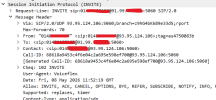
It seems to me (I could be wrong), that the "name" part is "test:" and the "User" part is the number you like to see.
So you could try the following:

<field name="ParameterIn" custom="" parameter="FromDisplayName">$CallerNum</field>

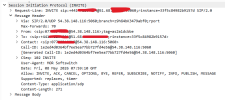
Normally, I would use a SIP trace (created from a 'Capture' on the 3CX) to find the fileds that I want to use.
You could also try this, to 'see' the fields, and what is being passed by the provider, in what fields.

Paulo
 
Hello Alphabetic,

It seems to me (I could be wrong), that the "name" part is "test:" and the "User" part is the number you like to see.
So you could try the following:

<field name="ParameterIn" custom="" parameter="FromDisplayName">$CallerNum</field>

Normally, I would use a SIP trace (created from a 'Capture' on the 3CX) to find the fileds that I want to use.
You could also try this, to 'see' the fields, and what is being passed by the provider, in what fields.

Paulo
Hi Paulo

"Test:" is my ring group.

I tried making this change but still no joy.

the Caller ID, whilst is visible in web client, it doesnt appending to be visible in mobile app.

1778229395874.png
 
I just uploaded another custom template based off of fuse UK and it's correctly displaying the caller number now.

Do anyone happen to know which specific parameter this is pulling from?
 
Hello Alphabetic,

Looking at the SIP that I have in use, it is setup in the following way.
I would think that this would be the default anyway's.

SIP Trace information
From: "CallerName"<sip:CallerNum@provider>

SIP Trunk parameters
<field status="readonly" name="ParameterIn" custom="" parameter="FromDisplayName">$CallerName</field>
<field status="readonly" name="ParameterIn" custom="" parameter="FromUserPart">$CallerNum</field>

And that would be what you already did have before any change.
But if you do have the number being displayed on the webclient... would that not mean it is all setup correct.
Sorry, but i also do not seem to get this part correct in my head and like yourself would like to know what is the root cause here.

Paulo
 
I just did a comparison between working and non working template and this is the difference:

Not working
Code:
      <field name="ParameterIn" custom="" parameter="FromUserPart">$CallerNum</field>
      <field name="ParameterIn" custom="" parameter="FromDisplayName">$CallerName</field>
      <field name="ParameterIn" custom="" parameter="ToUserPart">$CalledNum</field>

Working
Code:
      <field name="ParameterIn" custom="" parameter="ToUserPart">$CalledNum</field>
      <field name="ParameterIn" custom="" parameter="FromUserPart">$CallerName</field>
      <field name="ParameterIn" custom="" parameter="FromUserPart">$CallerNum</field>
 
So, if I add my mob to the 3CX address book then it looks like "CallerName" is being matched and is passing successfully when I use the not working template. Without it matching the address book, blank is displayed.

update:

If

Code:
<field name="ParameterIn" custom="" parameter="FromDisplayName">$CallerName</field>

is specified in my custom template and it doesnt match any entry in the address book then nothing is displayed.

Does this mean my SIP provider isnt sending from display name? idk.. beyond me now.

1778232679601.png
 
Last edited:
Hello Alphabetic,

In the SIP, you will see the following information:
From: "FromDisplayName"<sip:FromUserPart@provider>

In the Trunk you now have:
<field name="ParameterIn" custom="" parameter="FromUserPart">$CallerName</field>
<field name="ParameterIn" custom="" parameter="FromUserPart">$CallerNum</field>

This means that the 3Cx will take the information "FromUserName" (see SIP) and use that in the parts: $CallerName and $CallerNum.

Hope this will help you understand.
Paulo
 
Hello Alphabetic,

In the SIP, you will see the following information:
From: "FromDisplayName"<sip:FromUserPart@provider>

In the Trunk you now have:
<field name="ParameterIn" custom="" parameter="FromUserPart">$CallerName</field>
<field name="ParameterIn" custom="" parameter="FromUserPart">$CallerNum</field>

This means that the 3Cx will take the information "FromUserName" (see SIP) and use that in the parts: $CallerName and $CallerNum.

Hope this will help you understand.
Paulo
Hi

Just trying to understand.

did you mean to type "FromUserPart" on that last bit?

Im assuming then that when 3CX is presenting the display name its taking one of the variables $CallerName, $CallerNum when appending to my RG?

Actually, based on testing, its $CallerName thats been presented?
 
Hello Alphabetic,

Hope this will make sence:

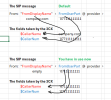
<field name="ParameterIn" custom="" parameter="FromDisplayName">$CallerName</field>
<field name="ParameterIn" custom="" parameter="FromUserPart">$CallerNum</field>
1778239971765.png
<field name="ParameterIn" custom="" parameter="FromUserPart">$CallerName</field>
<field name="ParameterIn" custom="" parameter="FromUserPart">$CallerNum</field>

Paulo
 
Does this mean my SIP provider is not sending me a "FromDisplayName" in the invite?

would I normally get FromUserPart as a the FromDisplayName in an invite?
 
From your message before, i did cut a part of the picture.
1778240505495.png
There is no name in the blue box, but there is a number in the user part just behinde the <SIP:

Just like the 3CX server, that can take and place information parts in the SIP message, this provider does not place anything in the name part (it's empty), the number is in the user part.
 
Hi Paulo

what I was getting at, is whos supposed to be sending what (So I could understand the logic of 3CX matching $CallerName)

Anyway, curiosity had me get a trace from a Voiceflex SIP and can see that they send the "FromDisplayName" as the "FromUserPart" too which is how it works fine with Voiceflex template etc.

Basically, my SIP provider isnt sending this and didnt do their template correctly when they gave it me.

Glad I've been able to learn how this works.. thanks for your input.

1778241352552.png
 
I think the correct answer here is: Cheers mate!
 
  • Love
Reactions: Alphabetic

Latest Posts

Forum statistics

Threads
111,982
Messages
590,116
Members
164,908
Latest member
FarizQasimov