- Joined
- Sep 27, 2022
- Messages
- 17
- Reaction score
- 5
Hi team, looking for some help!
We have a customer that requires CLI Passthrough for their business. I have confirmed with our carrier (Vonex, Australia) that they support CLI Passthrough, yet I can't get it to work in all of my testing
Vonex confirmed Caller ID is not being set at trunk level, and they say they have a customer with 3CX and it's successfully passing through
Really at a loss. The customer has all calls unconditionally forwarded to a call centre and not having the customer caller ID displaying at the call centre is really causing issues
We have a customer that requires CLI Passthrough for their business. I have confirmed with our carrier (Vonex, Australia) that they support CLI Passthrough, yet I can't get it to work in all of my testing
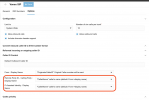
- From : Display Name, Remote Party ID and P-Asserted Identity all set to "OriginatorCallerID"
- Have tested in V18 and V20 systems
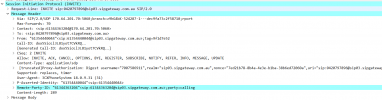
- As per the attached image, phone call from 0354440044 to 0344363208 and Remote-Party-ID set to OriginatorCaller ID, yet the attached shows Remote-Party-ID: "61344363204" which is the trunk phone number
- Have tried setting Remote Party ID to default and the others to "OriginatorCallerID", and the other way
- Have tried adding the Trunk to 3CX as "AU - Generic", "AU - Vocus" and "Worldwide - Generic" in case there were other random settings that I've got wrong
Vonex confirmed Caller ID is not being set at trunk level, and they say they have a customer with 3CX and it's successfully passing through
Really at a loss. The customer has all calls unconditionally forwarded to a call centre and not having the customer caller ID displaying at the call centre is really causing issues