Caller ID not working after changing voip provider to ATT flex

Status
Not open for further replies.

Song

Bronze Partner
Basic Certified
Joined
Nov 12, 2018
Messages
379
Reaction score
24
We used to have siptrunk.com as our voip provider and the incoming caller ID are working fine. After we switch our provider to ATT flex. the caller ID is not showing up. Is there a setting I need to do in 3cx? or is this a att issues? Do we just need to call ATT to enable caller ID on their end on the flex line? is that how it goes?

pleaes advise if anyone deal with ATT flex before.

thank you
 
Check the flow of the call. Does it come directly to the phone or does it pass through a digital receptionist / Queue / Ring group?
Also check if you have a contact for that number.
 
the did come in to a ringgroup. I tagged 8 people in the ring group. Yealink phone show the correct caller ID and telephone. but the snom 725 does not show the caller ID . only the caller number. I checked the ringgroup but there is no setting there..
 
Check your inbound rule name and your ring group name as the phone might be displaying those if the option under the contacts tab is enabled.
Also if the phone has a small display the whole caller ID and number might not fit.

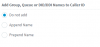
Navigate to Contacts / Options and under the "Add Group, Queue or DID/DDI Names to Caller ID" option select do not add. Apply the changes and try again.
1596093270616.png
 
Check your inbound rule name and your ring group name as the phone might be displaying those if the option under the contacts tab is enabled.
Also if the phone has a small display the whole caller ID and number might not fit.

Navigate to Contacts / Options and under the "Add Group, Queue or DID/DDI Names to Caller ID" option select do not add. Apply the changes and try again.
View attachment 17283
You are right. the two group name are label First and Second. That is why its showing up. I went to the contacts options and I do see the caller ID is set to Do not Add. So my question is why is it still adding it to the snom phone.? maybe its a snom phone setting issues? becuase on the yealink phone it does not add the group name into the display. My only other option is to remove the group name which is not allowed
 
Try to reset and reprovision the phone as it should follow the PBX settings. Since the Yealink is behaving correctly i assume that the PBX is sending the correct information. So a phone reset should fix the issue.
 
Status
Not open for further replies.

Forum statistics

Threads
111,955
Messages
589,925
Members
164,853
Latest member
as7h