Solved Callers can't hear ringing

Status
Not open for further replies.

treynolen

Gold Partner
Advanced Certified
Joined
Feb 14, 2019
Messages
42
Reaction score
2
I've seen some threads with close to this same subject, but nothing which matches exactly. When calling an extension, the caller just hears nothing until the call times out and goes to voicemail. There is no "ringing". The extension itself does ring, but if someone doesn't answer it, the caller just hears nothing for 20 seconds (default) until the voicemail answers. This results in many callers just hanging up because they think they have been disconnected. This just spontaneously started happening. The system was on 16.1 when it happened, but has been upgraded to 16.2. The extensions are all behind SBCs with the PBX itself in the "cloud". All of the SBCs have been updated to the new version. The PBX and the SBCs have all been rebooted. All system prompts have been updated, as well as all of the other updates applied. This particular install has 5 SBCs for different offices, and it happens at all of the branches.

I've seen some threads about converting the .wav files, but I can't find a .wav for the ring tone itself. I've tried delivering audio locally and from the PBX. All other functions of the system are working correctly. The majority of the desk phones are T29G.

Any suggestions would be appreciated.
 
Hello @treynolen

Does this happen with both external and internal callers? Can it be replicated when an extension is calling a different extension?
Are the phones provisioned with with the default templates and supported firmware?
 
Do you use Qs for incoming traffic? if so, do you set speficic ring for Qs?
 
This happens for any call internal or external. I've also replicated it not only with a different extension, but an extension behind a different SBC (different ISP, different network, etc...same PBX). The phone I found the issue on had an older firmware because we've had trouble with some T29Gs bricking when updating firmware, but I pushed the current firmware and it still had the issue.

@aws2p There are no Qs on this setup. There are also no special rings, but to be clear, this is not the ring that the desk phone makes. This is the ring tone heard by the caller to let you know that the phone is ringing. We're not playing music on hold or anything...this is just the normal ring that you would hear 3-5 times before the called person picks up or you are sent to vmail. I thought maybe the .wav that generates that sound might be corrupt, but I can't find it anywhere and don't really know if it even exists.
 
My apologies...I gave some incorrect information. This is only happening on external calls.
I have re-run the firewall checker and everything checks out OK there.
 
Who is your VoIP provider? Do you use more than one? If so, does it happen on all? Did this start right after the upgrade? Does the 3CX Firewall checker all pass?

I'm wondering if the audio path is actually being cut through, by the provider, before there is an off-hook, or it is simply blocked ports.
 
The VOIP provider is Siptrunk.com. There is only one provider. This started before the upgrade and the upgrade was put in place as part of the troubleshooting. The #CX Firewall checker passes.

I may not have been clear in my description. Everything works - voice paths work fine. The IVR works fine. The only issue is that when an external caller rings an extension, the caller does not hear the ringing tone before the voicemail or user picks up. If there is a 20 second delay before voicemail picks up, this results in the caller hearing 20 seconds of silence before it goes to voicemail and most callers hang up thinking that something has gone wrong. There simply isn't any "ring feedback" to let the caller know that the line is ringing. Once someone picks up, everything works. If voicemail picks up, it works. The caller and the callee can both hear each other. It is only the ring that the caller hears that doesn't work, so I'm pretty sure that the VOIP provider isn't blocking just that ring sound.

This system has been in place over a year. It started on 15.5 I believe, but may have been one version prior to that. It has worked find until last week regarding this issue. No internet providers or SIP providers have changed.

Since it affects multiple offices at the same time, I don't think it is a local networking issue. It really seems centered around the PBX only.
 
you said firmware has been updated on T29, did you factory reset phone and reprovision after? do you use 3cx yealink template version V90350?

can you wireshark an incoming call test and listen if ring back tone is audible or not in audio capture? or if there is some other interesting info for troubleshouting.

May be in last try you can during out of office hours do a fresh 3CX reinstall directly from latest and restore your backup , complete process take less than 15 minutes
 
Last edited:
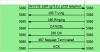
Wireshark would show if the 180 Ringing, or even a 183 Session Progress message is being sent to your provider. If it (they), are being sent, then you might want to get them involved.
 
My apologies...I gave some incorrect information. This is only happening on external calls.
I have re-run the firewall checker and everything checks out OK there.
This helps narrow down the issue. When a call comes in and an extension is polled the PBX will send the provider a Ringing message. This message does not contain the Ringing though. The message should be forwarded to the callers device and the ringing comes from there unless the provider sends its own ringing.
As @leejor mentioned Wireshark should help you see what is going on. If the PBX is sending the 180 Ringing then you should speak with your provider.
11883
Here is an example on how it should look like. Invite comes in from the provider and the PBX sends 100 trying and 180 Ringing as soon as the destination extension starts ringing.
(The call was not answered in this example so you see a Cancel message which does not affect the scenario)
 
This is now solved. The problem was that somehow the MOH (music on hold) file had been cleared from Dashboard--Settings--Music On Hold. We replaced it with onhold.wav and that fixed the problem. When an extension is called from an IVR, the call is placed on hold...It doesn't actually "ring". But, not having a file in MOH caused all holds to be silent.
 
Glad to see the issue has been resolved and thank you for updating the thread with your solution.
 
Status
Not open for further replies.

Forum statistics

Threads
111,933
Messages
589,810
Members
164,808
Latest member
jsbjsb