


- Joined
- Aug 21, 2024
- Messages
- 1
- Reaction score
- 0
Users are unable to log on or off via their avatar when the status in the panel-view does not match with the status in the user-menu.
Sometimes the user log off via panel and then tries to change the status via the avatar, which then does not work. The user then has to "align" the status again, to be able to change the status.
So the status in the status has to be "logged in" on the panel and "logout from queue" in the user menu or "logged out" on the panel and "login to queue". If this does not match the user must change the status via panel. If they change the status in the user-menu or the mobile app, nothing happens.
This is reproducable in v20 update 4. Can this somehow be fixed?
See the screenshots of an "aligned" status.
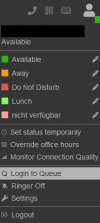

Sometimes the user log off via panel and then tries to change the status via the avatar, which then does not work. The user then has to "align" the status again, to be able to change the status.
So the status in the status has to be "logged in" on the panel and "logout from queue" in the user menu or "logged out" on the panel and "login to queue". If this does not match the user must change the status via panel. If they change the status in the user-menu or the mobile app, nothing happens.
This is reproducable in v20 update 4. Can this somehow be fixed?
See the screenshots of an "aligned" status.


