- Joined
- Mar 8, 2021
- Messages
- 11
- Reaction score
- 0
topology
3cx client --------router--------------------internet cloud--------------------------router-----firewall---------3cx server
i have two site :
HQ : install 3cx server version 16 with local ip and ports are allowed on firewall and firewall checker are approve that.
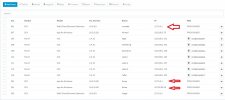
Remote site : I have remote 3cx users they working well when they receive and sending call from soft phone client ( v 16.3.0.220) but every soft phone shown in 3cx server with two IP one is local host 127.0.0.1 and WAN real ip of the site, that my first question why ?
if they open web client only shown in 3cx server one ip is the local host 127.0.0.1 and they can recieve and sending call but no media (can't hear voice) in the two direction. see attached for more details
3cx client --------router--------------------internet cloud--------------------------router-----firewall---------3cx server
i have two site :
HQ : install 3cx server version 16 with local ip and ports are allowed on firewall and firewall checker are approve that.
Remote site : I have remote 3cx users they working well when they receive and sending call from soft phone client ( v 16.3.0.220) but every soft phone shown in 3cx server with two IP one is local host 127.0.0.1 and WAN real ip of the site, that my first question why ?
if they open web client only shown in 3cx server one ip is the local host 127.0.0.1 and they can recieve and sending call but no media (can't hear voice) in the two direction. see attached for more details