- Joined
- Jun 7, 2019
- Messages
- 16
- Reaction score
- 2
Hello,
We have the following setup:
1. SIP Trunk where we have unlimited inbound calls but only 1 outbound call (one channel for outgoing calls).
2. SIP Trunk where we have unlimited inbound calls but only 1 outbound call (one channel for outgoing calls).
3. SIP Trunk where we have unlimited inbound calls and outbound calls.
The issue appears when we want to use the following scenario:
Outgoing call it's placed via first SIP Trunk, established without any issues but the second outgoing call will try to go on the first SIP Trunk again, where we will receive 486 Busy from Carrier because of no more available outgoing channels. Instead of switching to the second available Carrier (SIP Trunk) on Outbound Route, the call will remain stuck on the first SIP Trunk dropping the call with 486 Busy Here coming from the Carrier side and not going to the second route available.
I tried setting up only 1 concurrent call on the first SIP Trunk, but this will affect the incoming calls and it's not an option. Running with this setup will only allow the first outbound call to be established but the next outgoing/incoming call will be dropped with 486 Busy Here or had no available outgoing trunk(s) for Call error message.
My concern & question come here, shouldn't the 3CX PBX switch to the next available route on the Outbound Route if 486 Busy Here it's received from the main SIP Trunk/route?
Is there any way that we can force the PBX to switch to the next route without affecting the number of incoming calls also? It kind of sucks, in a normal way, it should overpass the first SIP Trunk when 486 Busy Here it's returned from Carrier side and go to the next available route but it's not doing this.
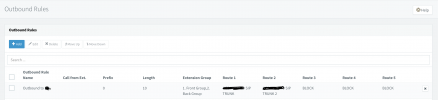
PBX it's running on version 18.0 (Build 314), license it's Enterprise Annual. Attaching a screenshot after Outbound Rules (in the screenshot there's no Route 3 because we were testing something that needed the third SIP Trunk to be out of equation).
Thanks,
Razvan
We have the following setup:
1. SIP Trunk where we have unlimited inbound calls but only 1 outbound call (one channel for outgoing calls).
2. SIP Trunk where we have unlimited inbound calls but only 1 outbound call (one channel for outgoing calls).
3. SIP Trunk where we have unlimited inbound calls and outbound calls.
The issue appears when we want to use the following scenario:
Outgoing call it's placed via first SIP Trunk, established without any issues but the second outgoing call will try to go on the first SIP Trunk again, where we will receive 486 Busy from Carrier because of no more available outgoing channels. Instead of switching to the second available Carrier (SIP Trunk) on Outbound Route, the call will remain stuck on the first SIP Trunk dropping the call with 486 Busy Here coming from the Carrier side and not going to the second route available.
I tried setting up only 1 concurrent call on the first SIP Trunk, but this will affect the incoming calls and it's not an option. Running with this setup will only allow the first outbound call to be established but the next outgoing/incoming call will be dropped with 486 Busy Here or had no available outgoing trunk(s) for Call error message.
My concern & question come here, shouldn't the 3CX PBX switch to the next available route on the Outbound Route if 486 Busy Here it's received from the main SIP Trunk/route?
Is there any way that we can force the PBX to switch to the next route without affecting the number of incoming calls also? It kind of sucks, in a normal way, it should overpass the first SIP Trunk when 486 Busy Here it's returned from Carrier side and go to the next available route but it's not doing this.
PBX it's running on version 18.0 (Build 314), license it's Enterprise Annual. Attaching a screenshot after Outbound Rules (in the screenshot there's no Route 3 because we were testing something that needed the third SIP Trunk to be out of equation).
Thanks,
Razvan