Calls to Android fail with "Call/Transaction Does Not Exist"

Status
Not open for further replies.

VSC

Forum User
Joined
Mar 16, 2020
Messages
110
Reaction score
14
Since an few days we experience, that incoming calls to an extension are massive delayed to Android clients. E.g. if someone makes an internal cal to my extension I see the incoming call on my Webclient and Desktop client but my 3CX app on my Android phone is not ringing. After about 30-60sec the Android phone is showing an incoming call and if I then try to answer that call it shows "Call/Transaction Does Not Exist" on my display and no call is beeing established.

Anybody with similar experince out there?
 

Attachments

  • 2020-12-31 14_27_28-Foto - Google Fotos.jpg
    2020-12-31 14_27_28-Foto - Google Fotos.jpg
    28.2 KB · Views: 12
Thanks for your reply. The behaviour is the same on wifi as on mobile data.
Outgoing calls or the echo test are working fine.

Interesstingly I found out that the "missed call indicator" appears immediately after a calling party hangs up. Around 30sec later my mobile indicates an incoming call which results in above mentioned error message if I try to answer it..
 
Hi @kieferschild do you have any ideas. Could it be related to any firewall rules on our 3CX host?
 
Try calling the phone and hanging up within 5 seconds if it does not ring.

Then immediately try calling it again and see if the 2nd attempt comes through faster.

Also, tell is if this affects ALL android users on your system or just specific ones.
 
Thanks @JohnS_3CX . I tried what you proposed and the 2nd call does not come through faster.
And all android users I talked to face the same problem: The call arrives 30-60sec delayed and ends with the above mentioned error message.
 
Ok, so assuming that the Android users always have the issue (4G/Office Wifi/Home Wifi) then in that case it might be a delay on the PBX side of things.

Confirm the the above assumption is indeed correct and we can then go further to look at the server.
 
@JohnS_3CX, I confirm.

Btw we did some cleanup of our firewall rules on our 3CX Windows host. We didi not delete any rules or ports that are needed for 3CX (imho). Are there any specific settings that could led to such a behaviour?
 
We have had some cases where some very strict Firewall Content Fitlering and DPO settings were impeding PUSH traffic.
A distinct case I remember is that someone wanted to block Apple or Google Store access to employees, so added this Content Filtering rule. this of course led to PUSH not working, because the ssame rule blocked also PUSH.
 
Ok, but we di not add such kind of rules and PUSH is still working but only delayed for android 3Cx user.
 
There are generally 2 cases, either this delay is coming from the PB, or the delay is at the Client end. I agree that logically, if this happens to all clients regardless of network, then you would be right to suspect something on the PBX.

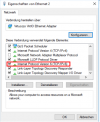
I have one last suggestion to make, if on the NIC of the PBX you have IPv6 enabled, disable it completely so the 3CX Server does not have an IPv6 address at all.
Because if you do, the server will try to contact Google Services over IPv6, but from experience I tell you that Google "doesn't seem to like" IPv6. Do this and restart the server completely, then try again.

If this still does not work, I would suggest you contact the 3CX Support Team to look into this further in the logs.
 
Thanks @NickD_3CX. I will disable IPv6 and restart our 3CX server on Saturday. Hope this helps as it is getting more and more annoying.

1610112543588.png
 
  • Like
Reactions: NickD_3CX
I disabled IPv6 and after a while (without any reboot) it works again. Incoming calls to an Android phone went through immediately as expected. I will further verify this with some more users on Monday.
 
Status
Not open for further replies.

Members Online Now

No members online now.

Forum statistics

Threads
111,832
Messages
589,284
Members
164,662
Latest member
DejanMDS