Calls to Call Queue not showing on phone

mikepro0517

Bronze Partner
Basic Certified
Joined
Jan 14, 2020
Messages
7
Reaction score
0
Hello, I have a client who is using SMB Pro Ver 20 update 5. using Fanvil X4 phones. I created a queue and added the three extensions, checked to make sure the extensions are set to allow multiple calls and that the queue is assigned to the trunk. The expected behavior should be when a user picks up and another call comes in, the user would like the second call to display on the phone and have the ability to put the first call on hold and answer the second call. The second inbound call is not displaying on the phone. am I missing something?
 
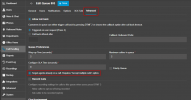
You would need to enable the targeting of busy agents on the call queue

1740755386138.png

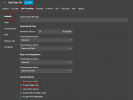
Then under each agent that you want to see the 2nd call coming in, you will need to enable the option to accept multiple calls in their forwarding rules

1740755470116.png
 
Those options are set. still not working
 
In your Panel, do you see the call ringing the second line of the phone? Have you tried with a 3CX application or web client?
 
I see the second call on the panel, it rings the other phones in the queue, however the office manager would like the ability if she is on a call to put that call on hold and answer the second call. the phone is configured with three lines the other lines don't blink when another call comes in. I checked everything, I have this working at other client sites using similar configurations.
 
As a test, disable the option in the queue to target busy agents, save the queue, then reenable it.
 
As a test, disable the option in the queue to target busy agents, save the queue, then reenable it.
I did this and it shows in the queue panel the other extensions ringing but the manager's phone is yellow and doesn't ring.
 
Last edited:

Members Online Now

Forum statistics

Threads
111,832
Messages
589,278
Members
164,662
Latest member
DejanMDS