Can SBC be installed on virtualbox or VmWare workstation

Status
Not open for further replies.

voice11

Bronze Partner
Basic Certified
Joined
Jul 15, 2016
Messages
78
Reaction score
2
Hello everyone.
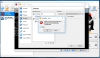
I have 3CX Debian (V15.5) on VmWare workstation 14 Pro (14.1.0), running on WIN7 pro SP1. Now I am planning to migrate in to the cloud (probably google unless someone suggest otherwise). I have question to what do I need to setup a SBC? I am inclined toward Linux (or may be windows too if I have to) but my dilemma is weather I need a dedicated machine to download that onto ....or can I use an existing server and install SBC on a virtualbox or Vmware workstation on there and use it that way. Can someone clarify this for me please? I tried installing both (Linux & Window based SBC) on virtalbox but it comes back as unsupported file. Virtual box can not read it.
 
Did you setup a new virtual machine - windows or debian ?

You install SBC within the virtual machine
 
How many extensions will you have on the remote site?

We generally use Raspberry Pi's for SBC if there are less than 15 phones.
 
Did you setup a new virtual machine - windows or debian ?

You install SBC within the virtual machine
Yes I tested on virtaulbox. Tried both separatelylinux as well as windows and downloaded SBC (both linux based as well as windows) but couldn't install as it said unsupported file
upload_2018-4-18_9-23-39.png
 
How many extensions will you have on the remote site?

We generally use Raspberry Pi's for SBC if there are less than 15 phones.
I will have between 10 to 15 actually. Since it close to threshold I thought to go with WIN or linux but I am open to raspberry as well... Thank you.
 
SBC install files are not virtual images that can be loaded directly into HyperV or Virtual Box as you are trying to do in the screenshot

You need to setup a windows machine in your virtual box, when done log into this machine and download the 3CX installation file within the windows machine - https://www.3cx.com/docs/3cx-tunnel-session-border-controller/
 
  • Like
Reactions: voice11
SBC install files are not virtual images that can be loaded directly into HyperV or Virtual Box as you are trying to do in the screenshot

You need to setup a windows machine in your virtual box, when done log into this machine and download the 3CX installation file within the windows machine - https://www.3cx.com/docs/3cx-tunnel-session-border-controller/
Ah...ok. Thank you @Saqqara. You mean in Win based VM, I need to install WIN OS..right? Then obviously once its a window machine, then download SBC directly into there, right?
And can samething be done with Linux based VM? With Linux based (if possible) you save hassle & money of installing windows OS. That is why I was trying debian VM. Thank you again.
 
Last edited:
Status
Not open for further replies.

Latest Posts

Forum statistics

Threads
111,885
Messages
589,545
Members
164,744
Latest member
johnblackwood1