Cannot add extension in 3CX

Status
Not open for further replies.

Kwang Mien

Silver Partner
Advanced Certified
Joined
May 14, 2020
Messages
255
Reaction score
17
Hi,

I am using 3cx version 18 (update 16)

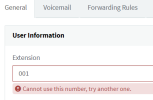
I could initially add 001 extension. Recently, i deleted this extension and tried to create 001 again. However, i could not and the error is
"Cannot use this number try another one". Pls see below

I tired other 3 digit extension starting with 0 , also cannot add.

However, i can add 3 digit extension starting with 1 e.g. 103

Can anyone advise how i can fix this issue ? (adding 3 digit extension starting with 0)
1675770404682.png

Thanks.

Regards,
Kwang Mien
 
We found a workaround to still create extensions starting with 0XX (All our 3CX are self hosted), but it would be nice if we can do this again using the normal management portal or atleast have the option to decide wether to use 0XX or 1XX and upward.

Im still wondering what the reason behind the removal of 0XX is.
I also have a customer that has this issue. Would love to see the workaround! Thanks!
 
We found a workaround to still create extensions starting with 0XX (All our 3CX are self hosted), but it would be nice if we can do this again using the normal management portal or atleast have the option to decide wether to use 0XX or 1XX and upward.

Im still wondering what the reason behind the removal of 0XX is.
Could you send to me also thanks Thomas
 
A workaround that worked for us, is that the new extension must be imported to users using the "Import" function. Even if there are only 1-2 users, branches with 0 can be created again. Say it works with import. We also have a number of customers where the extension begins with 0, since the official number also ends with 013, for example.. An official feedback from 3CX as to why this is no longer possible would be nice so that we can communicate this to the customer. Was there any information that this is no longer possible?
 
  • Like
Reactions: voizXL Thomas
Just export your extensions, modify, and import it again. Thats the workaround. With version U7 should come this possibility back.
 
A workaround that worked for us, is that the new extension must be imported to users using the "Import" function. Even if there are only 1-2 users, branches with 0 can be created again. Say it works with import. We also have a number of customers where the extension begins with 0, since the official number also ends with 013, for example.. An official feedback from 3CX as to why this is no longer possible would be nice so that we can communicate this to the customer. Was there any information that this is no longer possible?
This is indeed the workaround.

U can use the following template:

Number,FirstName,LastName,EmailAddress
007,Name107,Surname107,[email protected]

Save it as CSV and import it into your 3CX.
 
Hello voizXL Thomas, can you also send the work around to me? Thank you.
 
I also have a customer that has this issue. Would love to see the workaround! Thanks!
Kindly assist with this workaround i would be really grateful
 
It seems since the last update that we are able to again add extensions with a leading zero
 
It seems since the last update that we are able to again add extensions with a leading zero
with 3cx update 7, now extensions can have leading 0
 
You dont need any templates... just install the newest update of 3cx.
I can see they have fixed it for adding a extension manually, the Microsoft 365 sync is still not allowing a leading 0 for extensions, unless I'm missing something in my setup
 
  • Like
Reactions: jed
We found a workaround to still create extensions starting with 0XX (All our 3CX are self hosted), but it would be nice if we can do this again using the normal management portal or atleast have the option to decide wether to use 0XX or 1XX and upward.

Im still wondering what the reason behind the removal of 0XX is.
I'm also wondering what the reason behind the removal is, suddenly after all these years.

The workaround I used was exporting an existing extension to a .csv so I had a .csv template I could use, then modify the extension csv-file to the one I wanted to use (like 0XX) and import it again. That still seems to do the trick for extensions starting with 0.

EDIT: I see this workaround was already mentioned earlier, should have read the entire thread before replying. :)
 
  • Like
Reactions: Evolute IT and jed
I'm also wondering what the reason behind the removal is, suddenly after all these years.

The workaround I used was exporting an existing extension to a .csv so I had a .csv template I could use, then modify the extension csv-file to the one I wanted to use (like 0XX) and import it again. That still seems to do the trick for extensions starting with 0.

EDIT: I see this workaround was already mentioned earlier, should have read the entire thread before replying. :)
And it is not necessary any more...
 
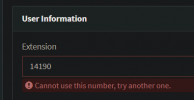
Having the same issue but this time is a random number.
1706710543365.png
Is there an explanation for this?
 
Having the same issue but this time is a random number.
View attachment 39456
Is there an explanation for this?
Is it already in use somewhere else? Check call queues, digital receptionists, ring groups, etc
Call it and see if someone answers
 
  • Like
Reactions: Evolute IT
Status
Not open for further replies.

Forum statistics

Threads
111,974
Messages
590,081
Members
164,899
Latest member
mazet