- Joined
- Dec 20, 2023
- Messages
- 13
- Reaction score
- 1
Hello,
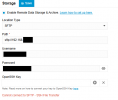
I am experiencing an issue configuring Remote Data Storage via SFTP (SSH File Transfer) on the latest self‑hosted 3CX instance.
When testing the connection, 3CX returns:
I have verified the following:
Questions:
Since all remote storage methods are failing, I am wondering whether this may be a broader configuration or version-related issue.
Any assistance would be greatly appreciated.
Best regards,
Serge Dornseiffer
Kind regards,
I am experiencing an issue configuring Remote Data Storage via SFTP (SSH File Transfer) on the latest self‑hosted 3CX instance.
When testing the connection, 3CX returns:
In addition, SMB and FTP are also failing in the same environment, although SFTP is the primary concern.“Cannot connect to SFTP – SSH File Transfer.”
Environment
- 3CX Version: Latest build (please advise if exact build number is required)
- Deployment: Self‑Hosted (Debian-based 3CX ISO)
- Feature: Remote Backup / Recording Storage
- Protocol: SFTP (Port 22)
Troubleshooting Performed
I have verified the following:
 The SFTP server is reachable from the network.
- Port 22 is open and accessible.
- Firewall rules allow outbound traffic from the 3CX server.
- The SFTP server allows inbound connections from the 3CX IP.
- Credentials are confirmed working from another machine.
- The remote directory exists and has correct write permissions.
- The SFTP Server is on Windows Server 2019 but I tried also on an external FTP server, same issue.
- However:
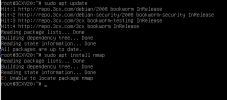
 The Debian distribution used by 3CX does not allow installation of additional SFTP tools, so I cannot perform a manual SFTP login test directly from the 3CX server.
- The SFTP server logs do not show any incoming connection attempts from 3CX.
- SMB and FTP connections also fail.
Questions:
- Is there a known issue in the latest 3CX build affecting remote storage protocols?
- Are there specific SFTP requirements (authentication method, SSH configuration, cipher restrictions, etc.)?
- Are there additional logs beyond the Activity Log that can confirm whether 3CX is attempting the connection?
Since all remote storage methods are failing, I am wondering whether this may be a broader configuration or version-related issue.
Any assistance would be greatly appreciated.
Best regards,
Serge Dornseiffer
Kind regards,