Cannot connect to Video Conference using Chrome in macOS High Sierra

Status
Not open for further replies.

SebasttianBie

Free User
Joined
Feb 1, 2022
Messages
6
Reaction score
1
Hi, everyone.

Since yesterday, we cannot connect to 3CX Video Conferences using Google Chrome. The following message (in German) appears. It translates to "Sorry, an error has occurred. Try connecting to your conference again using the login button."
Bildschirmfoto 2022-02-01 um 11.36.54.png
It doesn't work even when trying to connect again and again. It works fine however in Firefox!? We never had trouble like this before. It used to work well until yesterday. Does anyone have an idea or the same experience?

We are using:
3CX Version 18.0 (Build 314)
Chrome Version 97.0.4692.99 (Official Build) (x86_64)
macOS 10.13.6

Any help or comments are appreciated. Thank you!

Sebastian
 
Hi Sebastian,

By the sounds of it, for sure it must be something with Chrome, but we have not run into this ourselves, so I am suspecting maybe something to do with cache. Could you download and install the new Edge, which essentially is running a chromium engine at it's core, and check with that as well?

Also if you try on a different PC with Chrome, do you have the problem there too?
 
Hi, NickD. Thank you for your response.

I downloaded and installed new MS Edge. I have the same error there.
I tried other machines with Chrome and macOS 10.13.6 -> always the same error.
I tried other machines with Chrome and macOS 10.14 and 10.15 and 12: It works.

It seems to be related to macOS 10.13.6... However, I could join an MS Teams Meeting just fine using Chrome this morning. I would really be grateful for a solution as we still have multiple machines that only run on macOS 10.13.6 and cannot be upgraded.

Greetings!
Sebastian
 
Hi Sebastian,

It certainly sounds that way. On Chrome/Edge on a MacOS 10.13.6, can you press F12 to open the Developer options and go to the "Console" tab, after you open this page and see this error?

Maybe this gives us some clue.
 
Hi, Nick.

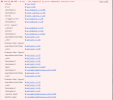
This is what appears in the console upon clicking the "Join" button.
Bildschirmfoto 2022-02-01 um 16.12.02.png
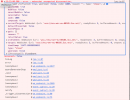
Here are the detailed views of each line:
Bildschirmfoto 2022-02-01 um 16.14.07.png

Bildschirmfoto 2022-02-01 um 16.14.14.png

Bildschirmfoto 2022-02-01 um 16.14.21.png

I hope this helps.

-Sebastian
 
Hi there,

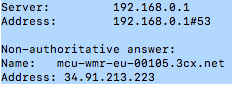
If you perform an nslookup from your current computer like this, what does it return?
nslookup mcu-wmr-eu-00105.3cx.net

I've performed a test and was able to connect in a meeting on this MCU server from my location. I suspect that perhaps you're not able to resolve the IP correctly. By the way this server is hosted in Google. Are you in a location that blocks Google services?
 
Hi, Leonidas. Thank you!

This is what's returned:


Bildschirmfoto 2022-02-01 um 16.37.20.png

Greetings!
 
Well that's correct. Resolving the server is fine.

The server seems to be operating fine so it's not an issue there. Do you have any strict firewalls/antiviruses that might be blocking something?

Additionally can you try changing your PBX location in Settings > Conferencing > Location and restarting your 3CX Gateway Service and try again and let me know if it works or not?
 
We have no strict firewall or antivirus software that might block the connection. In fact, we have not changed any configuration and we have been using 3CX Video Conferencing a lot until yesterday... when it suddenly stopped working for no obvious reason. As mentioned before, the connection from the same device using Firefox still works.
 
We're going to look into this today on a similarly configured system and get back to you. We recently updated our certificates. That's the only thing i can think of that could be the cause of the certificate store on that machine not being updated & thus not recognizing this certificate or restricted cipher suites on that O/S or machine in specific.

That being said, so far yours is the only instance reported having problems connecting. We'll check and get back to you.
 
I have been brainstorming this a little since yesterday and I think I suspect the same as @LeonidasG says, this could be related to an updated to MacOS Root Certificates.

If I'm not mistaken, the 10.4 update brought with it some changes in this area:
https://support.apple.com/en-bh/HT209143

This could explain why older versions have a problem, but after this update, it works fine.

I am pretty sure Chrome/Edge take their certs from the OS, whereas Firefox also has its own list of Trusted Root CAs.
 
Thank you, Leonidas and Nick. I appreciate your effort! I will try and update the list of trusted certificates on a 10.13 machine by transferring the list from a newer OS as soon as I have some time later today. Maybe that helps.
 
  • Like
Reactions: NickD_3CX
Hello,

We have done some investigating since yesterday and we know now the exact cause of the issue.

Recently we have update the certificates on our WebMeeting servers (V16 and V18) as the old ones were close to expiry. This has caused browsers running on older OS, like MacOS 10.13.6, to stop being able to connect to 3CX WebMeetings.

The solution to this is to advise the users to update their OS to the latest version of their OS that is released. Note that in the case of Mac, we are aware that some older hardware may not be able to upgrade the OS, but unfortunately there isn't anything we can do. This affects both Organizers and Participants of meetings.

For MacOS users, as a workaround, they can try downloading and installing Firefox 96.0.3 or newer, as this browser does not use the root certificates of the OS and has it's own list. This though is a workaround, so if this does not work, the solution in the previous paragraph needs to be used.

In addition to the above, if your 3CX Server is installed on a Windows OS, you will also need to make sure the Windows version complies with the minimum requirements outlined here, and that the OS has the latest updates installed.
 
Status
Not open for further replies.

Forum statistics

Threads
111,973
Messages
590,078
Members
164,896
Latest member
sameage