Cannot create queue with 0 (zero) number for receptionist

Status
Not open for further replies.

eangney

Free User
Joined
Jun 13, 2021
Messages
11
Reaction score
2
Dear 3CX Expert and All,
I am creating a queue for the receptionist with 0 (zero) press for the receptionist but I am getting error as attached (Invalid Extension Number Length). Do we have an alternative way to create a queue or call flow for the receptionist for 0 (zero) option when pressing?

Could you please provide instructions for that?


Thank you so much,

Regards,
EN
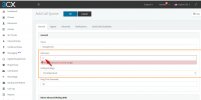
 

Attachments

  • queue_receptionist.jpg
    queue_receptionist.jpg
    119.3 KB · Views: 7
What you could do as a workaround is enable SIP ID calls and create a dummy extension that will utilize this SIP ID.

1. Access the Management Console and go to "Settings >> Network >> FQDN" and enable "Allow calls from/to external SIP URIs" under "Settings for Direct SIP Calls". Make sure the "Local SIP Domain" field contains the PBX's FQDN.

2. Go to Extensions and create a new dummy extension to be used only for this purpose.

3. In the Extension settings go to the "Options" tab and scroll down to where it says "SIP ID". In that field, enter 0.

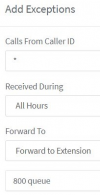
4. Still in the Extension settings go to "Forwarding Rules" and scroll down to "Exceptions". Create an exception rule that will essentially route all calls to the Call Queue. To do this, set the Caller ID to * as for it to catch all calls then set the destination to the Call Queue:
1627898472951.png


Now, by calling 0 calls will be routed to the dummy extension and therefore automatically be routed to the Call Queue due to the Exception rule. However, do bear in mind that the SIP ID option was not exactly designed for these kinds of scenarios and enabling it actually opens the possibility for external direct SIP calls to the PBX.
 
Status
Not open for further replies.

Latest Posts

Forum statistics

Threads
111,982
Messages
590,119
Members
164,908
Latest member
FarizQasimov