Solved Cannot find where to create bridges in V16??

Status
Not open for further replies.

zooey

Customer
Joined
Apr 15, 2019
Messages
4
Reaction score
0
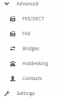
Crazy question: But I have the 3CX v16 system management portal up, and I can't seem to find the option where to create a bridge. Here's a shot of my left-hand side menu options:



10276


Our license is the 3CX Mini edition. Activated and paid-up for the next year.

I'm new to V16, but have supported previous versions for several years.
 
If you have a pro License, you will find bridges under Advanced
10277
 
Not heard of 3cx mini edition.

For bridges you need pro or Enterprise version https://www.3cx.com/ordering/pricing/
I misstated the license I had in the original post.


Yes---I do have the Pro edition license.

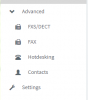
No option anywhere that I can find to create bridges.

Could this be a functionality in the software, that his failed to "unlock" with our recent license upgrade?

Some background info: we were running an older version of 3CX, with Maintenance Agreement. We have now upgraded to V16.
 
It’s under advanced as posted by tbwd
 
It’s under advanced as posted by tbwd

Thank you for the reply.

Unfortunately, it is not available where it is supposed to be on my admin console:

10320

I am currently checking with our 3cx license vendor.
 
You sure you have pro license

If you goto settings - license , click on refresh. Does it shown you have a pro license
 
I emailed our license vendor about this.

They must have done a refresh or something, because now Bridges is appearing in the menu options.

I think the problem was an issue with the license refresh with 3CX licensing services. We have had the installation running for about a week, and the Bridges option didn't enable until after I contacted our 3cx vendor a short while ago.

This thread can be closed.
 
Status
Not open for further replies.

Forum statistics

Threads
111,921
Messages
589,746
Members
164,796
Latest member
Dame24