Solved Cannot install 3cx SBC on Raspberry pi

Status
Not open for further replies.

leasetech

Silver Partner
Basic Certified
Joined
Oct 9, 2015
Messages
7
Reaction score
1
Hello there,

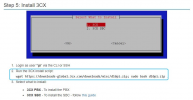
we are trying to install an SBC server on a raspberry pi but when the screen with two options appears and choose "2. 3CX SBC" I receive the message:
d10pi.zip: line 46: fail: command not found

Anybody faced this problem recently?

I have tried to install in 2 different pi macines in two different offices and I have the same problem
 
Actually yes I downloaded the image from the guide.
 
Yes I did exactly what you described, with pi user. The version is 10 (buster)
I have installed many sbcs in the past with the same way, but now I can't
 
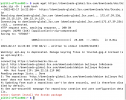
I am having similar issues. I can get all the way through to the part where it tries to download Debian bullseye, then it fusses because you can't do it securly.
 

Attachments

  • Screen Shot 2022-02-17 at 11.24.21 AM.png
    Screen Shot 2022-02-17 at 11.24.21 AM.png
    180.9 KB · Views: 22
  • Like
Reactions: ChrisC_3CX
Can you SSH to the pi, run the following command and tell me what you get?


If you see

At the end, I recommend then deleting the file with:
Before I try this, I gave a last try to the normal process and now it worked. I don't know if made some changes from 3cx team, but now worked.
 
  • Like
Reactions: pmterp
@layer4
As @Saqqara mentioned, download the image file from our guide and re-flash the SD the n try again.

@leasetech
Before I try this, I gave a last try to the normal process and now it worked. I don't know if made some changes from 3cx team, but now worked.
We didn't actually do anything, if everything is in order in regards to the Pi's and network configuration then it should just work.

In any case, glad to see you got this sorted! Please feel free to start a new thread should anything else come up!
 
Status
Not open for further replies.

Forum statistics

Threads
111,974
Messages
590,081
Members
164,899
Latest member
mazet