


- Joined
- Mar 31, 2019
- Messages
- 84
- Reaction score
- 15
System: Enterprise 16 SIM
Version: 20.0 Update 0 (Build 1620 Release)
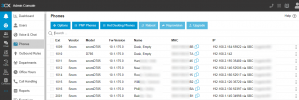
One of our clients running on V20 had a phone break on them and they wanted one of the infrequently used phones moved to the user's extension with the broken phone. I removed the "bad" IP phone from x1017 and removed the "good" IP phone from x1010, so that neither extension had any IP phones defined. I then added the MAC address of the "good" phone to x1017, logged into the phone's UI, pasted the provisioning link, and rebooted the phone. However, the phone keeps coming up as associated with x1010 on the Phones page, and x1010 shows as provisioned on the Users page (see attached screenshots). Even after resetting the phone to factory defaults and rebooting, the phone will not attach to the new extension. I verified that "No IP Phone is configured for this user" under x1010, and that the correct IP phone is listed under x1017. Please let me know what needs to be done to get this device registered to the correct extension in V20.

Thank you,
Russell Hopkinson
Version: 20.0 Update 0 (Build 1620 Release)
One of our clients running on V20 had a phone break on them and they wanted one of the infrequently used phones moved to the user's extension with the broken phone. I removed the "bad" IP phone from x1017 and removed the "good" IP phone from x1010, so that neither extension had any IP phones defined. I then added the MAC address of the "good" phone to x1017, logged into the phone's UI, pasted the provisioning link, and rebooted the phone. However, the phone keeps coming up as associated with x1010 on the Phones page, and x1010 shows as provisioned on the Users page (see attached screenshots). Even after resetting the phone to factory defaults and rebooting, the phone will not attach to the new extension. I verified that "No IP Phone is configured for this user" under x1010, and that the correct IP phone is listed under x1017. Please let me know what needs to be done to get this device registered to the correct extension in V20.
Thank you,
Russell Hopkinson


