Cannot talk on 3CX app while the signal bar on 3CX app is white

Status
Not open for further replies.

Kane Wong

Free User
Joined
Oct 13, 2018
Messages
233
Reaction score
9
Hello;

I found that if the 3 signal bar above the "Line 5" is white, I am not able to talk to another iPhone user, why?

It only work, if this is GREEN. What can I do to solve it? User A on iPhone can talk to User B on another iPhone only it is GREEN. User A cannot to to iPhone user C when it is WHITE. If the extension setting issue?
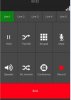
white_bar.JPG
 
@Kane Wong
In reals terms, those bars indicates the amount of RTP packets (ie, voice) received. If the indicator is gray, as in your screenshot, it means (almost) no RTP packets, so either the network connection is very poor (congested) or there is no RTP connection at all between the client and the PBX.

These being said, in "normal" circumstances a simple hold/resume of the call would solve the problem, since the call is SIP re-invited. However, more often it's a matter of network configuration to troubleshoot, which is far too much to do in one forum topic. However, you could try to see if the call is working properly
- by enabling PBX Delivers Audio in Management Console
or
- if iPhone is on Cellular Data, not WiFi, and using tunnel.
 
Last edited:
  • Like
Reactions: Evolute IT
Thank you!

The iPhone on cellular data is working fine. Now the workaround is to switch the internet gateway which means, I am using another router facing to the internet for 3CX mobile app with wifi.

there might be the network design issue, because my wifi for 3CX mobile app and the 3CX server are sitting on two different subnets - 3CX server is on 192.168.1.x and the 3CX mobile app is using on 172.16.1.x subnet because it is for staff who is using their own personal phone to access 3CX. We want to separate the personal device network and the corporate network where 3CX server deployed.
 
If you have two separate networks, you need to open port 5090 and https (444 or 5001) from 172.16.1.0/24 to the 3CX ip address

Also make sure that the devices on 172.16.1.0 can resolve your fqdn to the internal IP address of the 3CX server.
 
  • Like
Reactions: Evolute IT
If you have two separate networks, you need to open port 5090 and https (444 or 5001) from 172.16.1.0/24 to the 3CX ip address

Also make sure that the devices on 172.16.1.0 can resolve your fqdn to the internal IP address of the 3CX server.
Yes, the port 5090 is sure open already and for the internal IP address, we put the ip address instead of the fqdn.

Actually, I placed different post about the similar problem. The RTP packets indicators is good when using two different phone - iPhone call Android, or vice versa are good but when iPhone call iPhone, it display the white indicator.

Therefore; my network administrator want to understand the data flow difference between using the iphone and using the Android, why Android to iPhone work but not iPhone to iPhone, we believed that the app design amongst Android and the iPhone is different.

We think that if we understand the logic of data flow of two kinds of app, then it will easy for us to troubleshoot and make the correct change on network routing.
 
Hi;

Does anyone know what will make the "403 Invalid password provided" during the 3CX app connecting to the server?

This is the root cause to make the iPhone not able to connect to the 3CX server. When I use the 3CX app on the same phone through 4G network.
 
Hi;

Finally, figure out the why two iPhone cannot talk at different subnet because "Disallow use of extension outside the LAN (Remote extensions using Direct SIP or STUN will be blocked)" in "Options" is checked as default setup.

After uncheck this option, two iPhone can talk over different subnet.

But, still confuse why Android has no problem even though this feature is enabled.
 
Status
Not open for further replies.

Latest Posts

Forum statistics

Threads
111,937
Messages
589,831
Members
164,819
Latest member
mechelle