Can't call or take calls with webclient

Status
Not open for further replies.

easydone-1

Customer
Joined
Aug 8, 2023
Messages
7
Reaction score
1
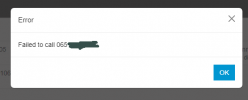
Can't call or take calls with webclient when logged in with my admin extension (100).
The message I get is "Call Failed".
With other extensions (101 i.e.) there is no problem (same browser).
What am I missing?
1691752080319.png
 
Is 100 included in an outbound rule? Is it in the Default group?
 
Hi @easydone-1 is the issue only with the webclient? what about using the same extension on your smartphone with the 3CX App?

is the issue only with external calls or also with internal calls?

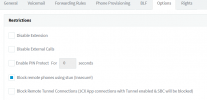
Did you check if the extension has any restriction?

1691776939470.png


do you have any outbound rule that can be used with that extension for external calls?
 
@Alejandro_3CX On https://www.3cx.com/docs/assign-system-owner/, under "Remove System Owner / System Admin from Default Group," it does not actually say to add the new admin group or admin extension to the outbound rule, which would in effect block external calls. I suggest the doc be updated to point that out.
 
Can you make internal calls to other Exts ?
Can you do a Call Pickup (*20* default Code) of other ringing Exts? See Settings>DialCodeSettings>PickupACall
If the internal calls are working then look into outbound rules as per Steves Posting.

Check What groups your in. Users>Groups> Edit the group/s your in and check your Role .
The Role is set in Users>Edit>Rights

If the Ext is in a ring Group and still does not ring with incoming calls then Check the Status is set as "Available"

Tony
 
Hi @easydone-1 is the issue only with the webclient? what about using the same extension on your smartphone with the 3CX App?
The 3CX app is working, the legacy desktop is also working.

is the issue only with external calls or also with internal calls?

Did you check if the extension has any restriction?

View attachment 36775


do you have any outbound rule that can be used with that extension for external calls?
Yes, only the webclient isn't working.
 
Is 100 included in an outbound rule? Is it in the Default group?
100 is working with the 3cx phone app and the legacy desktop app for windows (yes there is an outbund rule).
 
Can you make internal calls to other Exts ?
No.
Can you do a Call Pickup (*20* default Code) of other ringing Exts? See Settings>DialCodeSettings>PickupACall
If the internal calls are working then look into outbound rules as per Steves Posting.
No .
Check What groups your in. Users>Groups> Edit the group/s your in and check your Role .
The Role is set in Users>Edit>Rights

If the Ext is in a ring Group and still does not ring with incoming calls then Check the Status is set as "Available"

Tony
The extension does ring, but when I pickup it says: "failed to call". desktop phone, phone app and desktop legacy app are working.
 
Does *777 work?

Try a different browser or private/incognito window. Maybe it’s some odd cookie issue.
 
Does *777 work?

Try a different browser or private/incognito window. Maybe it’s some odd cookie issue.
Same in other browsers...
 
Private/Incognito works, at least in Chrome, not in firefox!
Deleting cookies in normal window has no effect.
Shoot me...
 
Hi @easydone-1 so summarizing: 3CX Apps on smartphone, legacy and desktop app work with ext 100, the only issue is with the webclient.

So, check that you are using the web client with Edge or Chrome, validate that browsers are up to date. Delete all the cache and cookies then confirm that the web client has access to the microphone.

Navigate to Audio/Video and check that your microphone is selected properly.

I also wonder what headset are you using? do you have any headset integration enabled?

Do you have any antivirus extension in your browser or any other extension installed?

Do you have any proxy configured in your browser?

What OS are you using? can you replicate the issue with another notebook and using a different network?
 
Hi @easydone-1 so summarizing: 3CX Apps on smartphone, legacy and desktop app work with ext 100, the only issue is with the webclient.
Yep
So, check that you are using the web client with Edge or Chrome, validate that browsers are up to date. Delete all the cache and cookies then confirm that the web client has access to the microphone.
They are.
Navigate to Audio/Video and check that your microphone is selected properly.
Are okay.
I also wonder what headset are you using? do you have any headset integration enabled?
No headset

Do you have any antivirus extension in your browser or any other extension installed?
No

Do you have any proxy configured in your browser?

No
What OS are you using? can you replicate the issue with another notebook and using a different network?
Win10

I've tried another computer (win11) this one works with extension 100 using the webclient.
So it's problem something with the PC.

Update: on the other computer it works with edge but not with chrome.
I won't look into it any further.
Everybody thanks for the support!

Chris
 
Last edited:
  • Like
Reactions: Alejandro_3CX
Status
Not open for further replies.

Forum statistics

Threads
112,018
Messages
590,315
Members
164,962
Latest member
robroye